


Related Tags
Entering the financial markets without a reliable source of market data can quickly lead to costly trading errors. Whether you are tracking daily stock movements, reviewing quarterly earnings reports, or monitoring macroeconomic trends, having a single hub to gather information is essential for making informed investment decisions.
Yahoo Finance remains one of the most widely used platforms for retail investors seeking real-time stock quotes, market news, and fundamental analysis tools. It serves as an accessible entry point for beginners while offering structured screening tools for intermediate investors comparing multi-asset portfolios.
What Is Yahoo Finance and How Does It Work?
It’s a financial news and data platform that provides real-time and delayed market quotes, financial reports, portfolio tracking tools, and international market coverage. Available across web browsers and mobile applications, the platform aggregates financial data from major global exchanges—including the NYSE, Nasdaq, and Bursa Malaysia—to give retail traders a broad overview of equity, forex, commodity, and cryptocurrency markets.
The core infrastructure operates on a freemium model. Retail investors can access stock screening tools, financial statement summaries, interactive charting software, and curated market news completely free of charge. Higher-tier analytical features, research reports, and advanced portfolio insights are gated behind a paid subscription service.
How to Set Up Portfolio Tracking on Yahoo Finance
Tracking your investments across multiple brokerages can be challenging without a unified interface. It allows you to create custom watchlists and manual portfolios to monitor profit and loss (P&L) performance over time.
- Create a Free Account: Sign in using your Yahoo credentials to sync your custom portfolios across desktop and mobile devices.
- Build a Custom Watchlist: Search for asset tickers (such as AAPL for Apple or 1155. KL for Maybank) and click "Add to Watchlist."
- Set Up Manual Holdings: Select "My Portfolio," click "Add Symbol," and input your entry price, trade date, and position quantity. The platform automatically calculates your unrealized gain/loss, total portfolio value, and daily performance percentage.
- Brokerage Account Linking: Depending on your jurisdiction, Yahoo Finance offers direct API links to select brokerages, allowing automatically synced transaction records.
Using the Stock Screener to Find Investment Opportunities
Finding quality stocks requires filtering thousands of listed companies down to a manageable list. The data platform Stock Screener offers built-in and customizable filters for equities, mutual funds, ETFs, and indices.
- Market Capitalization: Filter companies by Mega, Large, Mid, Small, or Micro-cap classifications.
- Valuation Metrics: Search for value opportunities by filtering for specific Price-to-Earnings (P/E) or Price-to-Book (P/B) ranges.
- Dividend Yield: Identify income-focused equities by specifying minimum dividend yield percentages.
- Sector and Industry: Narrow down search results to specific market sectors like Technology, Healthcare, or Financial Services.
Using these filters allows you to establish a disciplined shortlist of potential investments before conducting deeper fundamental analysis.
Key Features for Technical and Fundamental Analysis
While dedicated trading platforms offer advanced order execution capabilities, it provides a balanced suite of fundamental data and technical indicators suitable for initial analysis.
Technical Analysis with Yahoo Finance Interactive Charts
The platform's interactive charting interface allows you to analyze price action across daily, weekly, and intraday timeframes.
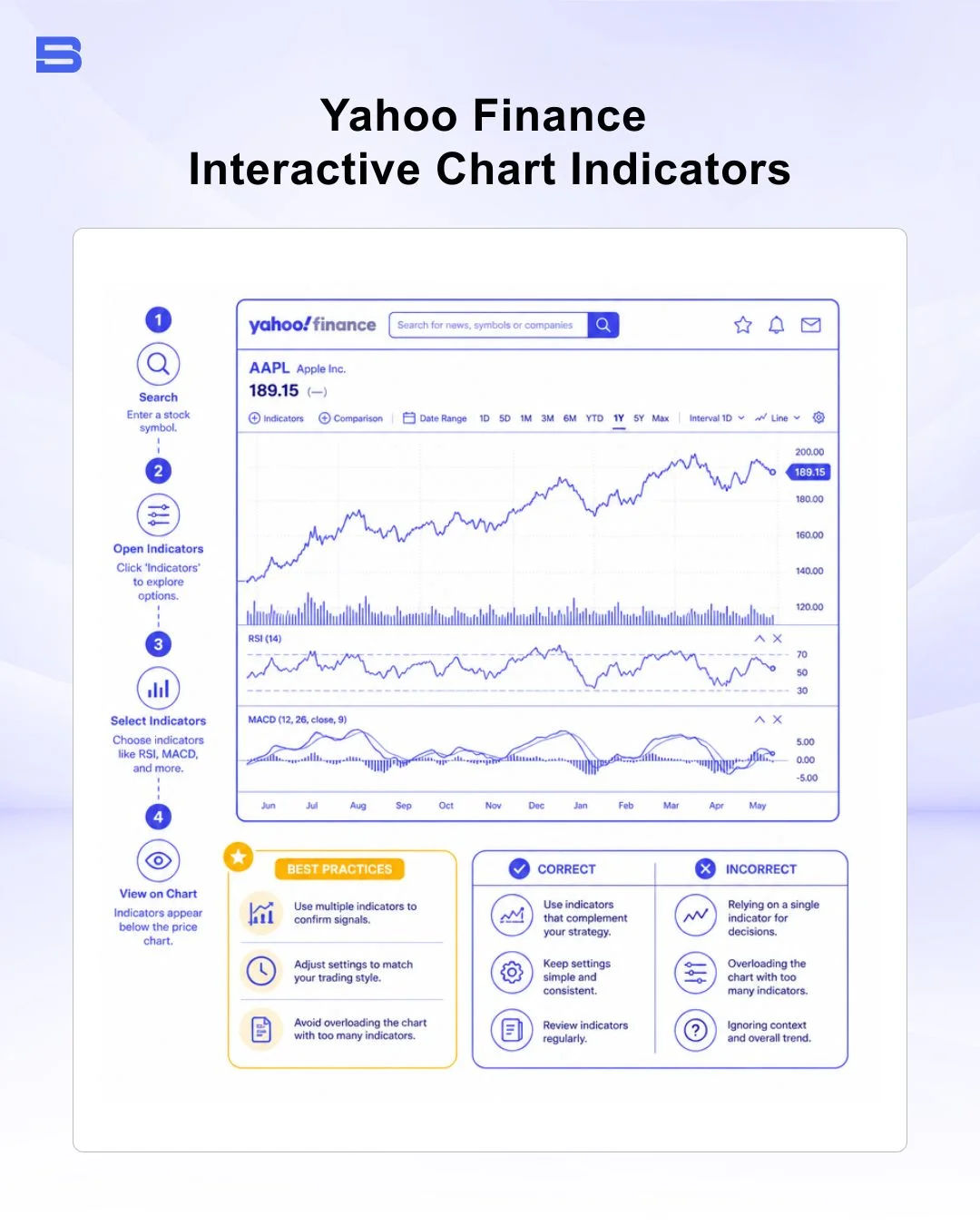
You can apply technical indicators such as Moving Averages (SMA/EMA), Relative Strength Index (RSI), and Moving Average Convergence Divergence (MACD) to identify trend directions and potential reversal zones. Trendline drawing tools, Fibonacci retracements, and candlestick charting modes are also available directly within the browser window.
Understanding Data Delays and Real-Time Quotes
A critical factor for retail traders to understand is market data latency. While price quotes for major US equities are generally real-time on Yahoo Finance, data for certain international stock exchanges, commodities, or index feeds may carry a 15-minute delay on the free tier.
Market data latency can create execution traps for active intraday traders. If you rely on delayed price quotes on Yahoo Finance to make real-time trading decisions on your brokerage account, the actual execution price may differ significantly from what you see on the screen. Always confirm live market prices directly inside your broker's order execution window before entering a position.
Yahoo Finance Free vs. Yahoo Finance Plus: Is the Upgrade Worth It?
For most retail investors, Yahoo Finance's free tier provides enough data for daily market research and fundamental screening. However, active traders and portfolio managers may want to upgrade to Yahoo Finance Plus for deeper analysis.
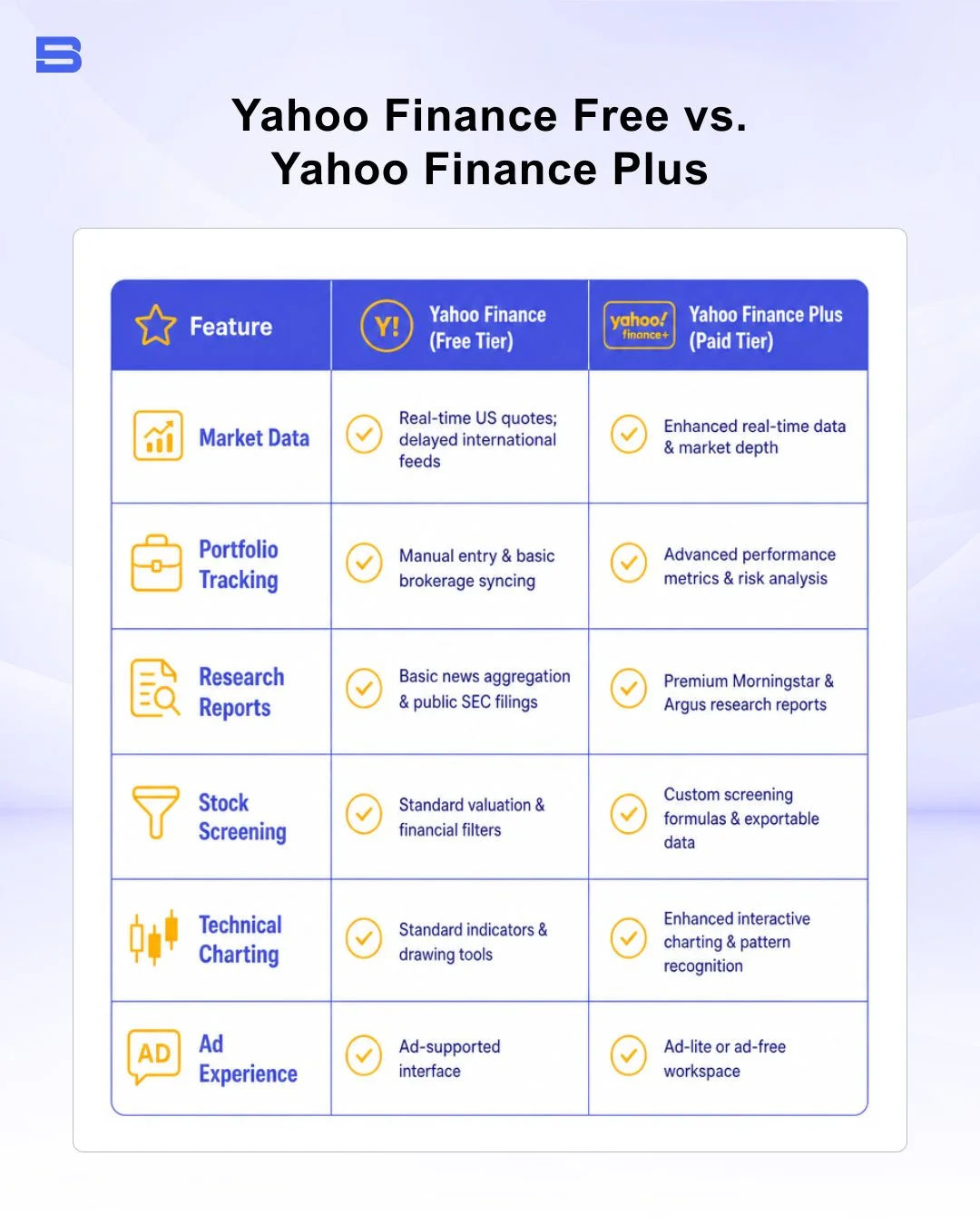
If you are an investor focused on long-term equity holding, dollar-cost averaging, or basic fundamental screening, the free version covers all core requirements. Upgrading to the paid tier is generally only necessary if you require downloadable historical datasets or institutional-style equity research reports.
Comparing Yahoo Finance vs. Google Finance and Other Alternatives
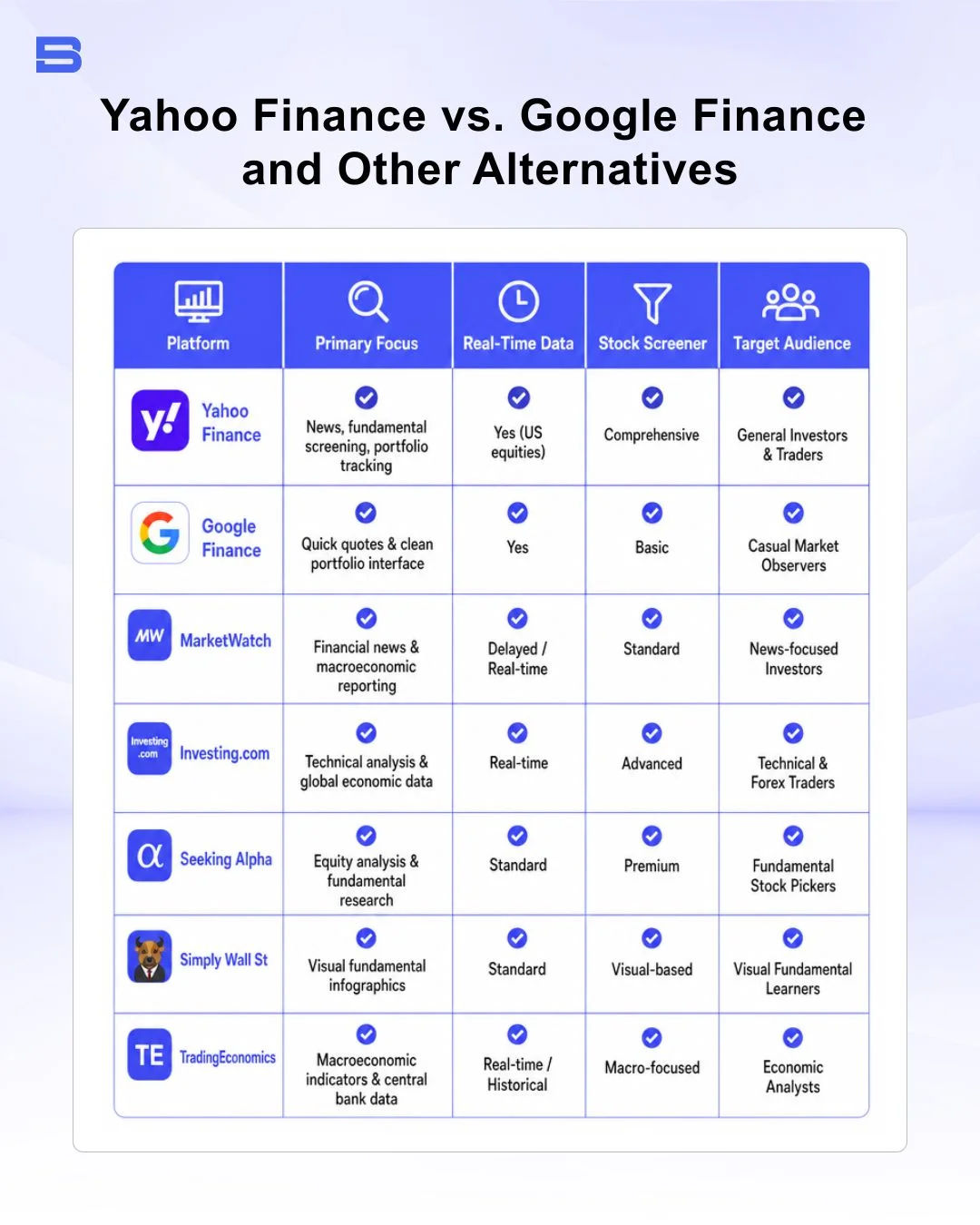
Selecting the right financial platform depends on whether you prioritize simplicity, deep fundamental metrics, economic data, or community insights.
- Google Finance: Offers an ultra-lightweight, ad-free interface focused purely on quick stock quotes and portfolio tracking. It lacks the advanced screening depth and technical charting capabilities of Yahoo Finance.
- MarketWatch: Excellent for macro-economic headlines, market pulse analysis, and financial news coverage, though its screening tools are less intuitive for beginner retail investors.
- Investing.com: A multi-asset technical analysis platform featuring extensive economic calendars, international forex data, and global market coverage.
- Seeking Alpha: Focuses heavily on crowdsourced stock analysis, fundamental opinion pieces, and detailed earnings call transcripts for active stock pickers.
- Simply Wall St: Transforms complex financial statements into visual infographics, making balance sheet health and valuation analysis easily understandable for beginners.
- TradingEconomics: The go-to platform for global macroeconomic indicators, central bank interest rates, GDP growth metrics, and inflation data.
Is Yahoo Finance Accurate and Reliable for Retail Investors?
For standard fundamental research, financial statement analysis, and general price history, Yahoo Finance is highly reliable. The platform sources its core underlying pricing and corporate disclosure data directly from major market data vendors and official regulatory filings submitted to authorities such as the US Securities and Exchange Commission (SEC).
However, discrepancies can occasionally occur during extreme market volatility, corporate action adjustments (such as stock splits or special dividends), or rapid pre-market/after-hours trading sessions. While it serves as a powerful standalone research hub, long-term investors should cross-reference key corporate financial figures against official investor relations reports or regulatory filings before committing capital.
Conclusion
It remains an effective, versatile resource for retail investors looking to streamline their daily financial research. By combining real-time quotes, customizable stock screeners, and interactive charts into a single workspace, it allows you to monitor market trends without managing multiple tools simultaneously.
To maximize its value while protecting your capital, leverage its free portfolio and screening tools for initial equity research, while relying on your regulated brokerage account for final live pricing and trade execution.
- Proprietary Trading Explained: What It Is and Its Key Benefits
- TradingView: Features, Broker Integration, and Strategies
- cTrader: How It Works and How It Compares
- What Is a VPS for Trading and Do You Need One?
- Thinkorswim Trading: Features, Tools, and Availability
- Trading Platform Malaysia: What to Look For
- Bursa Anywhere: A Guide to Managing Shares in Malaysia
- What Is Forex Factory and How Do Traders Use It?
- Delta App: Multi-Asset Portfolio Tracker for Crypto & Stocks
- What Is Trading Central and How to Use It?
- What Is Simply Wall St and How to Use It
- What Is Seeking Alpha and How to Use It
- What Is MarketWatch and How to Use It
- What Is Barchart and How to Use It
- Google Finance Explained: How to Track Stocks and Markets
- What Is Finviz and How to Use It for Stock Screening
- What Is Yahoo Finance and How to Use It
- What Is TradingEconomics and How to Use It
- StockCharts Review 2026: Features, Pricing, and Performance
- What Is ZuluTrade and How Does Copy Trading Work on It?
- What Is Investing.com and How to Use It?
- What Is Myfxbook and How Do Traders Use It?
- What Is CoinGecko? A Complete Guide to Crypto Data Tracking
- What Is CoinMarketCap and How to Use It
- What Is CoinStats and How to Use It for Portfolio Tracking
- What Is Sharesight and How to Use It for Portfolio Tracking
- What Is Personal Capital and How to Use It
- What Is a Low Spread Broker? How It Affects Your Trading
- What Is an Introducing Broker (IB) in Forex?
- What Is Social Trading? How Copy Trading Platforms Work
- What Is a PAMM Account? How Managed Forex Accounts Work
- What Is a Margin Account and How Does Margin Trading Work?
- What Are Trading Signals and How Do They Work?
- What Is an Expert Advisor (EA) in Forex Trading?
Disclaimer: The content on this page is intended for educational and informational purposes only. It does not constitute financial, investment, tax, or legal advice, and should not be interpreted as a recommendation to buy, sell, or hold any financial instrument or asset. Trading and investing involve significant risk, including the possible loss of your entire capital. Products such as forex, CFDs, and cryptocurrencies carry additional risks due to leverage, high volatility, and limited regulatory protection in some jurisdictions. Past performance of any financial instrument does not guarantee future results. Any market views, forecasts, or opinions expressed are those of the author at the time of writing and may not reflect current market conditions. Platform features, fees, and regulatory status are subject to change — always verify information directly with the relevant provider or regulator before making any financial decision. BrokerSpecs may receive compensation from third parties featured on this site. Always conduct your own due diligence and consider seeking advice from a licensed financial professional before investing. Portions of this article were prepared with the assistance of AI tools and reviewed by our editorial team before publication.