


Related Tags
Entering your first trade can be exciting, but watching your broker's order screen freeze while options Greeks swing sharply in a fast-moving market is a problem every trader wants to avoid. If you have ever felt limited by retail trading platforms that offer basic line charts and delayed quotes, you have likely encountered retail limits when analyzing complex multi-leg options strategies or evaluating underlying market probability.
Professional institutional traders rely on dedicated software engines to calculate probability cones, stress-test portfolios against hypothetical market crashes, and execute custom automated scripts in real time.
Thinkorswim, Charles Schwab’s flagship trading platform suite, aims to bring those institutional-grade capabilities directly to individual retail investors. Originally built by the independent brokerage thinkorswim Group and acquired by TD Ameritrade in 2009, the platform is now fully integrated under the Charles Schwab banner and is widely regarded as one of the most capable analytical platforms available to retail traders.
However, its professional depth comes with a steep learning curve and hardware demands that every investor must weigh before making it their main platform.
What Is thinkorswim? Overview and Ecosystem
Thinkorswim is an institutional-grade multi-asset trading platform designed for advanced charting, derivatives analytics, and strategy backtesting, provided without platform licensing fees to Charles Schwab account holders. thinkorswim is offered by Charles Schwab & Co., Inc., a broker-dealer registered with the US Securities and Exchange Commission (SEC) and a member of the Financial Industry Regulatory Authority (FINRA), while futures trading is provided through Charles Schwab Futures and Forex LLC, which is regulated by the Commodity Futures Trading Commission (CFTC) and is a member of the National Futures Association (NFA).
The platform serves primarily US-based equities, options, and futures traders who demand granular market data and sophisticated execution tools.
Platform Ecosystem: Multi-Device Trading
The software suite operates across three distinct environments, each synchronized to share watchlists, chart drawings, and portfolio alerts in real time:
- thinkorswim Desktop: The flagship Java-based application installed directly on Windows or macOS. It offers full analytical power, customizable multi-monitor layouts, real-time Level II market depth (the full list of buy and sell orders beyond the best price), and native script development.
- thinkorswim Web: A streamlined browser-based interface designed for quick trade execution and core technical charting without requiring software installation or local system memory overhead.
- thinkorswim Mobile: Native smartphone and tablet applications built for iOS and Android, allowing active traders to manage positions, view options risk profiles, and stream live CNBC audio on the go.
For traders comparing thinkorswim mobile vs desktop performance, the desktop client remains essential for heavy technical charting and strategy backtesting. While the mobile app is ideal for position monitoring and order adjustments, complex custom scripts and multi-grid visual layouts require the dedicated processing power of the desktop environment.
Core Analytical and Trading Features
What sets it apart from basic retail broker apps is its specialized analytical toolset. Rather than treating technical charts and options chains as simple order pads, the platform treats every market instrument as an ongoing quantitative risk exercise.
Suppose you want to evaluate an iron condor (a four-leg options strategy that aims to profit when the price stays within a set range) on an equity index moving near historic volatility levels. Instead of estimating potential profitability using simple strike prices, you can model the trade directly in the platform to evaluate implied volatility shifts (the market's expectation of future price swings), statistical probability cones, and Greeks calculations (measures of how an option's price reacts to changes in price, time, and volatility) before committing capital.
Keep in mind that options carry specific risks: an iron condor has a defined but real maximum loss, short legs on American-style options (such as most stock and ETF options) can be assigned early, and options can expire worthless. Futures are leveraged, so losses can exceed the margin you deposit. Before trading options, review the Options Clearing Corporation's (OCC) Characteristics and Risks of Standardized Options.
Options Visualizations and the thinkorswim Analyze Tab
The thinkorswim Analyze tab acts as a real-time risk evaluation lab. Traders can construct hypothetical options positions and view visual profit-and-loss risk profiles charted directly against price movements in the underlying asset.
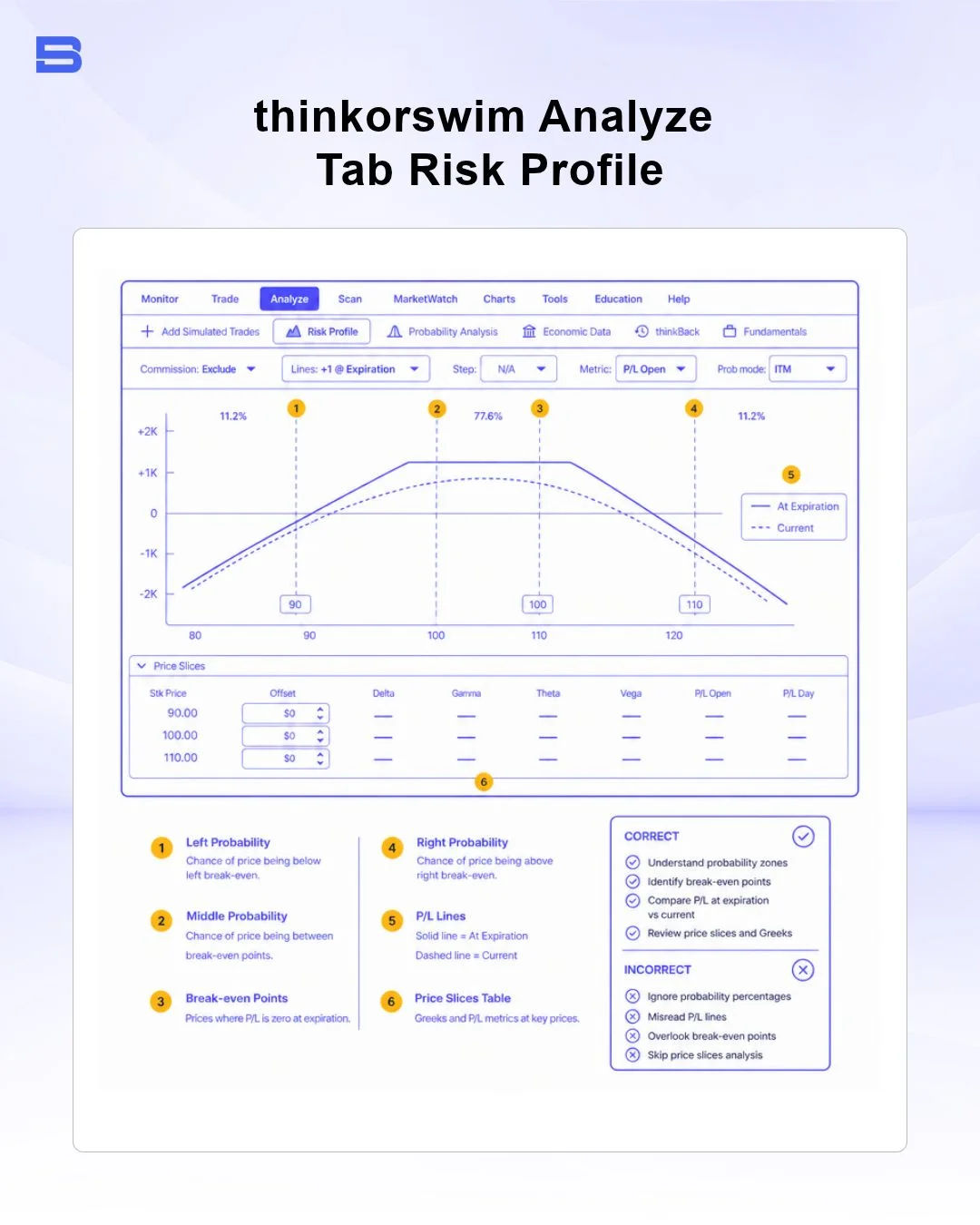
The tab estimates the theoretical probability of an option expiring In-The-Money (ITM) or Out-Of-The-Money (OTM) using a pricing model based on current implied volatility. These figures are model-based estimates, not predictions, and actual outcomes can differ significantly. You can instantly stress-test your portfolio against sudden shifts in market volatility or time decay (theta, θ) to visualize prospective gains or losses before placing a single trade.
Advanced Analytics and thinkScript Custom Indicators
For technical analysts and quantitative traders, it provides thinkScript, a proprietary built-in programming language. Using thinkScript custom indicators, users can write custom technical studies, generate visual chart overlays, and build automated conditional alerts based on complex multi-timeframe criteria.
Unlike low-level code that requires external compilers, thinkScript operates natively inside the desktop terminal. You can backtest custom technical indicators across years of historical data to assess historical performance metrics before risking live capital.
Risk-Free Practice with thinkorswim Paper Trading
New traders can practice, and experienced traders can test new strategies, using the platform's paper trading feature, branded as paperMoney. The paperMoney environment provides virtual capital alongside full access to thinkorswim’s technical studies, options chains, and order types.
Simulated trading allows you to master complex order entry mechanics—such as One-Cancels-Other (OCO) orders or dynamic trailing stops—without financial risk. However, simulated execution does not account for real-world order slippage or market liquidity constraints during fast-moving events, so live market performance may vary.
thinkorswim Pricing and Fees: Understanding Commission and Overhead Costs
According to Charles Schwab's official pricing schedule (verified September 2026), thinkorswim fees are integrated directly into Schwab's standard brokerage fee structure:
- US Stocks and ETFs: $0 commission for standard online market and limit orders.
- Options Contracts: $0 base commission plus a $0.65 fee per options contract.
- Futures Contracts: $2.25 per contract fee per side plus exchange/clearing fees.
- Platform & Maintenance Fees: $0 monthly software, data feed, or platform access fees for active accounts.
While the software engine carries no monthly subscription cost, high-tier features require adequate local computing infrastructure.
System Requirements and VPS for Trading Considerations
The desktop version of this platform is built on Java, making it noticeably resource-intensive. Charles Schwab publishes official minimum system requirements, but for smooth multi-chart setups with real-time Level II quotes, we recommend a multi-core processor (Intel i7/Apple M-series or higher) and 16GB to 32GB of RAM.
Active algorithmic traders running automated thinkScript alerts often use a virtual private server (VPS), a remote computer that keeps the platform running around the clock. Hosting the platform on a remote server maintains low latency to US exchange servers and prevents localized hardware slowdowns from disrupting automated tracking.
Comparing thinkorswim to Other Advanced Trading Platforms
Evaluating the platform against other industry platforms highlights distinct operational strengths and trade-offs:
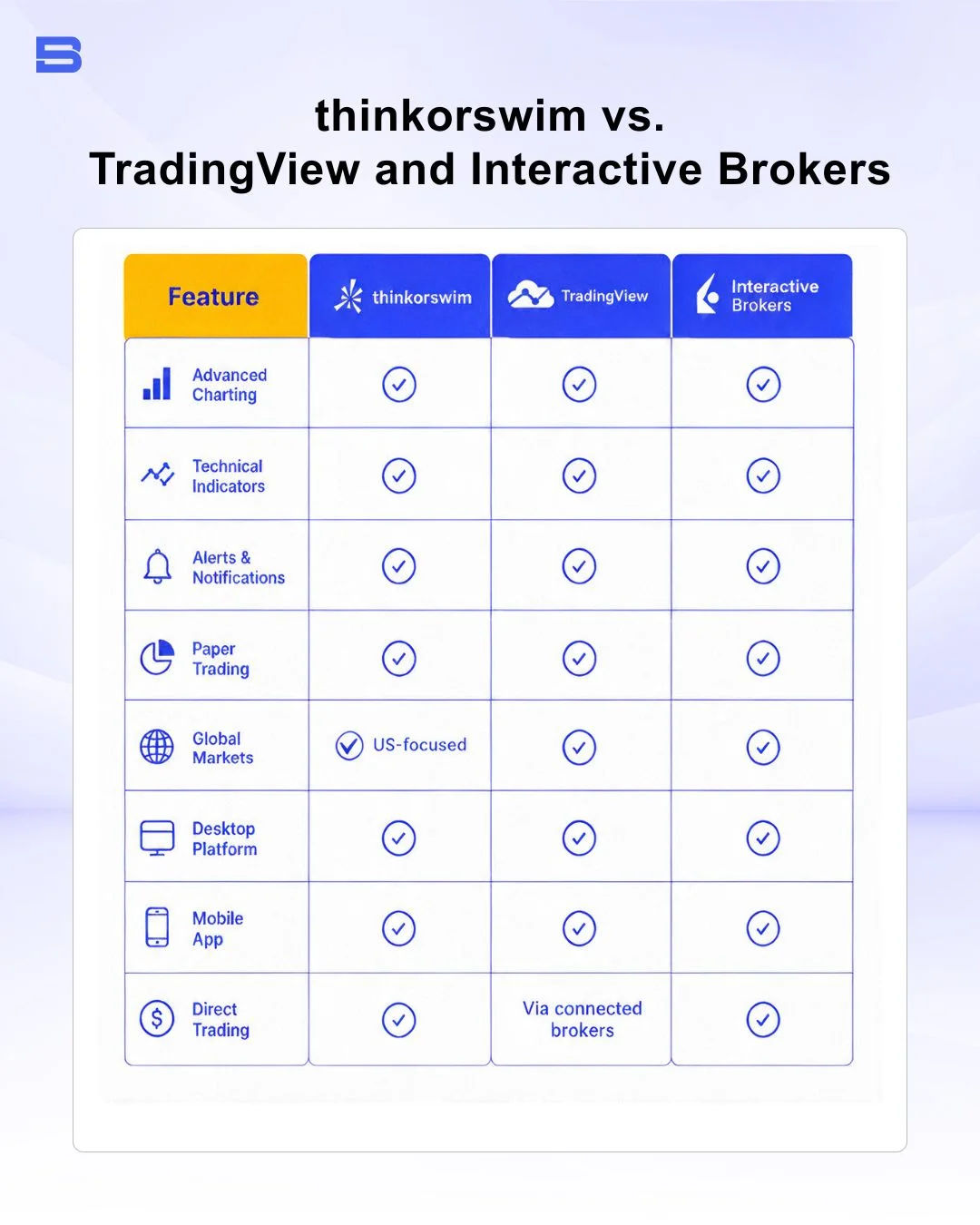
While TradingView excels at browser-based multi-asset charting and cTrader is built around fast order execution for currency traders, thinkorswim is widely regarded as one of the strongest choices for integrated US options modeling, although the best fit depends on the markets you trade and your trading style. Conversely, traders seeking extensive global exchange access across multiple currencies frequently turn to Interactive Brokers, while futures-focused traders often look at NinjaTrader for its dedicated futures tools.
Regional Context: International Access and Local Alternatives
A critical constraint for international traders is regulatory availability. Following Charles Schwab's acquisition of TD Ameritrade, completed in 2020, access to thinkorswim accounts for non-US residents was significantly restricted in several regions. Outside select approved international hubs, non-US retail investors often cannot open direct thinkorswim accounts.
For investors searching for a trading platform in Malaysia or across Southeast Asia, direct access to thinkorswim may be unavailable due to local licensing and account restrictions. Malaysian stock investors typically utilize national market infrastructure tools such as Bursa Anywhere to manage local equities and Central Depository System (CDS) accounts, pairing them with internationally regulated multi-asset platforms overseen by the Securities Commission Malaysia (SC) or tier-1 authorities like the UK Financial Conduct Authority (FCA).
The Bottom Line
For active options traders, technical chartists, and market strategists, the platform may offer institutional-level depth without software licensing costs. Its Analyze tab, flexible thinkScript scripting environment, and paperMoney simulator are among its strongest features, but its steep learning curve, hardware demands, and limited availability outside the US mean it may not suit every trader.
- Proprietary Trading Explained: What It Is and Its Key Benefits
- TradingView: Features, Broker Integration, and Strategies
- cTrader: How It Works and How It Compares
- What Is a VPS for Trading and Do You Need One?
- Thinkorswim Trading: Features, Tools, and Availability
- Trading Platform Malaysia: What to Look For
- Bursa Anywhere: A Guide to Managing Shares in Malaysia
- What Is Forex Factory and How Do Traders Use It?
- Delta App: Multi-Asset Portfolio Tracker for Crypto & Stocks
- What Is Trading Central and How to Use It?
- What Is Simply Wall St and How to Use It
- What Is Seeking Alpha and How to Use It
- What Is MarketWatch and How to Use It
- What Is Barchart and How to Use It
- Google Finance Explained: How to Track Stocks and Markets
- What Is Finviz and How to Use It for Stock Screening
- What Is Yahoo Finance and How to Use It
- What Is TradingEconomics and How to Use It
- StockCharts Review 2026: Features, Pricing, and Performance
- What Is ZuluTrade and How Does Copy Trading Work on It?
- What Is Investing.com and How to Use It?
- What Is Myfxbook and How Do Traders Use It?
- What Is CoinGecko? A Complete Guide to Crypto Data Tracking
- What Is CoinMarketCap and How to Use It
- What Is CoinStats and How to Use It for Portfolio Tracking
- What Is Sharesight and How to Use It for Portfolio Tracking
- What Is Personal Capital and How to Use It
- What Is a Low Spread Broker? How It Affects Your Trading
- What Is an Introducing Broker (IB) in Forex?
- What Is Social Trading? How Copy Trading Platforms Work
- What Is a PAMM Account? How Managed Forex Accounts Work
- What Is a Margin Account and How Does Margin Trading Work?
- What Are Trading Signals and How Do They Work?
- What Is an Expert Advisor (EA) in Forex Trading?
Disclaimer: The content on this page is intended for educational and informational purposes only. It does not constitute financial, investment, tax, or legal advice, and should not be interpreted as a recommendation to buy, sell, or hold any financial instrument or asset. Trading and investing involve significant risk, including the possible loss of your entire capital. Products such as forex, CFDs, and cryptocurrencies carry additional risks due to leverage, high volatility, and limited regulatory protection in some jurisdictions. Past performance of any financial instrument does not guarantee future results. Any market views, forecasts, or opinions expressed are those of the author at the time of writing and may not reflect current market conditions. Platform features, fees, and regulatory status are subject to change — always verify information directly with the relevant provider or regulator before making any financial decision. BrokerSpecs may receive compensation from third parties featured on this site. Always conduct your own due diligence and consider seeking advice from a licensed financial professional before investing. Portions of this article were prepared with the assistance of AI tools and reviewed by our editorial team before publication.