



Related Tags
Managing multiple brokerage accounts and keeping track of your stock investments across different trading apps can quickly become disorganized. You might find yourself logging into three separate trading portals just to confirm your total holding of a single stock, or waiting days for paper statements to arrive in the mail to confirm a dividend payout.
Bursa Anywhere was introduced to solve this exact fragmentation. Instead of juggling fragmented broker statements, Malaysian retail investors can now monitor their central depository accounts from a single mobile dashboard.
What Is Bursa Anywhere and How Does It Work?
Bursa Anywhere is the official Central Depository System (CDS) mobile application launched by Bursa Malaysia Depository Sdn Bhd. It serves as a single digital platform where individual retail investors can view and manage all their direct CDS accounts in one place.
Think of it as a record-keeping and account-management app, not a trading app. Instead, it functions as a centralized repository where all your electronic share ownership records, account statuses, and corporate action details are aggregated directly from Bursa Malaysia Depository's records.
Consider a practical example: if you hold Maybank shares bought through Broker A and Tenaga Nasional shares bought through Broker B, checking your portfolio normally requires logging into two distinct broker apps. With Bursa Anywhere, both holdings automatically aggregate under your National Registration Identity Card (NRIC) profile, giving you a consolidated market value of your entire direct CDS portfolio in one view.
Managing Your CDS Account: Direct vs. Authorised Nominee
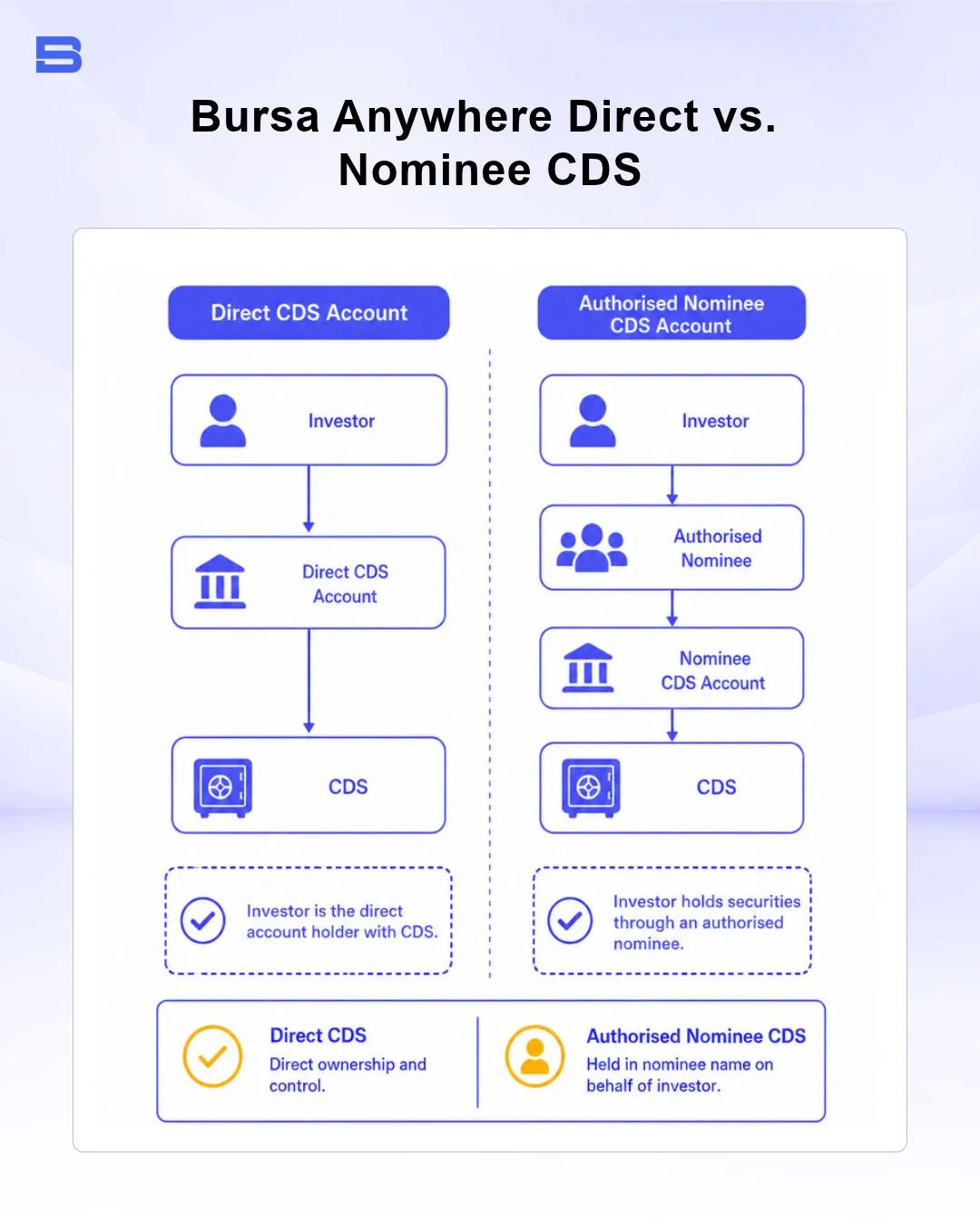
To make the most of Bursa Anywhere, you need to know how different types of Central Depository System (CDS) accounts interact with the app. In Malaysia, share ownership is recorded through two primary CDS account structures:
- Direct CDS Account: Opened in your personal name. You are listed on the company's official record of depositors, receive corporate action notices and annual reports directly, and have full access to self-service features on Bursa Anywhere.
- Authorised Nominee Account: Held on your behalf by a broker or nominee company (e.g., bank nominee services). While you retain beneficial ownership of the shares, the broker’s name appears on the register of depositors.
The app offers complete, end-to-end self-service functionality primarily for Direct CDS Accounts. While the app lets you view consolidated holdings across certain nominee accounts linked to your NRIC, you generally must initiate administrative operations—such as share transfers or bank detail updates—through your nominee broker.
If you are just getting started with Malaysian equities, understanding how to set up your holdings is essential. For a step-by-step breakdown of setting up your trading framework, read our guide on How to Open a Trading Account in Malaysia.
Account Reactivation and Updates
A common issue long-term investors face is discovering that their CDS account in Malaysia has become dormant. Under Bursa Malaysia Depository rules, a CDS account that still holds securities but has had no deposits or withdrawals for 36 consecutive months is designated Inactive, while an account with a nil securities balance and no activity over a set period is designated Dormant. Bursa Malaysia Depository sends a notice one month before either status takes effect.
Previously, reactivating a dormant account or updating a changed correspondence address required printing forms, obtaining physical witness signatures, and visiting a broker branch. Bursa Anywhere streamlines these maintenance tasks entirely via mobile:
- Updating Contact Details: You can update your mobile number, email address, and correspondence address in the app. The changes sync across all direct CDS accounts linked to your NRIC.
- Reactivating Inactive Accounts: If your account is dormant or inactive, you can submit an electronic reactivation request directly through the app.
- Opening Additional CDS Accounts: Existing users can open additional direct CDS accounts with participating brokers via the app without re-submitting physical identity documents.
As of 2026, according to Bursa Malaysia Depository, reactivating an Inactive CDS account through Bursa Anywhere is free, while reactivating a Dormant account costs RM5 per account. Transfers between your own direct CDS accounts carry a separate RM10 fee per transfer. You pay both via FPX (Financial Process Exchange) online banking within the app.
Key Features: Portfolio Tracking and CDS Balance Checking
The app's core appeal lies in its comprehensive tracking suite. It translates complex settlement records into a clean mobile interface.
- Consolidated Portfolio Valuation: See the current market value of all your holdings across your direct CDS accounts (known as mark-to-market value), based on the latest available prices, which may be delayed.
- eStatements and Transaction History: Download up to 12 months of monthly CDS statements and view detailed credit/debit transaction logs (such as share deposits, transfers, or corporate action adjustments) for free.
- Corporate Action Tracking: Receive push notifications for upcoming rights issues, bonus issues, share splits, and dividend entitlement dates relevant to the stocks you own.
- General Meeting E-voting Access: Access links and notices for Annual General Meetings (AGMs) and Extraordinary General Meetings (EGMs), allowing shareholders to exercise their voting rights digitally.
Share Transfers Between Your CDS Accounts and to Family Members
Transferring share ownership between accounts historically required filling out physical Transfer Forms (Form FTF010) at a broker's office. Bursa Anywhere digitizes this process for transfers between your own direct CDS accounts.
Here's how the two main types of personal transfers work:
- Transfers Between Your Own CDS Accounts: Moving shares from a direct CDS account at Broker A to another direct CDS account at Broker B.
- Transfers to Immediate Family Members: Bursa Malaysia Depository allows transfers to approved relatives such as parents, children, spouses, siblings, grandparents, and grandchildren, but these require supporting documents and are generally submitted through your broker. Check the latest Bursa Assist guidance before you start.
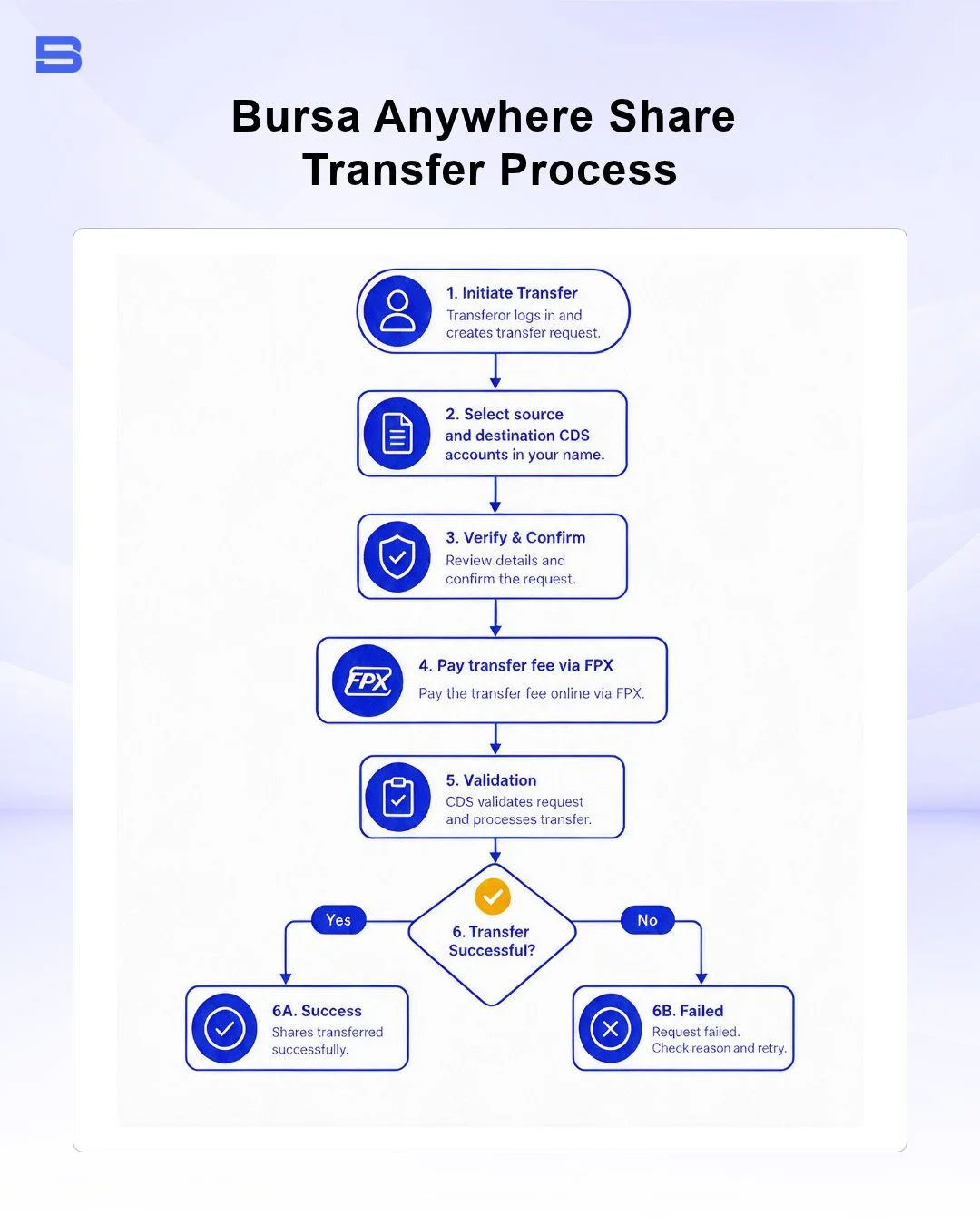
To execute a transfer, you select the source and destination CDS accounts in your name, choose the stock counter, and specify the quantity. The app then directs you to pay the transfer fee via FPX.
Bursa Malaysia Depository charges a transfer fee of RM10 per transfer request. Processing times can vary, so check the request status in the app after you submit.
Setting Up eDividend for Direct Cash Crediting
Dividend management is another critical area where Bursa Anywhere eliminates manual paperwork. In the past, companies mailed dividend cheques, which often got lost in transit or incurred bank processing fees.
Through the eDividend feature in Bursa Anywhere, you can register and link your preferred Malaysian bank account directly to your NRIC. Once configured, any cash dividend declared by a listed company you hold is automatically credited directly to your bank account on the payment date.
To update your eDividend bank details on Bursa Anywhere:
- Navigate to the Profile or eServices section in the mobile app.
- Select eDividend Registration / Update.
- Enter your bank name, account number, and upload a supporting document (such as a bank statement header showing your name and account number) for verification.
- Submit the request via electronic Know-Your-Customer (e-KYC) authentication.
Once approved, the updated bank details apply across all your direct CDS accounts, which helps reduce the risk of delayed or lost dividend payments.
Integrating Your Brokerage: From CGS-CIMB iTrade to Mobile CDS Tracking
When you trade stocks through local brokerages—such as CGS iTrade (formerly CGS-CIMB iTrade), Maybank Investment, RHB TradeSmart, or Hong Leong Investment Bank—your trade executions settle through Bursa Malaysia Depository.
While you use your broker's trading application (like CGS iTrade, formerly CGS-CIMB iTrade) to execute orders, analyze technical charts, and monitor real-time order books, Bursa Anywhere works quietly in the background as the master record holder.
Linking your brokerage accounts to the app requires no manual syncing. During your initial registration on the app, your identity is authenticated using e-KYC verification (scanning your MyKad and performing facial recognition).
The app automatically queries the central depository system and links every direct CDS account registered under your NRIC. Whether you opened an account via CGS-CIMB (now CGS International) five years ago or opened a new account via another broker today, it automatically appears on your Bursa Anywhere dashboard.
Comparing Mobile CDS Tracking to a Trading Platform in Malaysia
It is vital not to confuse custodial management applications with active trading environments. Investors often ask how Bursa Anywhere compares to an execution-focused trading platform in Malaysia or advanced charting tools like TradingView and cTrader.
Bursa Anywhere acts as the central vault and registry, whereas active trading platforms act as the execution gateway.
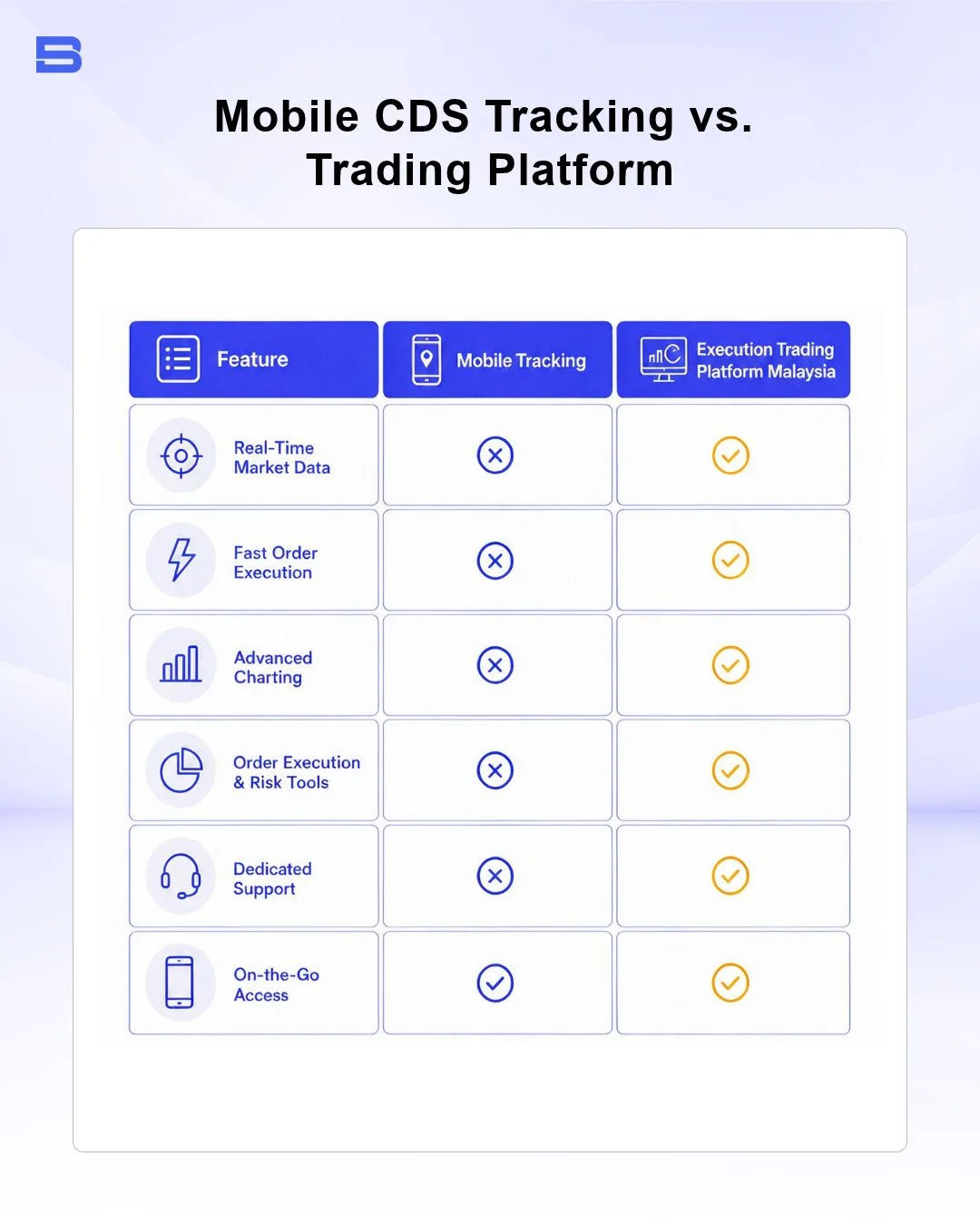
Using both tools together provides a balanced approach: you rely on your licensed broker's trading platform or a dedicated charting tool for analysis and trade execution, and rely on Bursa Anywhere for long-term portfolio tracking and administrative control.
The Bottom Line on Managing Your Shares with Bursa Anywhere
Bursa Anywhere gives Malaysian retail investors central control over their stock ownership records. By consolidating multiple CDS accounts, automating eDividend collection, and streamlining share transfers into a mobile dashboard, it eliminates unnecessary paperwork. Pairing the app for custodial oversight with a licensed brokerage app for execution gives you a complete, organized framework for managing Malaysian equities.
- Proprietary Trading Explained: What It Is and Its Key Benefits
- TradingView: Features, Broker Integration, and Strategies
- cTrader: How It Works and How It Compares
- What Is a VPS for Trading and Do You Need One?
- Thinkorswim Trading: Features, Tools, and Availability
- Trading Platform Malaysia: What to Look For
- Bursa Anywhere: A Guide to Managing Shares in Malaysia
- What Is Forex Factory and How Do Traders Use It?
- Delta App: Multi-Asset Portfolio Tracker for Crypto & Stocks
- What Is Trading Central and How to Use It?
- What Is Simply Wall St and How to Use It
- What Is Seeking Alpha and How to Use It
- What Is MarketWatch and How to Use It
- What Is Barchart and How to Use It
- Google Finance Explained: How to Track Stocks and Markets
- What Is Finviz and How to Use It for Stock Screening
- What Is Yahoo Finance and How to Use It
- What Is TradingEconomics and How to Use It
- StockCharts Review 2026: Features, Pricing, and Performance
- What Is ZuluTrade and How Does Copy Trading Work on It?
- What Is Investing.com and How to Use It?
- What Is Myfxbook and How Do Traders Use It?
- What Is CoinGecko? A Complete Guide to Crypto Data Tracking
- What Is CoinMarketCap and How to Use It
- What Is CoinStats and How to Use It for Portfolio Tracking
- What Is Sharesight and How to Use It for Portfolio Tracking
- What Is Personal Capital and How to Use It
- What Is a Low Spread Broker? How It Affects Your Trading
- What Is an Introducing Broker (IB) in Forex?
- What Is Social Trading? How Copy Trading Platforms Work
- What Is a PAMM Account? How Managed Forex Accounts Work
- What Is a Margin Account and How Does Margin Trading Work?
- What Are Trading Signals and How Do They Work?
- What Is an Expert Advisor (EA) in Forex Trading?
Disclaimer: The content on this page is intended for educational and informational purposes only. It does not constitute financial, investment, tax, or legal advice, and should not be interpreted as a recommendation to buy, sell, or hold any financial instrument or asset. Trading and investing involve significant risk, including the possible loss of your entire capital. Products such as forex, CFDs, and cryptocurrencies carry additional risks due to leverage, high volatility, and limited regulatory protection in some jurisdictions. Past performance of any financial instrument does not guarantee future results. Any market views, forecasts, or opinions expressed are those of the author at the time of writing and may not reflect current market conditions. Platform features, fees, and regulatory status are subject to change — always verify information directly with the relevant provider or regulator before making any financial decision. BrokerSpecs may receive compensation from third parties featured on this site. Always conduct your own due diligence and consider seeking advice from a licensed financial professional before investing. Portions of this article were prepared with the assistance of AI tools and reviewed by our editorial team before publication.