


Related Tags
Entering a trade during periods of high market volatility can be exciting, but a sudden requote or unexpected slippage can quickly turn that excitement into frustration. Seeing an order filled several pips away from your intended entry price highlights why execution quality and platform architecture matter. Today's traders often look for transparent pricing, reliable execution, and intuitive interfaces, which is why platforms such as Spotware's cTrader and NinjaTrader keep coming up. This guide explains how cTrader works, what its key features are, and how it compares with MetaTrader and TradingView.
What Is cTrader and How Does It Work?
cTrader is a multi-asset trading platform developed by Spotware Systems and built with Electronic Communication Network (ECN) and Straight Through Processing (STP) brokers in mind. The platform itself doesn't execute your trades — your broker does. How your order is filled depends on the execution model your broker runs on cTrader, so check whether your account routes orders to external liquidity providers or handles them in-house.
To fully understand how cTrader operates, it helps to look at the mechanics behind pricing. When you place an order, the software matches your trade against an aggregated pool of prices supplied by tier-one banks and institutional financial entities.
Many brokers that offer cTrader provide raw-spread accounts, where spreads on major pairs can go as low as 0.0 pips and a separate commission is charged per trade. Spreads, commissions, and execution quality are set by your broker, not by cTrader, so compare them before you open an account.
Key Features of cTrader
cTrader combines a clean interface with charting, automation, and order-management tools built directly into the platform.
According to Spotware's official cTrader documentation, the platform offers 54 chart timeframes, from standard minute charts to tick, Renko, and Range charts, which form a new bar after a set number of trades or a set price move rather than after a fixed amount of time.
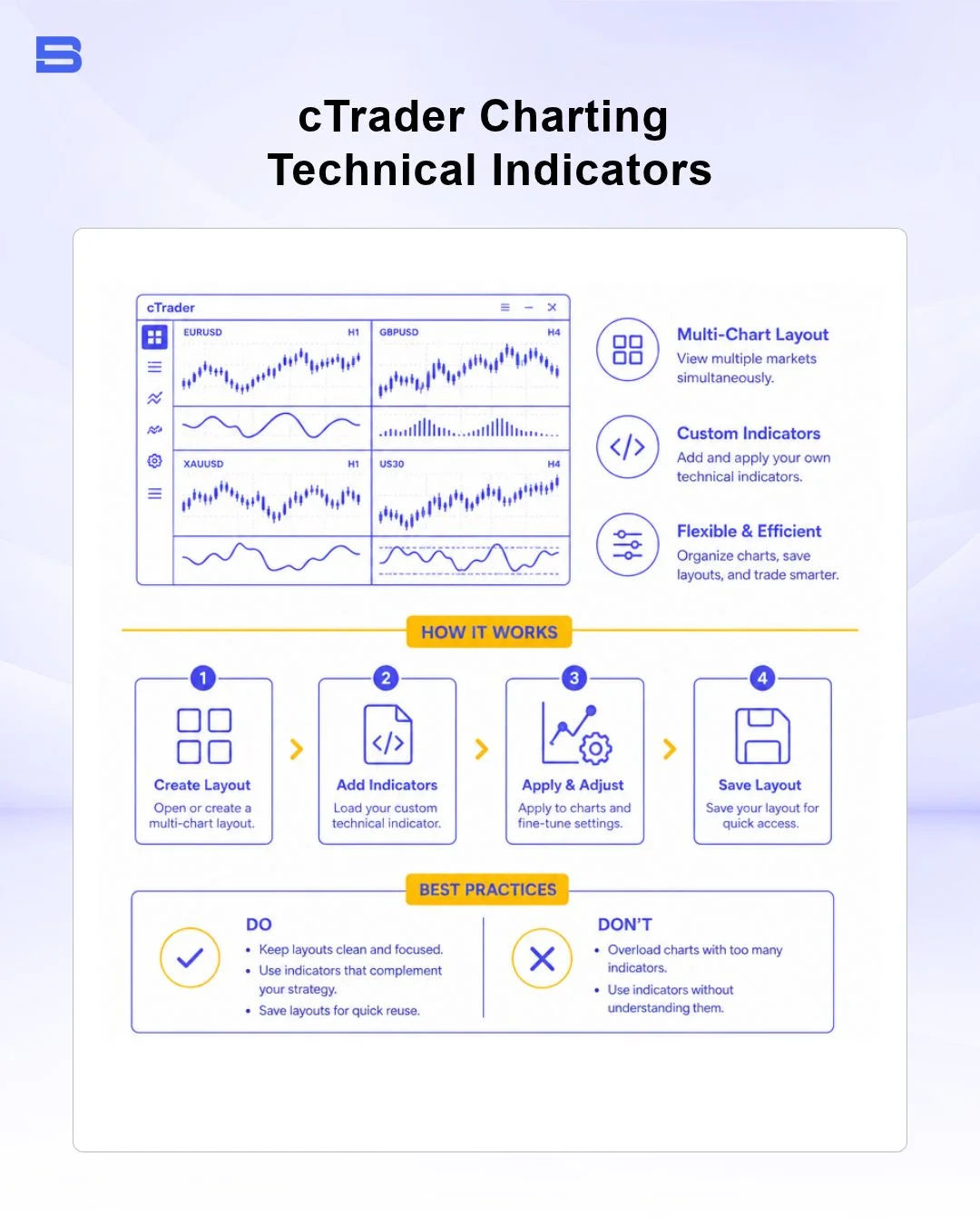
With a broad range of built-in technical indicators, detachable charts for multi-screen setups, and chart-trading tools, cTrader lets traders modify stop-loss and take-profit levels directly on the chart by dragging the respective controls to their desired price levels.
Trading Automation with cBots
For traders focused on algorithmic strategies, cTrader's cBots offer a modern alternative to older coding environments. Because cBots are built on C# and the .NET framework, developers can write automated trading programs with widely used programming tools. cTrader can also run cBots in the cloud, so your strategies can keep running without a dedicated Virtual Private Server (VPS).
It is essential to approach automated strategies with caution. While backtesting on historical data helps refine system logic, over-optimizing or curve-fitting a cBot to past price action often leads to severe drawdowns (large drops in account value from a previous peak) when exposed to live, unexpected market volatility.
Multi-Device and Mobile Accessibility
cTrader syncs your workspace across devices. Whether you analyze markets on the desktop app, trade in a web browser, or manage open positions on the mobile app for iOS or Android, your cloud-saved chart templates, watchlists, and account settings stay the same on every device.
ECN Execution and Depth of Market (DOM)
A primary advantage of using ECN execution cTrader setups is greater price transparency through Level II Depth of Market (DOM). Unlike basic retail interfaces that show only a single bid and ask price, cTrader’s DOM panel reveals the real-time liquidity available at various price tiers.
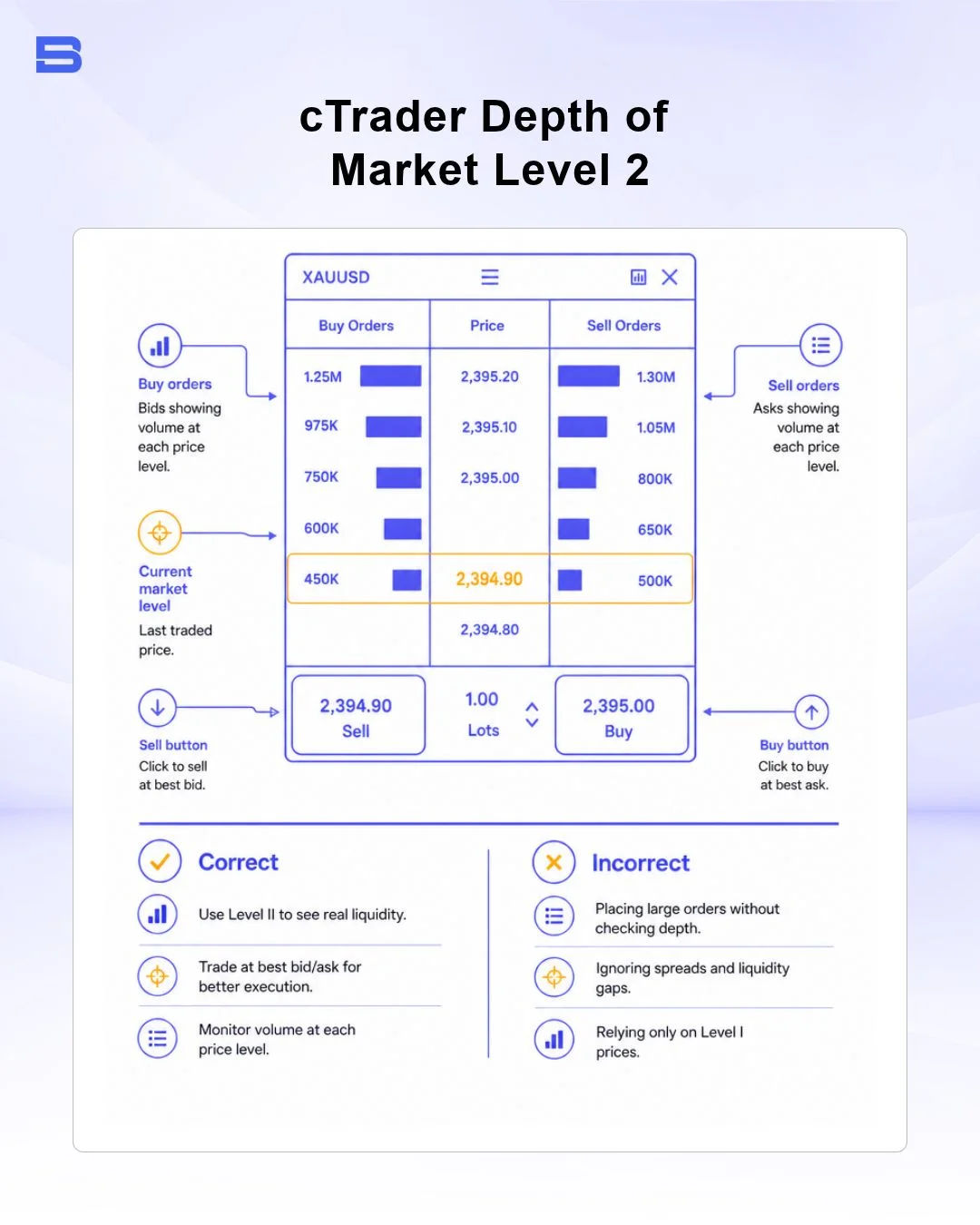
The platform offers three distinct DOM views:
- Standard DOM: Displays the total volume available for purchase or sale at specific price levels.
- Price DOM: Allows fast ladder-style scalping and quick limit order placement.
- VWAP DOM: Shows the Volume Weighted Average Price for large trade sizes across current order book depths.
Imagine you want to execute a large 50-lot EUR/USD order during a high-impact news release. If the top bid price only has 10 lots available, cTrader fills the remaining 40 lots at the next best available price tiers down the depth ladder.
This execution model is designed to reduce requotes, but no platform can remove slippage or price gaps when liquidity thins out. To learn more about how order fills function during market gaps, explore what is slippage in forex.
Comparing cTrader with MetaTrader and TradingView
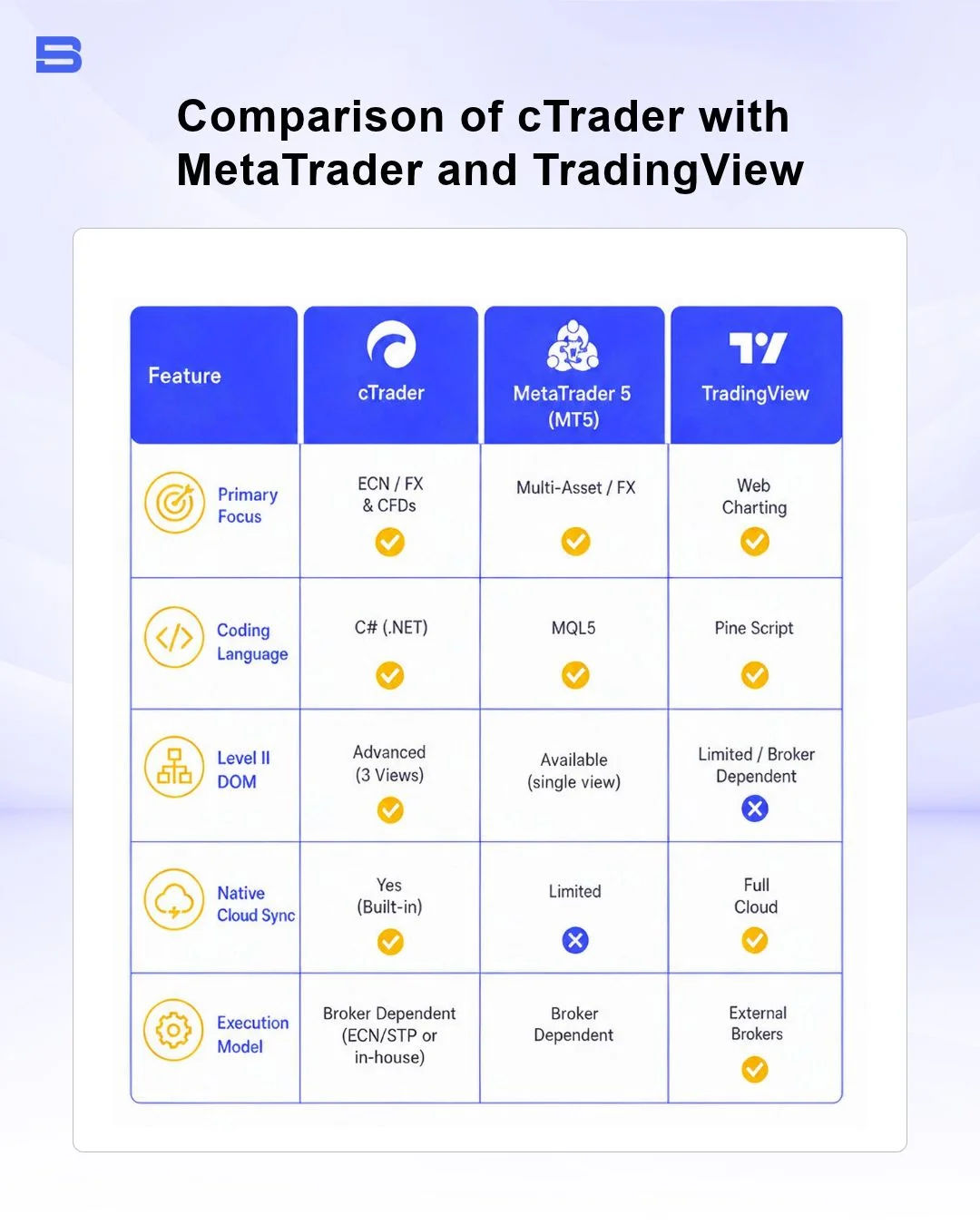
Choosing the right software depends heavily on your execution style, coding preferences, and need for market depth. Below is a breakdown of how cTrader compares against industry standards like MetaTrader 5 and TradingView.
MetaTrader 5 (MT5) uses its own MQL5 language for Expert Advisors and is supported by the widest range of brokers. TradingView is built around browser-based charting and a large trader community, uses its own Pine Script language for custom indicators and strategies, and lets you place trades only through brokers connected to its platform. cTrader combines Level II Depth of Market with C# automation through cBots, but it is offered by fewer brokers than MetaTrader.
Is cTrader Better Than MetaTrader?
Whether cTrader is "better" than MetaTrader depends on what you value most as a trader. Many traders find cTrader's interface cleaner and more intuitive, and it includes built-in risk tools on the order ticket. Because cBots are written in C#, a widely used programming language, developers who already know C# may find it easier to pick up than MetaTrader's proprietary MQL language.
However, MetaTrader is offered by more brokers, and its long-established ecosystem includes a much larger library of third-party custom indicators and Expert Advisors (EAs). If you prioritize a modern user experience (UX), speed, and transparent market depth, cTrader is often the superior choice. If you rely on legacy custom EAs or require a specific niche broker, MetaTrader might remain necessary.
Regional Availability and Broker Support
cTrader is available worldwide, but whether you can use it depends on which brokers offer it in your country. Leading global ECN brokerages offer cTrader accounts alongside traditional platforms, providing competitive commission structures and raw spreads.
For traders operating within Southeast Asia, platform choices often depend on the underlying asset class. If you trade Malaysian equities directly, you can use Bursa Anywhere, Bursa Malaysia's mobile app for Central Depository System (CDS) services, such as account opening, securities-balance inquiries, statements, and securities transfers.
Bursa Anywhere is Bursa Malaysia's mobile app for CDS-related services, such as account opening, securities-balance enquiries, statements, and securities transfers. It does not provide forex or CFD trading. cTrader, by contrast, is only available through brokers that choose to offer it.
Before you open an account, check that the broker is licensed by a recognized regulator, such as the UK Financial Conduct Authority (FCA) or the Australian Securities and Investments Commission (ASIC), and that the license covers clients in your country. If you live in Malaysia, also check the Securities Commission Malaysia (SC) Investor Alert List before sending any funds.
Should You Use cTrader?
cTrader combines Level II Depth of Market, C# automation through cBots, and a clean, modern interface, which makes it a strong alternative to older platforms for many retail traders. How well it works for you will still depend on the broker you choose. If price transparency and modern design are central to your trading plan, it's worth testing cTrader on a demo account first.
- Proprietary Trading Explained: What It Is and Its Key Benefits
- TradingView: Features, Broker Integration, and Strategies
- cTrader: How It Works and How It Compares
- What Is a VPS for Trading and Do You Need One?
- Thinkorswim Trading: Features, Tools, and Availability
- Trading Platform Malaysia: What to Look For
- Bursa Anywhere: A Guide to Managing Shares in Malaysia
- What Is Forex Factory and How Do Traders Use It?
- Delta App: Multi-Asset Portfolio Tracker for Crypto & Stocks
- What Is Trading Central and How to Use It?
- What Is Simply Wall St and How to Use It
- What Is Seeking Alpha and How to Use It
- What Is MarketWatch and How to Use It
- What Is Barchart and How to Use It
- Google Finance Explained: How to Track Stocks and Markets
- What Is Finviz and How to Use It for Stock Screening
- What Is Yahoo Finance and How to Use It
- What Is TradingEconomics and How to Use It
- StockCharts Review 2026: Features, Pricing, and Performance
- What Is ZuluTrade and How Does Copy Trading Work on It?
- What Is Investing.com and How to Use It?
- What Is Myfxbook and How Do Traders Use It?
- What Is CoinGecko? A Complete Guide to Crypto Data Tracking
- What Is CoinMarketCap and How to Use It
- What Is CoinStats and How to Use It for Portfolio Tracking
- What Is Sharesight and How to Use It for Portfolio Tracking
- What Is Personal Capital and How to Use It
- What Is a Low Spread Broker? How It Affects Your Trading
- What Is an Introducing Broker (IB) in Forex?
- What Is Social Trading? How Copy Trading Platforms Work
- What Is a PAMM Account? How Managed Forex Accounts Work
- What Is a Margin Account and How Does Margin Trading Work?
- What Are Trading Signals and How Do They Work?
- What Is an Expert Advisor (EA) in Forex Trading?
Disclaimer: The content on this page is intended for educational and informational purposes only. It does not constitute financial, investment, tax, or legal advice, and should not be interpreted as a recommendation to buy, sell, or hold any financial instrument or asset. Trading and investing involve significant risk, including the possible loss of your entire capital. Products such as forex, CFDs, and cryptocurrencies carry additional risks due to leverage, high volatility, and limited regulatory protection in some jurisdictions. Past performance of any financial instrument does not guarantee future results. Any market views, forecasts, or opinions expressed are those of the author at the time of writing and may not reflect current market conditions. Platform features, fees, and regulatory status are subject to change — always verify information directly with the relevant provider or regulator before making any financial decision. BrokerSpecs may receive compensation from third parties featured on this site. Always conduct your own due diligence and consider seeking advice from a licensed financial professional before investing. Portions of this article were prepared with the assistance of AI tools and reviewed by our editorial team before publication.