


Related Tags
Entering a trade without analyzing market structure first is like driving through a storm without headlights—you might keep moving forward, but you're blind to sudden turns. In short, you need to understand the market setup before you trade. For swing and position traders, identifying relative strength and screening hundreds of assets before the market opens is essential for long-term consistency.
StockCharts has served as a cornerstone web platform for technical analysis since 1999. Known for its custom market scanning tools and classic charting frameworks, it caters primarily to intermediate investors looking to analyze broad market trends rather than execute high-frequency day trades.
What Is StockCharts?
It’s an independent, web-based technical analysis platform designed to help traders analyze financial markets, screen for setups, and track relative asset strength. Unlike execution-focused broker platforms built primarily for rapid order placement, StockCharts specializes in macro market visualization, sector rotation tracking, and technical screening.
The platform focuses on intermediate position and swing traders who rely on end-of-day or multi-day price action. Through its signature tools and broad library of educational resources—known as ChartSchool—it allows users to apply technical overlays, indicators, and proprietary scanning scripts across equities, ETFs, mutual funds, and major indexes without downloading local software.
Core Features of StockCharts
StockCharts combines traditional technical analysis tools with proprietary relative strength indicators. Understanding how its feature suite functions helps determine if it fits your technical workflow.
SharpCharts vs. StockChartsACP
StockCharts provides two distinct environments for displaying market data: SharpCharts and StockChartsACP (Advanced Charting Platform).
SharpCharts represents the legacy engine, rendering static image-based charts. While static charts lack instant click-and-drag capabilities, they offer exceptionally clean formatting, multi-chart layout saving, and precise printing capabilities—making them popular for blog publishing and static technical reports.
StockChartsACP is the modern, dynamic HTML5 alternative. It features interactive streaming, real-time indicators, drag-and-drop customization, and multi-pane charting. This division highlights a key trade-off on the platform: traditional static charts prioritize structural clarity and print quality, whereas dynamic HTML5 charting delivers fluid, real-time interaction for active market monitoring.
StockCharts Technical Rank (SCTR)
One of the platform's standout tools is the StockCharts Technical Rank (SCTR)—a proprietary numerical score from 0.0 to 99.9 assigned to individual stocks and ETFs within specific market universe groups.
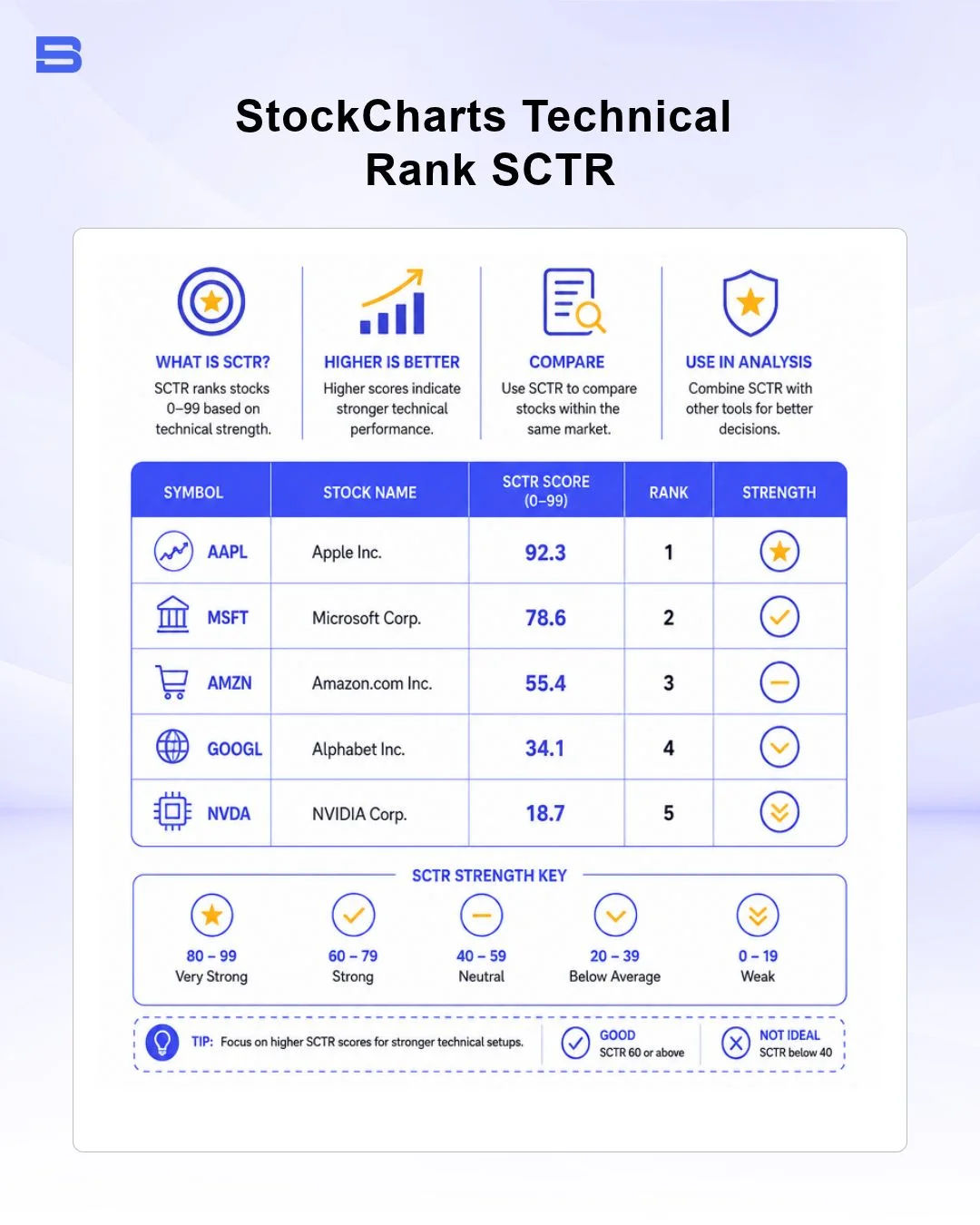
The SCTR score quantifies a security's relative technical strength by weighing multiple technical indicators across three time horizons:
- Long-Term Indicators (30% Weight): Percent distance from the 200-day Simple Moving Average (SMA) (20%) and 125-day Rate of Change (ROC) (10%).
- Medium-Term Indicators (30% Weight): Percent distance from the 50-day SMA (15%) and 20-day ROC (15%).
- Short-Term Indicators (40% Weight): 3-day slope of the Percentage Price Oscillator (PPO)-Histogram (20%) and 14-day Relative Strength Index (RSI) (20%).
An SCTR score above 80.0 indicates that an asset is outperforming 80% of its peers within the same market group, helping trend traders quickly isolate market leaders without building complex mathematical formulas from scratch.
Technical Alerts, Custom Scans, and ChartPacks
To automate market filtering, StockCharts includes a custom scanning engine. Users can write detailed text-based scan scripts using technical parameters (e.g., finding stocks where the 20-day Exponential Moving Average (EMA) crosses above the 50-day SMA while the SCTR score is above 75).
Automated technical alerts can be sent via email or web notifications when specific price or indicator thresholds are breached. Additionally, the platform offers pre-configured ChartPacks—curated collections of chart templates and market lists created by technical analysts—allowing subscribers to instantly load comprehensive market overviews into their personal accounts.
StockCharts Pricing & Tier Breakdown
Beyond core features, understanding StockCharts' pricing structure is essential for evaluating fit. Evaluating StockCharts requires understanding its free offerings, paid subscription tiers, and potential real-time data fees.
Is StockCharts Free?
StockCharts offers a basic, ad-supported free version accessible directly through a web browser. Free users can generate public charts, view basic indicators, and read ChartSchool articles. However, free access comes with notable limitations: charts render as static images, free users receive data delayed by 15 minutes, settings cannot be saved, and custom scanning is heavily restricted.
Paid Subscription Tiers
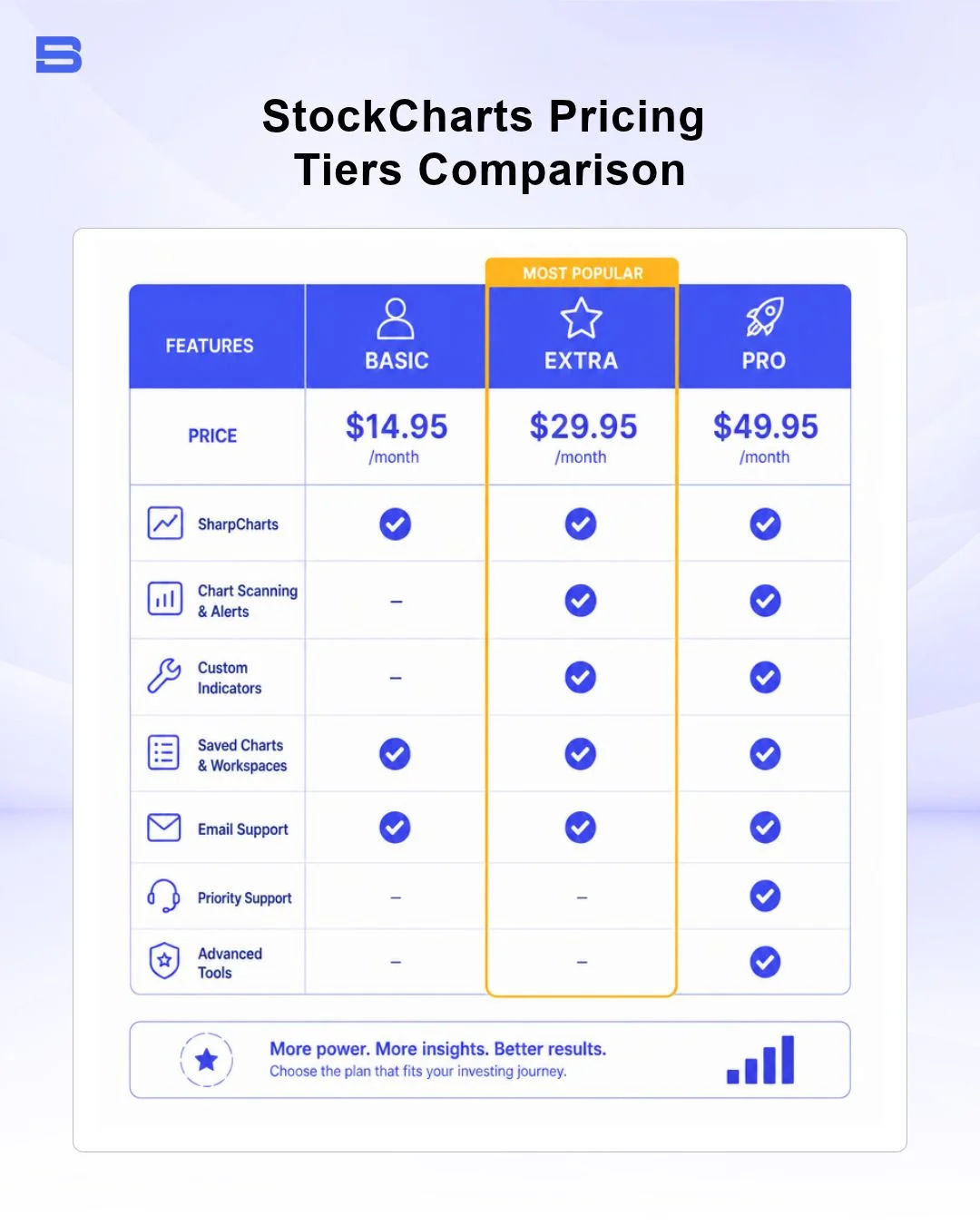
For saved configurations and advanced screening, StockCharts provides three primary monthly paid tiers:
- Basic ($19.95/month): Includes 11 indicators per chart, delayed data, 1 auto-updating chart, and up to 25 saved ChartLists.
- Extra ($29.95/month): Unlocks 25 indicators per chart, side-by-side chart comparisons, custom scan building, automated technical alerts, and up to 250 saved ChartLists.
- Pro ($49.95/month): Designed for active power users, offering historical data depth, up to 500 saved ChartLists, multi-chart layouts, and higher scan script execution priority.
Real-Time Data Add-Ons and Exchange Fees
By default, paid plans include auto-refreshing delayed data. Active intraday traders requiring streaming tick-by-tick data require purchase real-time data add-ons.
Exchange data feeds are billed separately on a monthly basis to cover exchange pass-through costs. For instance, real-time US market data packages (covering NYSE, Nasdaq, and OPRA—the US equity and options exchanges) require additional monthly fees. The SEC and FINRA enforce strict exchange guidelines. The US Securities and Exchange Commission (SEC) and Financial Industry Regulatory Authority (FINRA) mandate strict classification between non-professional and professional subscribers, with higher feed rates applied to commercial entities.
Comparing StockCharts vs. Modern Alternatives
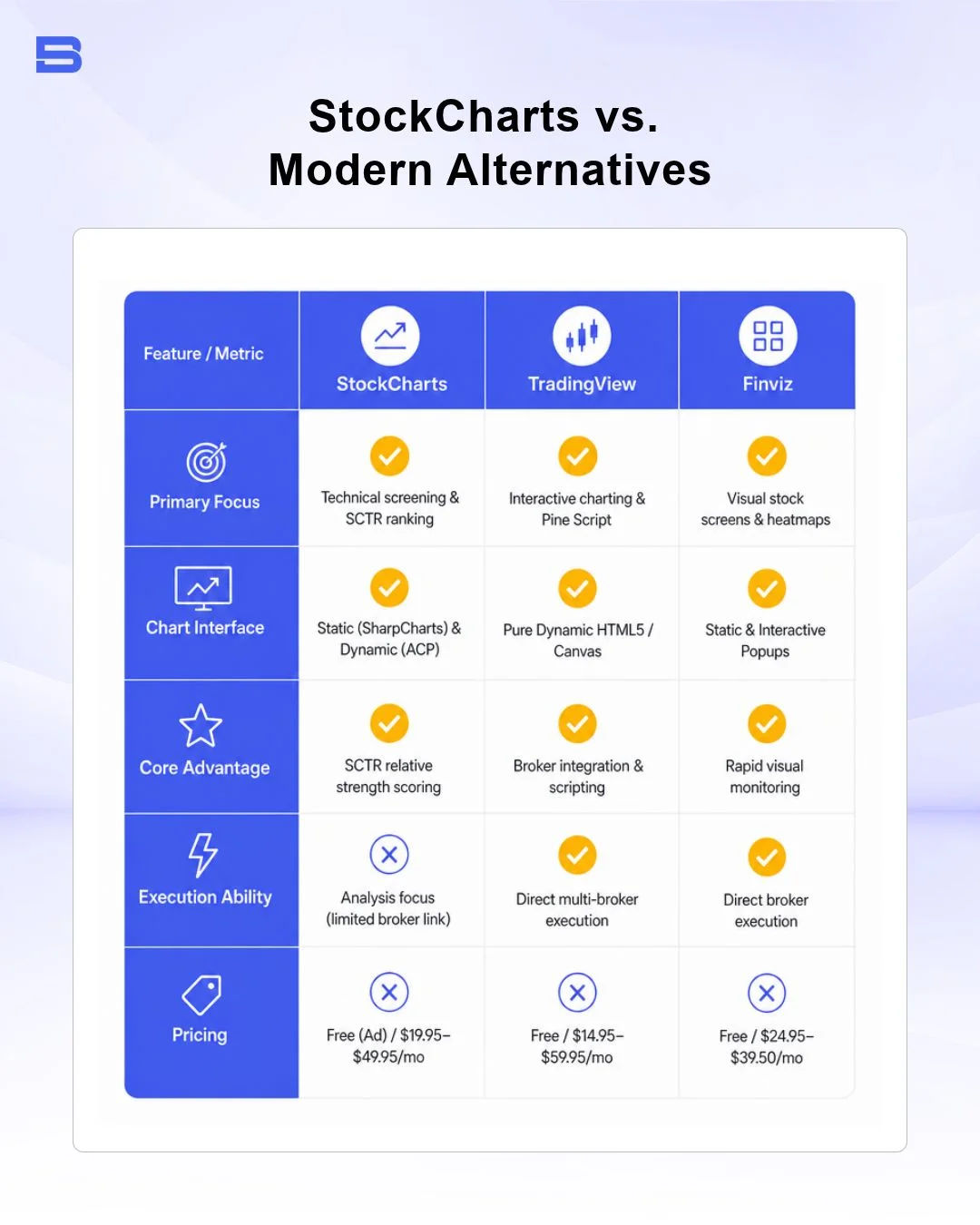
While StockCharts excels in technical screening, other platforms offer different strengths. It offers technical screening tools that focus on relative strength analysis; modern charting platforms offer alternative feature sets depending on your operational focus.
- TradingView: Features fluid HTML5 charting, deep multi-broker integration, cloud-based scripting via Pine Script, and a massive social trading network.
- Finviz: Focuses on fast visual stock screening, instant sector heatmaps, and financial news aggregations.
- Execution Platforms (Thinkorswim & cTrader): Brokerage-native platforms engineered for direct order routing, direct-access execution, and advanced options order entry rather than pure multi-market screening.
- Complementary Macro Tools (Trading Economics, Barchart, Trading Central): Excellent specialized services for economic indicators, commodity futures breakdowns, and automated technical pattern recognition overlays.
Final Thoughts
StockCharts is a useful platform for swing and position traders who value relative strength screening, custom scans, and technical rankings such as SCTR. While its traditional charting approach and additional real-time data fees may be less suitable for active day traders, its market analysis tools provide a structured view of broader trends.
Traders can also use TradingEconomics to monitor economic data, indicators, and global market developments alongside technical analysis.
- Proprietary Trading Explained: What It Is and Its Key Benefits
- TradingView: Features, Broker Integration, and Strategies
- cTrader: How It Works and How It Compares
- What Is a VPS for Trading and Do You Need One?
- Thinkorswim Trading: Features, Tools, and Availability
- Trading Platform Malaysia: What to Look For
- Bursa Anywhere: A Guide to Managing Shares in Malaysia
- What Is Forex Factory and How Do Traders Use It?
- Delta App: Multi-Asset Portfolio Tracker for Crypto & Stocks
- What Is Trading Central and How to Use It?
- What Is Simply Wall St and How to Use It
- What Is Seeking Alpha and How to Use It
- What Is MarketWatch and How to Use It
- What Is Barchart and How to Use It
- Google Finance Explained: How to Track Stocks and Markets
- What Is Finviz and How to Use It for Stock Screening
- What Is Yahoo Finance and How to Use It
- What Is TradingEconomics and How to Use It
- StockCharts Review 2026: Features, Pricing, and Performance
- What Is ZuluTrade and How Does Copy Trading Work on It?
- What Is Investing.com and How to Use It?
- What Is Myfxbook and How Do Traders Use It?
- What Is CoinGecko? A Complete Guide to Crypto Data Tracking
- What Is CoinMarketCap and How to Use It
- What Is CoinStats and How to Use It for Portfolio Tracking
- What Is Sharesight and How to Use It for Portfolio Tracking
- What Is Personal Capital and How to Use It
- What Is a Low Spread Broker? How It Affects Your Trading
- What Is an Introducing Broker (IB) in Forex?
- What Is Social Trading? How Copy Trading Platforms Work
- What Is a PAMM Account? How Managed Forex Accounts Work
- What Is a Margin Account and How Does Margin Trading Work?
- What Are Trading Signals and How Do They Work?
- What Is an Expert Advisor (EA) in Forex Trading?
Disclaimer: The content on this page is intended for educational and informational purposes only. It does not constitute financial, investment, tax, or legal advice, and should not be interpreted as a recommendation to buy, sell, or hold any financial instrument or asset. Trading and investing involve significant risk, including the possible loss of your entire capital. Products such as forex, CFDs, and cryptocurrencies carry additional risks due to leverage, high volatility, and limited regulatory protection in some jurisdictions. Past performance of any financial instrument does not guarantee future results. Any market views, forecasts, or opinions expressed are those of the author at the time of writing and may not reflect current market conditions. Platform features, fees, and regulatory status are subject to change — always verify information directly with the relevant provider or regulator before making any financial decision. BrokerSpecs may receive compensation from third parties featured on this site. Always conduct your own due diligence and consider seeking advice from a licensed financial professional before investing. Portions of this article were prepared with the assistance of AI tools and reviewed by our editorial team before publication.