


Related Tags
Managing investments across multiple trading platforms, crypto wallets, and stock brokerages often leads to tab-switching fatigue and a fragmented view of your total net worth. Tracking individual performance on each app manually makes it difficult to see your true risk exposure or overall gain and loss in real time.
The Delta app (branded as Delta by eToro) solves this multi-broker isolation by acting as a centralized, passive monitoring hub. Rather than moving your capital or executing trades inside a new ecosystem, Delta aggregates live pricing, transaction histories, and analytics across global asset classes into a single screen.
What Is the Delta App and How Does It Work?
The Delta app is a cross-asset portfolio tracking application designed to monitor stocks, exchange-traded funds (ETFs), cryptocurrencies, forex, commodities, and indices in one consolidated dashboard without executing trades.
Acquired by eToro in 2019, Delta operates purely as a data tracking and analysis layer. It connects to your existing brokerages, crypto exchanges, and wallet addresses to pull read-only balance data. The app does not custody your funds, nor does it possess authorization to transfer or trade assets on your behalf.
Instead of logging into separate accounts to see how your equities in global markets, crypto holdings in cold storage, and spot forex trades are performing, Delta app pulls those data points into a unified ledger. It continuously calculates your total net worth, overall unrealized profit and loss (P&L), and asset allocation percentages in your base currency of choice.
Core Features: Multi-Asset Analytics and Market Context
The Delta app excels at providing real-time tracking of your entire investment portfolio through a unified dashboard. Let's explore the core features that make the Delta app a favorite for intermediate investors managing multiple asset classes.
Portfolio Allocation and Profit/Loss Analytics
Delta app organizes holdings into clean visual distributions. You can break down your net worth by asset class (e.g., equities vs. digital assets), geographic market exposure, or specific industry sectors.
The app tracks both realized and unrealized gains across various timeframes (24 hours, 7 days, 1 year, or all-time). It also factors in transaction costs, cash flows, and exchange fees to calculate an accurate cost basis for your positions.
AI Market Context: "Why Is It Moving?"
When an asset in your watchlist or portfolio experiences sudden volatility, identifying the catalyst usually requires digging through market news. Delta addresses this with its "Why is it moving?" feature.
Powered by news aggregation and AI summaries, the app generates concise notes explaining the fundamental drivers behind sharp market swings—such as central bank rate updates, corporate earnings reports, or regulatory changes.
Personalized Daily Recaps and Notifications
Traders can set custom threshold alerts for target prices, portfolio percentage movements, or market cap milestones. Delta app also delivers a customizable audio and visual summary known as The Daily Recap, keeping you informed on key overnight movements in global markets before your regional market opens.
Connecting Your Accounts: API Security & Sync Mechanics
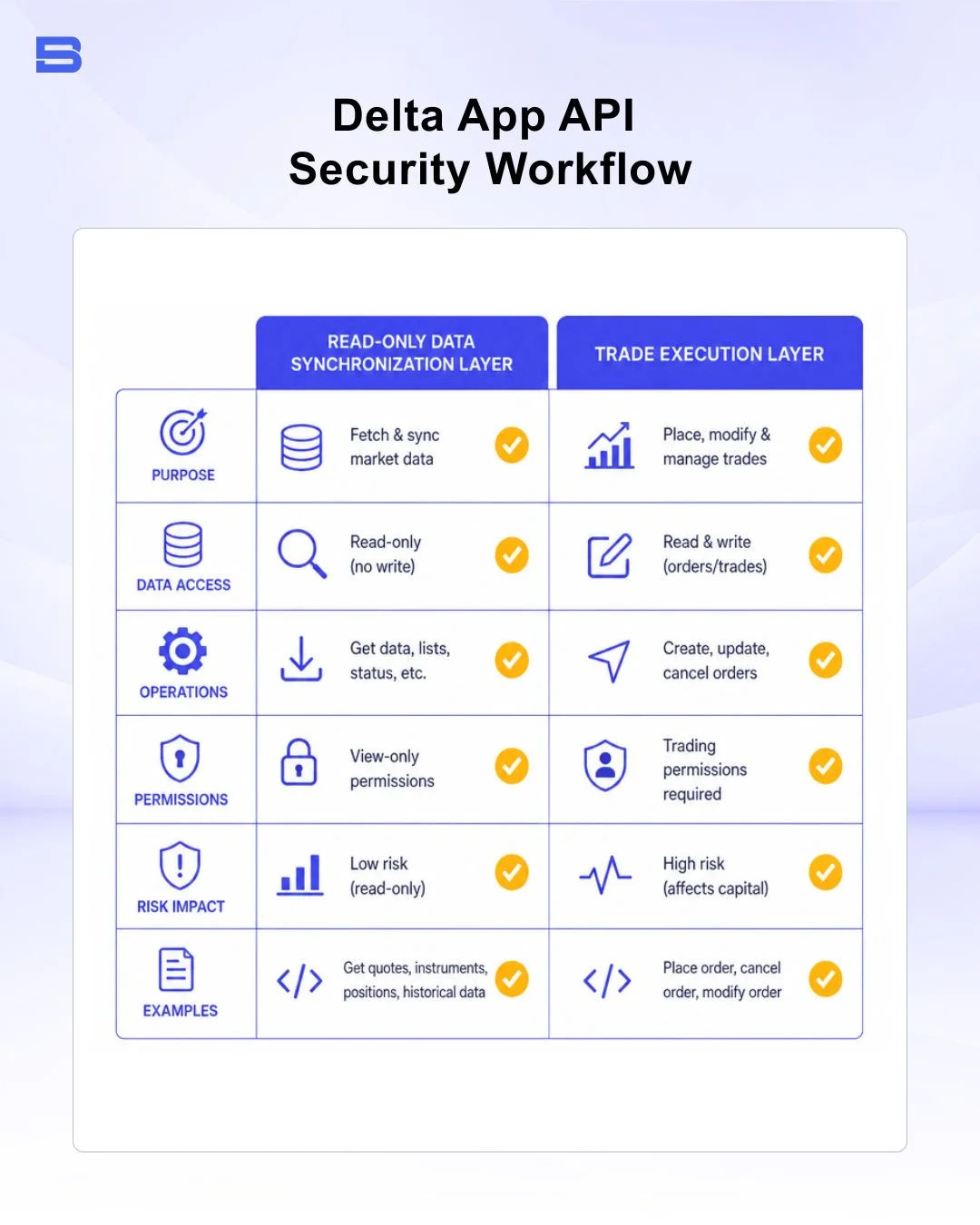
Security is a primary concern when linking third-party applications to personal financial accounts. Delta app handles integrations through standardized read-only protocol structures.
Read-Only API Security
When linking a crypto exchange (like Binance or Coinbase) or a brokerage account to Delta, the connection relies on Read-Only API keys or secure OAuth protocols.
- No Execution Permissions: Read-only API keys explicitly block trade execution, withdrawal requests, and fund transfers.
- Data Encryption: Sync credentials and cached balance data are encrypted locally and in transit using bank-level encryption protocols.
- Regulatory Context: Standard API read-only data integrations align with digital security frameworks recognized by international bodies like the US Securities and Exchange Commission (SEC) and open-banking data aggregator guidelines established by authorities like the Monetary Authority of Singapore (MAS).
Exchange, Wallet, and Brokerage Connectivity
Delta app natively connects with over 200 crypto exchanges, major global equities brokerages, and public blockchain addresses (e.g., Ethereum, Bitcoin, Solana). Entering a public wallet address allows Delta to index on-chain token balances and NFT assets automatically without inputting private keys.
For regional equity accounts—such as localized brokers in Southeast Asia or regional trading platform Malaysia providers that lack public open-API access—the Delta app allows manual transaction logging or Comma-Separated Values (CSV) file imports. You can manually input your entry price, quantity, and brokerage commission to ensure those holdings remain accounted for in your total net worth calculations.
Delta Basic vs Delta PRO: Pricing Breakdown
Delta operates on a freemium model. Is the Delta app free? Yes, the core platform remains free to use via Delta Basic, while advanced traders can opt for Delta PRO or Delta PRO+ subscriptions.
Free Tier Limitations (Delta Basic)
Delta Basic offers full cross-asset tracking capabilities for casual investors. Under updated tier structures, basic users can track up to 10 distinct assets across their portfolio and link unlimited account connections. It provides standard price alerts, basic analytics, and syncing across up to 2 mobile devices.
If your portfolio holds more than 10 assets, any additional assets added beyond the free limit remain saved securely in your ledger but are visually blurred until you upgrade or remove existing entries.
Paid Tiers: Delta PRO & Delta PRO+
The Delta app pricing model is straightforward, with a free tier for beginners and paid tiers for investors with larger portfolios. Understanding the Delta app's tier structure helps you choose the right plan for your tracking needs.
For investors managing larger or more active portfolios, paid tiers unlock broader tracking limits and deeper analytics:
- Delta PRO (As of October 2024—From ~$4.49/month billed annually or $6.99/month): Increases tracking capacity up to 40 distinct assets, unlocks 4 specialized Portfolio Insights modules (including asset location and trade statistics), enables auto-refreshing prices, provides expanded AI insight credits, and allows syncing across 5 devices.
- Delta PRO+ (From ~$8.99/month billed annually or $13.99/month): Removes all asset and portfolio limits, grants institutional real-time pricing quotes, full historical gains/tax export reporting, complete access to all Portfolio Insights modules, and unlimited AI market explanations.
- eToro Club Perk (as of October 2024): Investors who hold an active tier status within eToro (Silver, Gold, Platinum) may qualify for complimentary access to Delta PRO as part of eToro's membership benefits—check eToro's official site to confirm current partnership status.
Delta App Alternatives: How It Compares
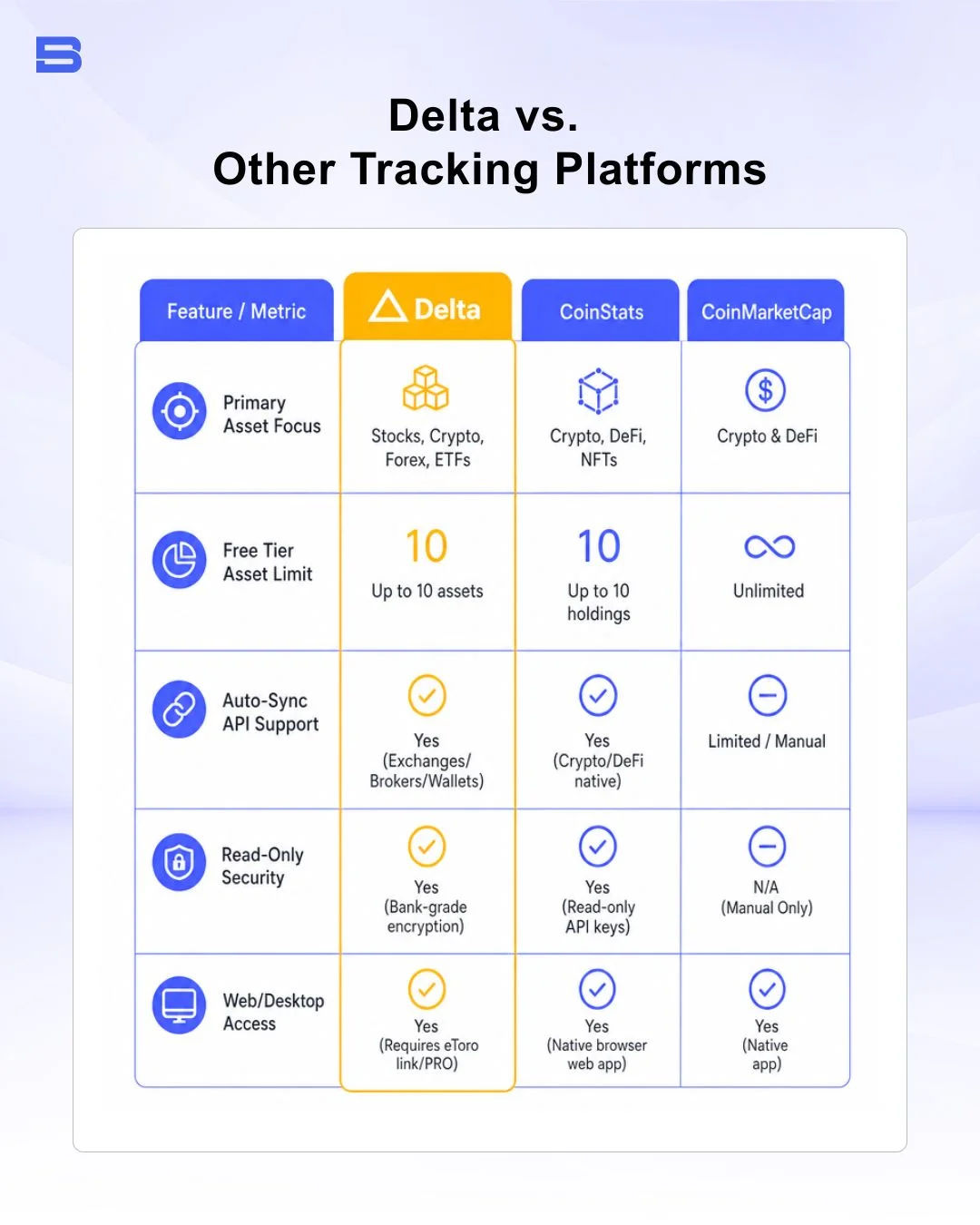
While Delta excels at visual polish and multi-asset integration, alternative tracking tools cater to different trader priorities, such as web-native tracking or dividend tax accounting
Delta vs. Other Tracking Platforms
- CoinStats: Highly focused on digital assets and Web3. CoinStats provides deeper native multi-chain DeFi wallet integrations and liquidity pool tracking compared to Delta. However, Delta offers a more unified interface for balancing traditional equities, crypto, and forex holdings in a single dashboard view—a feature CoinStats doesn't natively support.
- CoinMarketCap & CoinGecko: Both CoinMarketCap and CoinGecko serve primarily as public market data aggregators. While both offer simple manual portfolio trackers that are 100% free, they lack auto-syncing, read-only API broker connections for stocks and traditional assets.
- Sharesight: Optimized specifically for stock market investors, ETF holders, and dividend tracking. Sharesight provides complex corporate action handling, dividend reinvestment calculation, and localized tax-reporting spreadsheets, making it stronger for traditional equities than Delta, though it lacks Delta's seamless crypto and spot forex integration.
Active Analysis Tools vs. Passive Trackers
It is essential to distinguish passive portfolio aggregators like Delta from active chart analysis or execution environments.
Platforms such as TradingView or active multi-asset broker terminals like cTrader are built for real-time technical charting, order entry, and live market execution. Delta app does not replace charting software or execution brokers; instead, it aggregates the end-result balances from those trading activities into a high-level portfolio overview.
The Bottom Line
The Delta app provides a clean, secure solution for intermediate investors seeking to eliminate multi-app account fragmentation. By utilizing read-only API connections, it delivers real-time net worth tracking and AI market context across stocks, crypto, and forex without exposing your funds to execution or withdrawal risks.
While investors holding more than 10 assets must weigh the cost of paid PRO tiers, and some regional brokerages may occasionally require manual transaction inputs, the Delta app still delivers strong portfolio tracking. It remains a polished solution for intermediate investors seeking cross-asset management in a single interface.
- Proprietary Trading Explained: What It Is and Its Key Benefits
- TradingView: Features, Broker Integration, and Strategies
- cTrader: How It Works and How It Compares
- What Is a VPS for Trading and Do You Need One?
- Thinkorswim Trading: Features, Tools, and Availability
- Trading Platform Malaysia: What to Look For
- Bursa Anywhere: A Guide to Managing Shares in Malaysia
- What Is Forex Factory and How Do Traders Use It?
- Delta App: Multi-Asset Portfolio Tracker for Crypto & Stocks
- What Is Trading Central and How to Use It?
- What Is Simply Wall St and How to Use It
- What Is Seeking Alpha and How to Use It
- What Is MarketWatch and How to Use It
- What Is Barchart and How to Use It
- Google Finance Explained: How to Track Stocks and Markets
- What Is Finviz and How to Use It for Stock Screening
- What Is Yahoo Finance and How to Use It
- What Is TradingEconomics and How to Use It
- StockCharts Review 2026: Features, Pricing, and Performance
- What Is ZuluTrade and How Does Copy Trading Work on It?
- What Is Investing.com and How to Use It?
- What Is Myfxbook and How Do Traders Use It?
- What Is CoinGecko? A Complete Guide to Crypto Data Tracking
- What Is CoinMarketCap and How to Use It
- What Is CoinStats and How to Use It for Portfolio Tracking
- What Is Sharesight and How to Use It for Portfolio Tracking
- What Is Personal Capital and How to Use It
- What Is a Low Spread Broker? How It Affects Your Trading
- What Is an Introducing Broker (IB) in Forex?
- What Is Social Trading? How Copy Trading Platforms Work
- What Is a PAMM Account? How Managed Forex Accounts Work
- What Is a Margin Account and How Does Margin Trading Work?
- What Are Trading Signals and How Do They Work?
- What Is an Expert Advisor (EA) in Forex Trading?
Disclaimer: The content on this page is intended for educational and informational purposes only. It does not constitute financial, investment, tax, or legal advice, and should not be interpreted as a recommendation to buy, sell, or hold any financial instrument or asset. Trading and investing involve significant risk, including the possible loss of your entire capital. Products such as forex, CFDs, and cryptocurrencies carry additional risks due to leverage, high volatility, and limited regulatory protection in some jurisdictions. Past performance of any financial instrument does not guarantee future results. Any market views, forecasts, or opinions expressed are those of the author at the time of writing and may not reflect current market conditions. Platform features, fees, and regulatory status are subject to change — always verify information directly with the relevant provider or regulator before making any financial decision. BrokerSpecs may receive compensation from third parties featured on this site. Always conduct your own due diligence and consider seeking advice from a licensed financial professional before investing. Portions of this article were prepared with the assistance of AI tools and reviewed by our editorial team before publication.