


Related Tags
Entering a trade for the first time can be thrilling, but maintaining long-term profitability requires consistent evaluation of your actual execution. Many traders rely on gut feeling or flawed spreadsheet entries, which obscure true performance metrics like leverage exposure, average holding times, and severe drawdowns.
Myfxbook fills this gap by serving as an automated analytical hub for retail traders. By establishing a direct, read-only link to your trading account, the platform removes trade-logging bias and provides an objective view of your strategy's statistical health.
What Is Myfxbook and How Does It Work?
It is a free online analytical platform and automated community space designed for forex and CFD traders. It serves primarily as an independent third-party performance tracker, allowing users to analyze trading accounts, evaluate public systems, and review automated trading strategies without manual data entry.
The platform operates via direct integration with popular trading terminals, including MetaTrader 4 (MT4), MetaTrader 5 (MT5), cTrader, and proprietary broker environments. Connection is achieved using a read-only API connection or an investor password (read-only access credentials). This technical architecture ensures that it can read historical and real-time execution data—such as open positions, closed trades, lot sizes, and swap charges—without having administrative access to execute orders or withdraw funds from your brokerage account.
Regulatory oversight remains essential when evaluating brokers connected to analytical tools. For instance, intermediate traders in Southeast Asia often verify broker licensing through local authorities like the Securities Commission Malaysia (SC) or tier-1 offshore regulators before linking accounts to third-party services.
Key Performance Metrics to Watch
Raw profit figures in currency units can be misleading when evaluating trading performance. A trader gaining $10,000 on a $1,000,000 balance exhibits a completely different risk profile than one gaining $10,000 on a $5,000 balance. Myfxbook normalizes trade logs into standardized statistical outputs.
- Abs. Gain vs. Gain: Absolute gain measures return relative to initial deposit, while standard gain factors in deposit and withdrawal adjustments to represent true strategy growth.
- Profit Factor: The ratio of gross profits to gross losses. A Profit Factor above 1.5 indicates a resilient system, whereas a value below 1.0 reflects a loss-making enterprise.
- Sharpe Ratio: Measures risk-adjusted returns relative to account volatility. Higher values demonstrate that returns stem from systematic execution rather than erratic risk-taking.
- Average Trade Duration: Identifies structural trading style, differentiating fast-scalping EAs from multi-week swing traders.
How Account Verification Works (Track Record vs Privileges)
To prevent manipulation, the platform implements a two-stage verification framework. Understanding the difference between these checkmarks is vital when analyzing public strategy providers or signal services.
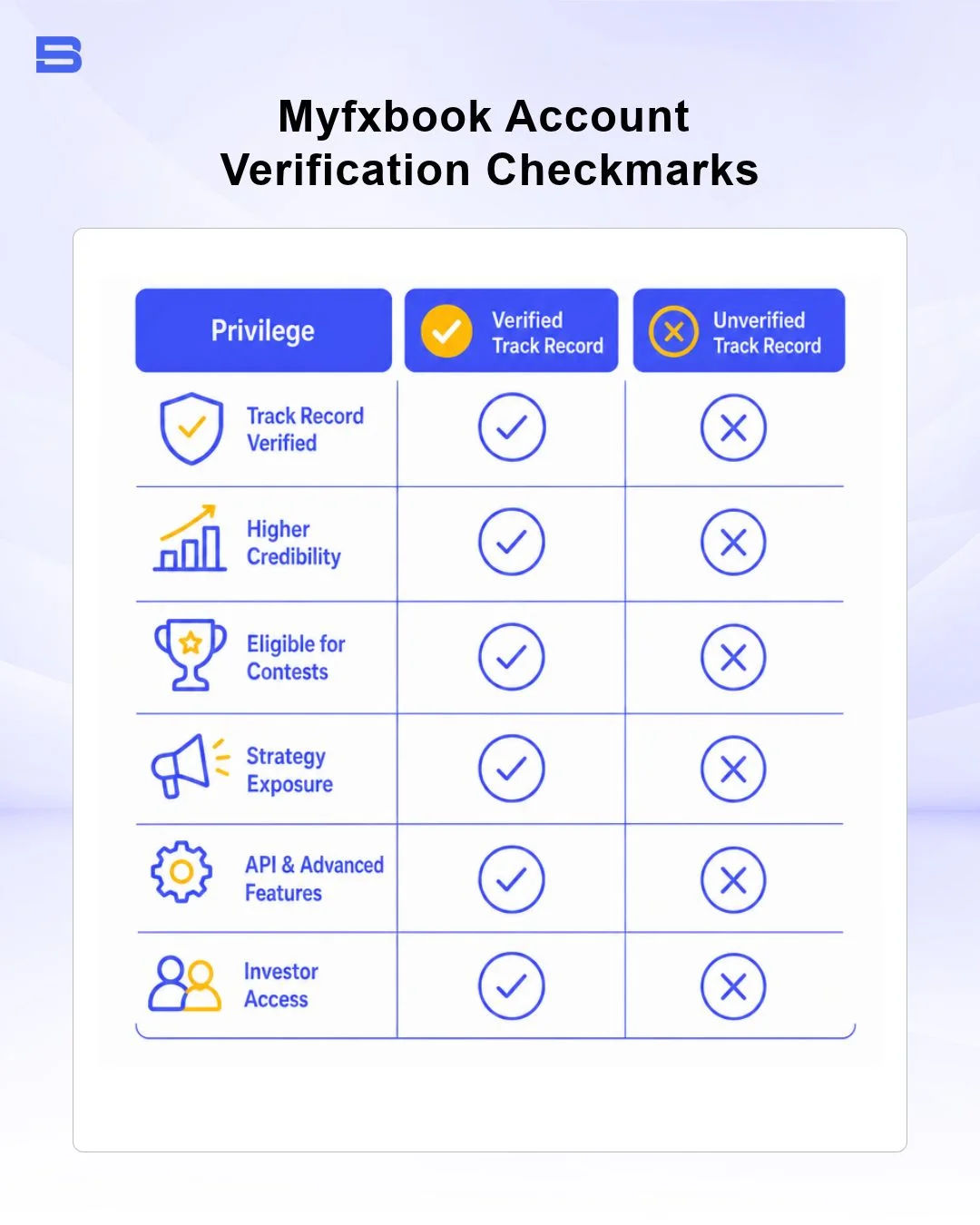
- Track Record Verified: Indicates that the trade history displayed on the platform matches the actual server logs of the connected broker directly via the trader API or Publisher EA connection. This prevents users from altering statement history manually.
- Trading Privileges Verified: Confirms that the account holder creating the page actually owns and controls the trading account. This is verified by placing a unique investor password or pending order generated by the platform inside the terminal.
Verification Red Flag: Be cautious of system sellers displaying a green checkmark for "Track Record" but lacking "Trading Privileges," or accounts running on unregulated demo servers labeled as live environments. Always verify regulatory licensing via international authorities like the Financial Conduct Authority (FCA) when evaluating third-party strategy managers.
Core Features of Myfxbook
Beyond personal portfolio tracking, it also hosts a comprehensive suite of market utility tools provided at zero cost.
- Economic Calendar: Real-time macroeconomic event tracking, filtering high-impact data releases like NFP, CPI, and central bank interest rate announcements.
- Calculators: Position sizing, pip value, margin requirements, and risk-of-ruin utilities calibrated to precise account currencies.
- System Community: A public directory of thousands of verified and unverified strategies for performance benchmark comparisons.
- Custom Widgets: Embeddable performance cards for traders looking to display real-time statistics on private websites or forums.
Utilizing the Forex Sentiment Outlook
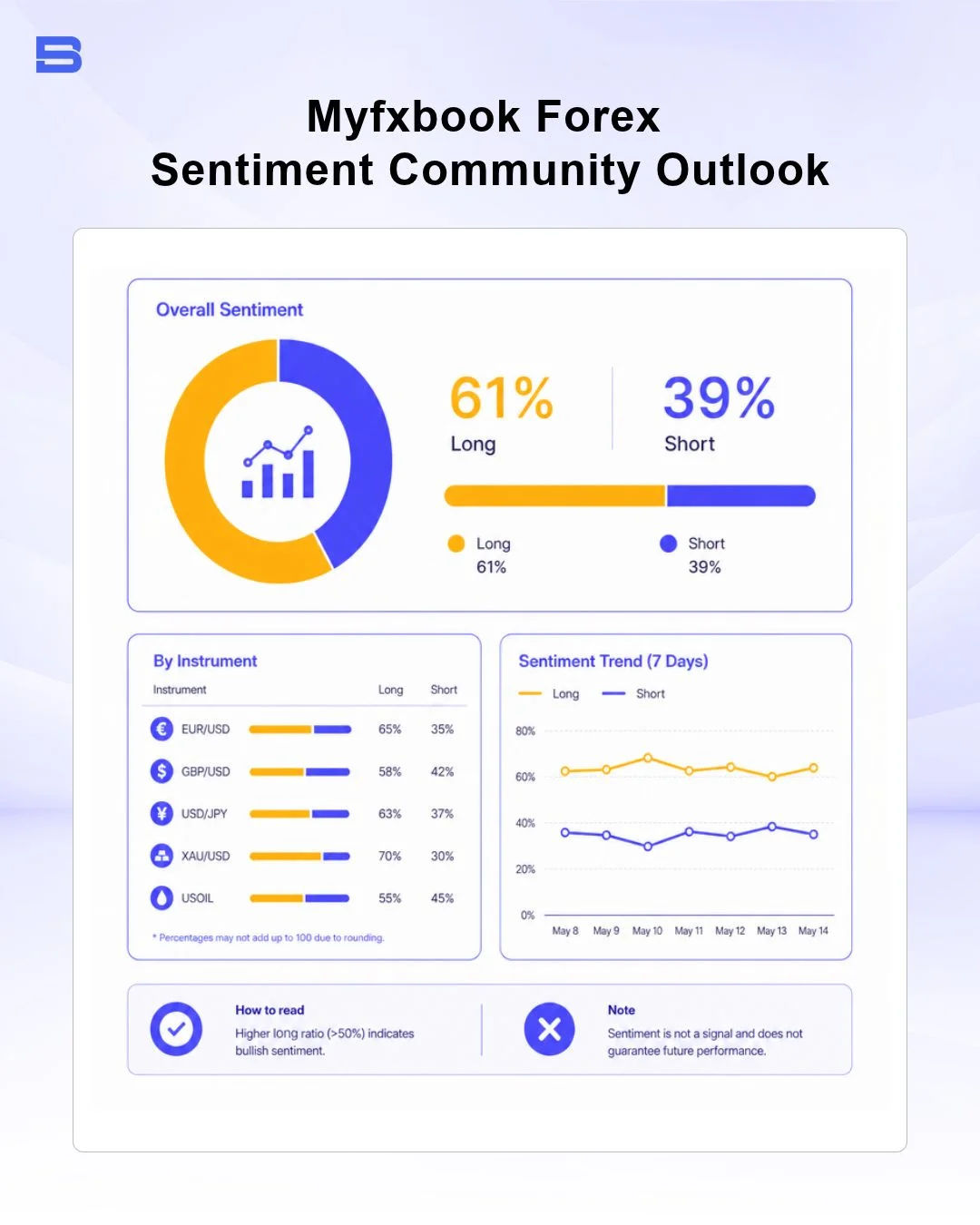
Myfxbook compiles trade execution data across thousands of connected live accounts to build its Community Outlook indicator. This tool displays the aggregate percentage of open long versus short positions, total trade volume, and average entry prices across major currency pairs.
Traders often use this sentiment map as a contrarian indicator. When retail sentiment leans heavily to one side—for example, 85% of community traders holding long positions on EUR/USD—institutional liquidity providers often push price lower to clear concentrated stop-loss orders below support levels.
Step-by-Step Guide to Connecting MT4/MT5
Setting up automated tracking for your MetaTrader terminal takes less than five minutes.
- Sign Up: Create a free account on the official Myfxbook portal.
- Add Account: Navigate to Portfolio > Add Account and choose your platform (e.g., MetaTrader 4 (Auto Update)).
- Select Broker & Server: Search for your broker name and select the exact live or demo server hosting your account.
- Input Investor Password: Enter your trading account number and your investor password (read-only password provided by your broker). Never input your primary master trading password.
- Confirm Integration: Click Connect and wait for the platform to import historical trade statements.
Analyzing Expert Advisors (EAs) & Systems
Automated trading via Expert Advisors (EAs) requires strict empirical evaluation. Third-party developers frequently present optimized backtest results that fail to reflect real market conditions like execution slippage, spread widening during news, and overnight swap charges.
It provides an environment to stress-test EA claims by evaluating forward-tested, live account statements. When reviewing an EA listing on Myfxbook, examine the equity curve alongside the balance curve. A widening gap between equity and balance signals high floating losses, which is common in dangerous Martingale or grid-based trading strategies that delay closing losing positions.
Integrating Automated Trading Tools & VPS
For traders running automated EAs alongside Myfxbook auto-update protocols, continuous platform uptime is necessary. Interruptions in internet connection or local hardware shutdowns can stop trade execution and delay statement updates.
Utilizing a VPS for trading ensures that MetaTrader terminals stay online 24/7 with low-latency connections to broker execution servers. It's free and supported by the platform to capture trade logs seamlessly without missing execution cycles.
Comparing Myfxbook with Forex Factory & Other Tools
Choosing the right analytical platform depends on whether your strategy focuses on macroeconomic events, automated tracking, social copy trading, or technical charting.
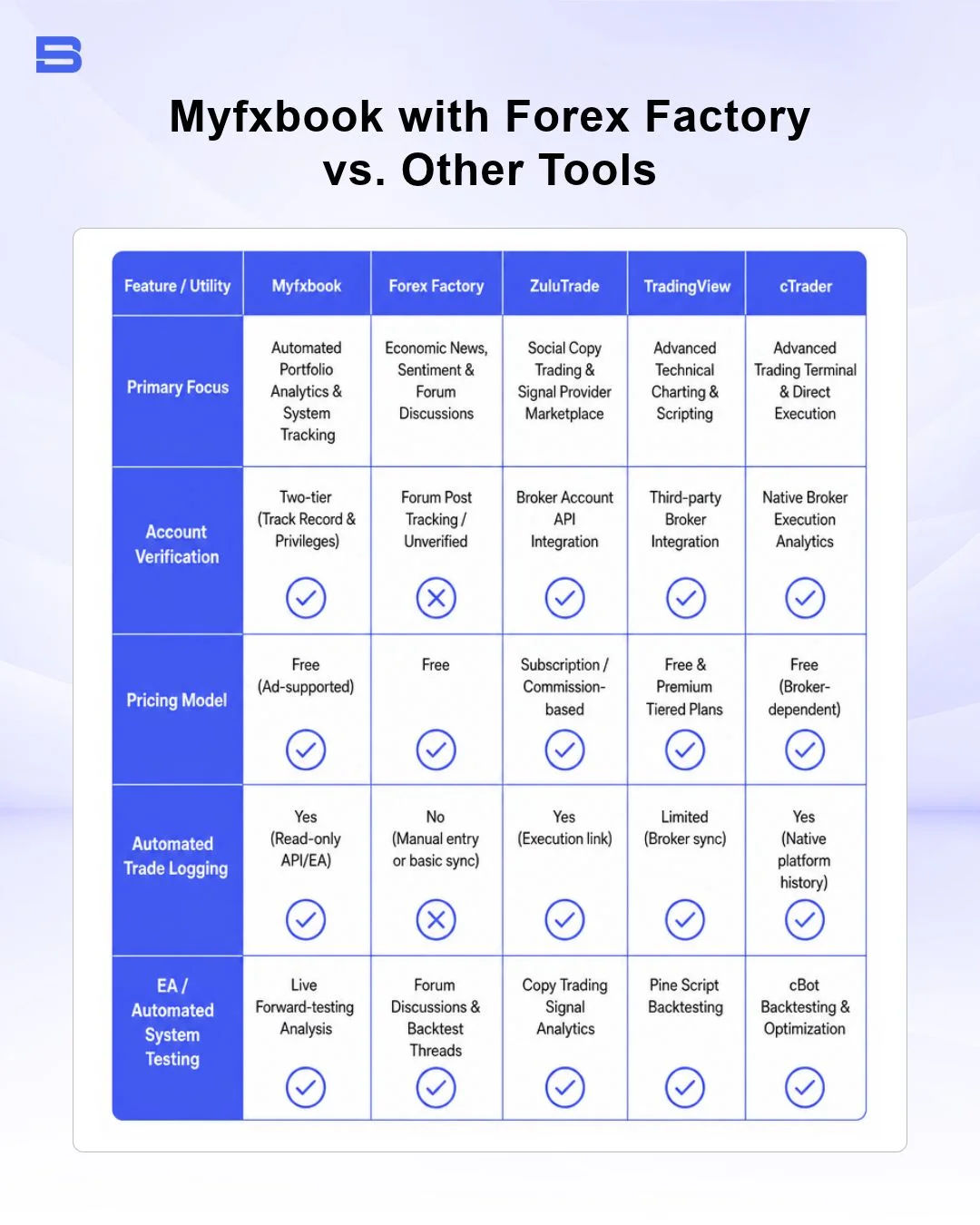
Comparing Myfxbook to tools like Forex Factory highlights distinct differences: Forex Factory excels at news events and community discussions, while it provides structured statistical portfolio tracking. Similarly, traders utilizing Zulutrade focus primarily on copy trading execution, whereas Myfxbook users prioritize strategy verification and trade logging. Advanced charting tools like TradingView and platform software like cTrader complement the platform by providing execution terminals that feed clean data into Myfxbook dashboards.
The Bottom Line
Myfxbook removes guesswork from trading performance by converting execution logs into actionable, transparent statistical metrics. Whether you are validating a personal strategy, auditing an automated EA, or reviewing public signal providers, verifying both track records and trading privileges remains your primary defense against misleading performance claims. Connect your account via read-only investor credentials, monitor risk metrics like maximum drawdown, and use objective data to guide your strategy adjustments.
- Proprietary Trading Explained: What It Is and Its Key Benefits
- TradingView: Features, Broker Integration, and Strategies
- cTrader: How It Works and How It Compares
- What Is a VPS for Trading and Do You Need One?
- Thinkorswim Trading: Features, Tools, and Availability
- Trading Platform Malaysia: What to Look For
- Bursa Anywhere: A Guide to Managing Shares in Malaysia
- What Is Forex Factory and How Do Traders Use It?
- Delta App: Multi-Asset Portfolio Tracker for Crypto & Stocks
- What Is Trading Central and How to Use It?
- What Is Simply Wall St and How to Use It
- What Is Seeking Alpha and How to Use It
- What Is MarketWatch and How to Use It
- What Is Barchart and How to Use It
- Google Finance Explained: How to Track Stocks and Markets
- What Is Finviz and How to Use It for Stock Screening
- What Is Yahoo Finance and How to Use It
- What Is TradingEconomics and How to Use It
- StockCharts Review 2026: Features, Pricing, and Performance
- What Is ZuluTrade and How Does Copy Trading Work on It?
- What Is Investing.com and How to Use It?
- What Is Myfxbook and How Do Traders Use It?
- What Is CoinGecko? A Complete Guide to Crypto Data Tracking
- What Is CoinMarketCap and How to Use It
- What Is CoinStats and How to Use It for Portfolio Tracking
- What Is Sharesight and How to Use It for Portfolio Tracking
- What Is Personal Capital and How to Use It
- What Is a Low Spread Broker? How It Affects Your Trading
- What Is an Introducing Broker (IB) in Forex?
- What Is Social Trading? How Copy Trading Platforms Work
- What Is a PAMM Account? How Managed Forex Accounts Work
- What Is a Margin Account and How Does Margin Trading Work?
- What Are Trading Signals and How Do They Work?
- What Is an Expert Advisor (EA) in Forex Trading?
Disclaimer: The content on this page is intended for educational and informational purposes only. It does not constitute financial, investment, tax, or legal advice, and should not be interpreted as a recommendation to buy, sell, or hold any financial instrument or asset. Trading and investing involve significant risk, including the possible loss of your entire capital. Products such as forex, CFDs, and cryptocurrencies carry additional risks due to leverage, high volatility, and limited regulatory protection in some jurisdictions. Past performance of any financial instrument does not guarantee future results. Any market views, forecasts, or opinions expressed are those of the author at the time of writing and may not reflect current market conditions. Platform features, fees, and regulatory status are subject to change — always verify information directly with the relevant provider or regulator before making any financial decision. BrokerSpecs may receive compensation from third parties featured on this site. Always conduct your own due diligence and consider seeking advice from a licensed financial professional before investing. Portions of this article were prepared with the assistance of AI tools and reviewed by our editorial team before publication.