


Related Tags
Imagine waking up to a sudden market movement and having to log into four different cryptocurrency exchange apps, unlock two hardware wallets, and dig through three distinct decentralized finance (DeFi) protocols on different blockchains just to figure out your total net worth. For active crypto investors and multi-chain traders, managing fragmented asset data is frustrating and time-consuming.
CoinStats was designed to eliminate this exact operational headache. Positioned as a comprehensive cryptocurrency portfolio management platform, it aggregates your holdings across exchanges, self-custody wallets, and DeFi protocols into a unified dashboard, giving you real-time visibility over your entire digital asset portfolio from a single screen.
Why Use CoinStats for Crypto Portfolio Tracking?
At its core, CoinStats operates as an information aggregator rather than a custodial exchange or wallet. CoinStats is a crypto portfolio tracker that aggregates your holdings across blockchains, exchanges, and DeFi protocols in one unified interface. It automatically syncs real-time balance updates and profit and loss (P&L) calculations from your wallet addresses and connected accounts.
To map your holdings, CoinStats relies on two primary integration methods: API keys for centralized exchanges (CEXs) and public wallet addresses for decentralized blockchains. By reading on-chain ledger data and account balances via exchange APIs, the software builds a central view of your net worth updated in real time.
Tracking Assets Across 120+ Blockchains and DeFi Protocols
Modern crypto portfolios rarely sit on a single network. You might hold Bitcoin on its native blockchain, trade Layer-2 tokens on Arbitrum or Base, and store non-fungible tokens (NFTs) on Ethereum or Solana.
CoinStats addresses this multi-chain reality by supporting over 120 blockchain networks. Rather than manually logging every transaction, you simply input your public wallet address (such as an Ethereum 0x... address or a Solana public key). CoinStats scans the public ledger to index your token balances, historical transfer logs, and current market values automatically.
DeFi and NFT Portfolio Management
Tracking assets held in self-custody wallets is relatively straightforward, but decentralized finance introduces extra complexity. When you stake tokens in a liquidity pool or lock assets in a yield farming contract, standard wallet apps often show those tokens as "missing" because they have left your wallet address.
CoinStats hooks directly into more than 10,000 DeFi protocols—including major automated market makers (AMMs), lending platforms, and liquid staking providers—to track staked collateral, accrued rewards, and yield farming positions.
Additionally, it features a built-in NFT gallery interface that fetches floor prices and historical purchase data for collectibles across networks like Ethereum, Polygon, and Solana.
Is CoinStats Safe? API Security and Wallet Permissions
Security is the single most important factor when choosing a portfolio tracker. Because connecting your financial accounts to a third-party application introduces operational risks, understanding how CoinStats interacts with your data is critical.
CoinStats operates on a non-custodial model, meaning it never holds your private keys, seed phrases, or physical funds. However, like any cloud-based software, security relies on both the platform's infrastructure and how safely you configure your connections.
How to Safely Connect Exchanges via Read-Only API
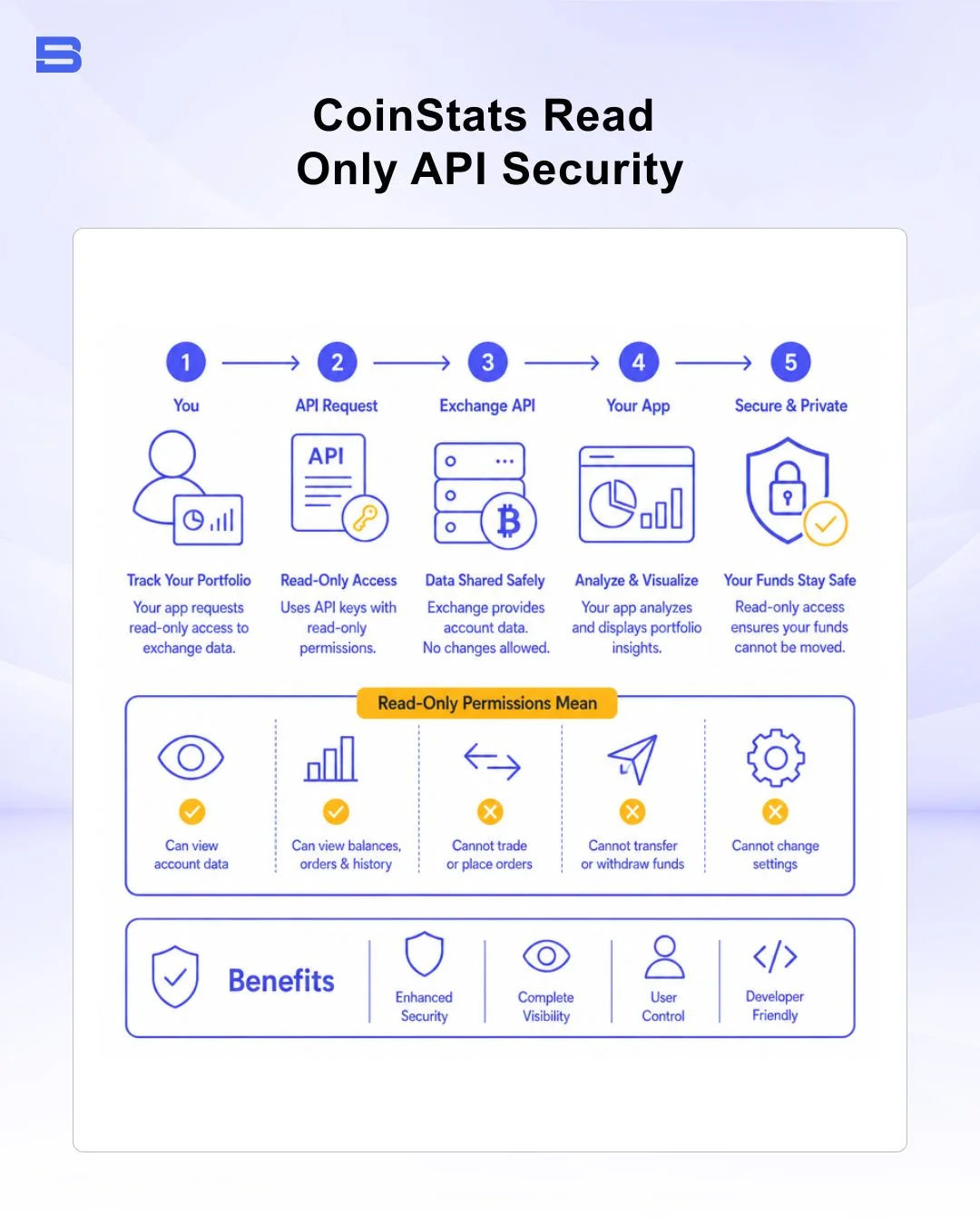
When linking a centralized exchange account (such as Binance, Coinbase, or Bybit) to CoinStats, you generate an Application Programming Interface (API) key within your exchange settings. This API key acts as a secure bridge, allowing CoinStats to read your balance history.
To protect your funds during setup, follow these strict security steps:
- Enable Read-Only Permissions Only: When creating the API key on your exchange, strictly check the "Read-Only" or "Enable Reading" box.
- Disable Trading Permissions: Ensure that spot, margin, or futures trading capabilities are unselected.
- Disable Withdrawal Permissions: Never enable withdrawal permissions on an API key generated for a portfolio tracking service. Disabling withdrawals ensures that even if an API key is compromised, no external actor can transfer funds out of your exchange account.
- Restrict IP Addresses (Optional): If your exchange supports IP whitelisting, restrict API access to specific IP ranges where recommended.
When properly limited to read-only access, an API key acts like a view-only bank statement: it permits CoinStats to display your numbers without the ability to move your money.
Key Management and Data Privacy Risks
While read-only API keys cannot be used to withdraw assets directly, using third-party tracking apps still involves distinct data privacy and operational risks:
- API Key Exploits: If a platform experiences a server-side breach, exposed API keys could leak trade history or portfolio values to malicious actors. In rare historical cases across the crypto industry, attackers have attempted to exploit trading-enabled API keys through automated market manipulation (such as wash trading low-liquidity pairs). This highlights why disabling trade permissions on API keys is so critical.
- Wallet Approval Risks: If you connect a Web3 wallet directly to a platform's decentralized application (dApp) features, always verify that you are granting view permissions rather than signing token allowance contracts or smart contract execution requests.
- Regulatory Compliance Verification: When dealing with centralized crypto platforms, verify that your service providers comply with relevant local oversight. For instance, in Malaysia, digital asset exchanges (DAXs) operate under the supervision of the Securities Commission Malaysia (SC), while global oversight standards are continuously monitored by bodies like the US Securities and Exchange Commission (SEC). Always ensure your underlying trading venues are properly regulated before issuing API keys.
CoinStats Free vs. Premium Plans
CoinStats operates on a freemium model. The free version offers basic wallet and exchange integration for casual investors, while higher tiers cater to active traders who require frequent data synchronization, multi-wallet tracking, and advanced analytics.
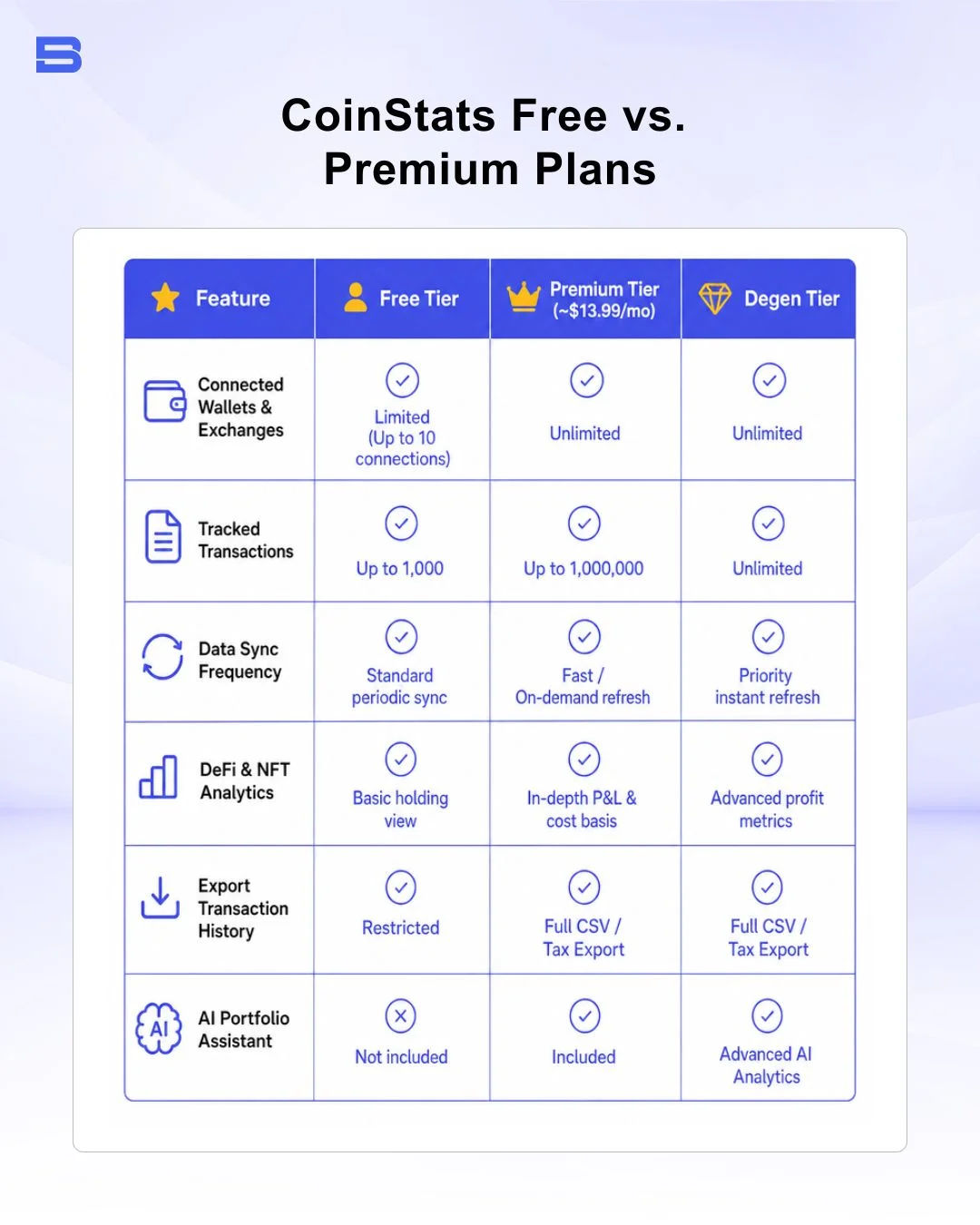
For beginners testing the software, the free plan provides ample functionality to track a simple portfolio across a couple of wallets and one exchange. However, if you conduct hundreds of transactions a month or utilize complex yield farming setups, typical free-tier transaction limits may prompt you to evaluate a paid upgrade—consult CoinStats' pricing page for current tier specifications.
Comparing CoinStats vs. Delta App for Crypto Tracking
CoinStats is frequently evaluated against Delta App, another established mobile and desktop portfolio manager. While both platforms excel at tracking digital assets, their focus areas differ significantly.
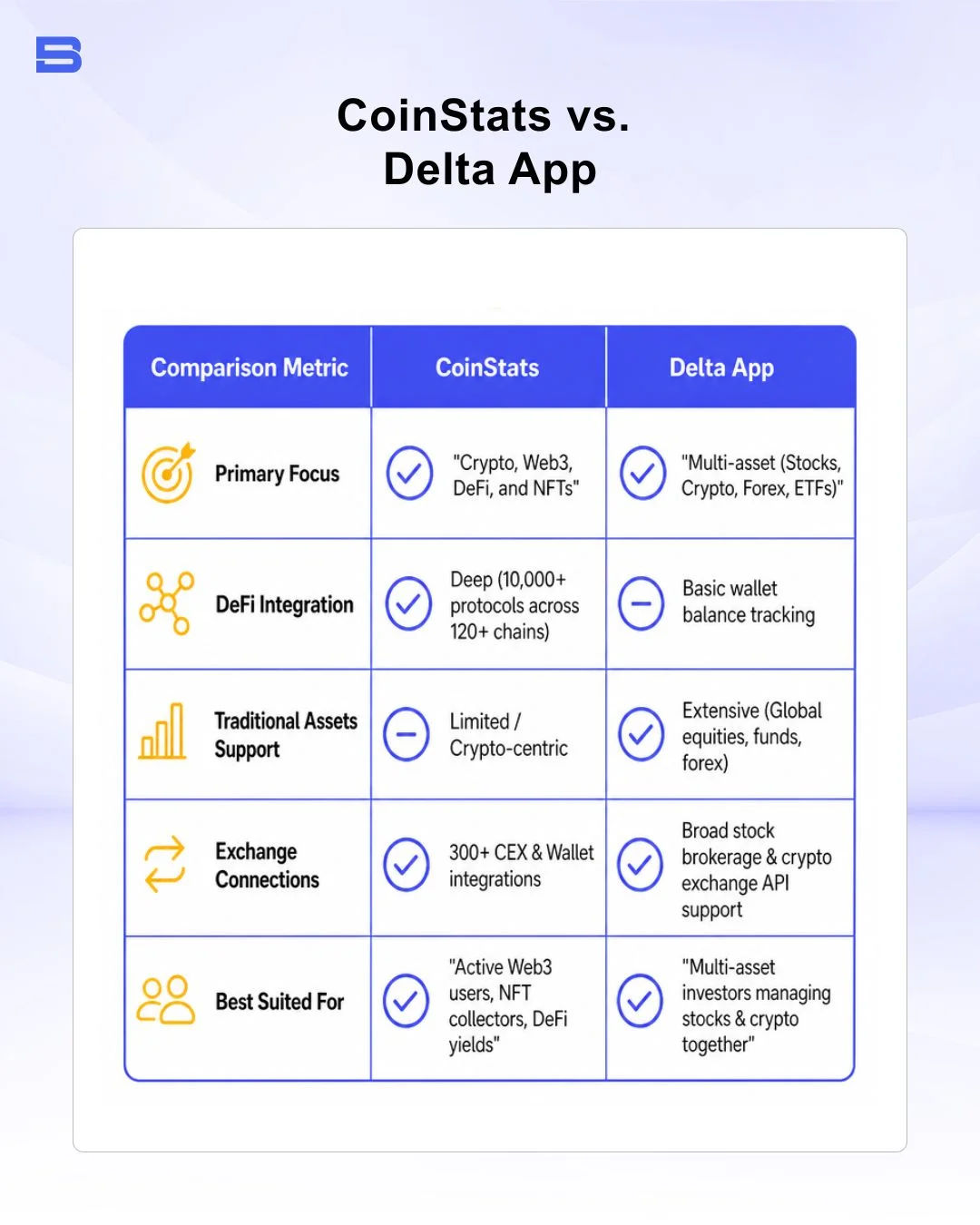
If your investment portfolio consists primarily of traditional equities alongside a few crypto holdings, multi-asset financial apps or traditional portfolio trackers like Sharesight and Personal Capital might suit you better. Conversely, if your activity centers around decentralized applications, liquidity pools, and multi-chain tokens, CoinStats provides deeper Web3 visibility.
CoinStats vs. CoinGecko and CoinMarketCap
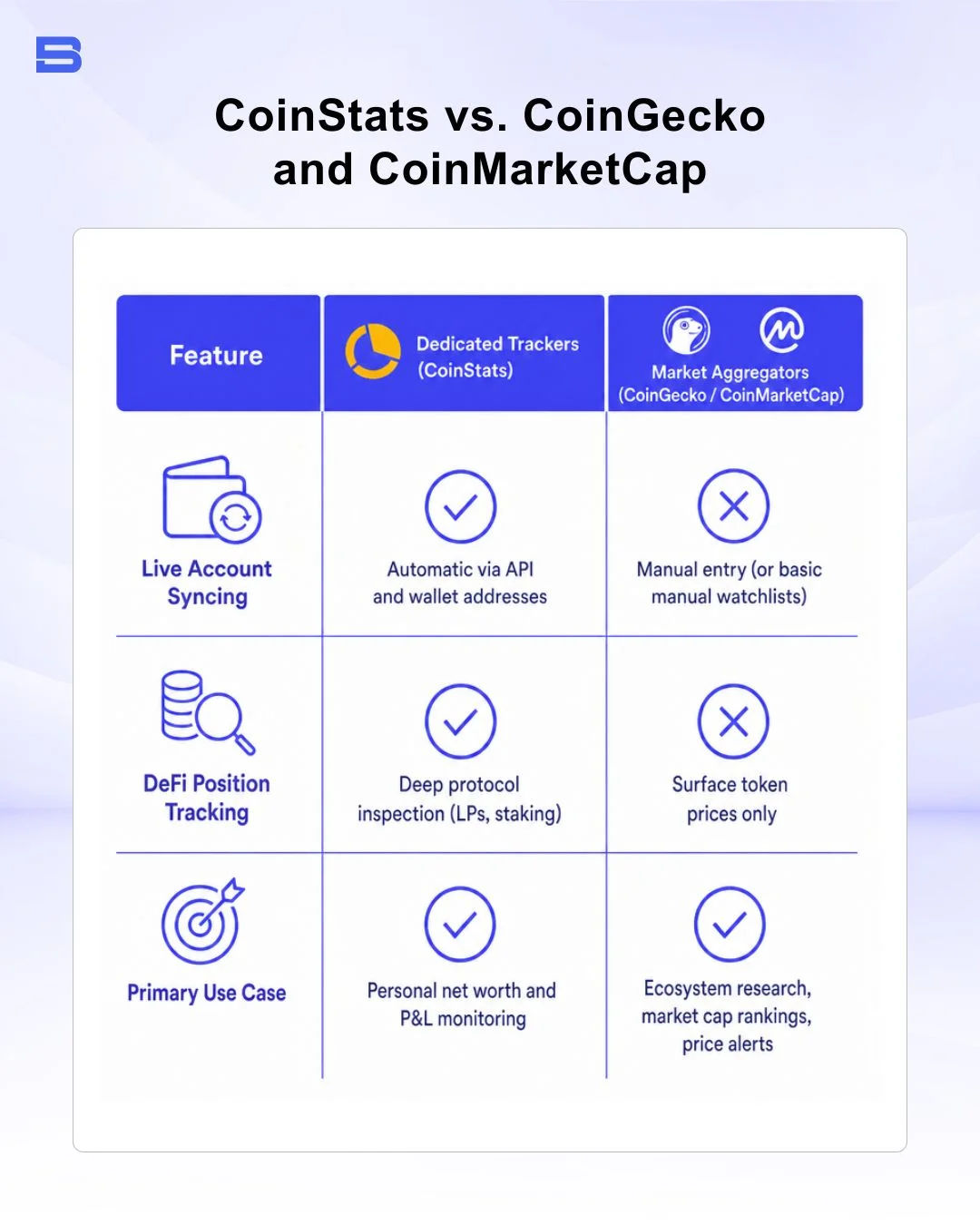
It is common for newcomers to confuse dedicated portfolio tracking software with price aggregation websites like CoinGecko and CoinMarketCap.
Price aggregators serve primarily as market research directories—offering coin rankings, trading volume charts, contract addresses, and exchange liquidity metrics across the entire crypto ecosystem. While both CoinGecko and CoinMarketCap offer manual portfolio features where you can type in your token counts, they do not automatically sync live balances from private wallet keys or exchange APIs.
For chart analysis and technical execution, traders often complement these platforms with technical analysis tools like TradingView, specialized trading interfaces like cTrader, or local equity monitoring apps like Bursa Anywhere.
The Bottom Line
CoinStats is a robust tool for investors looking to consolidate a fragmented cryptocurrency footprint into a single readable dashboard. By leveraging public wallet addresses and read-only exchange APIs, it delivers comprehensive real-time tracking across multi-chain ecosystems, DeFi protocols, and NFT collections without taking custody of your private assets.
To maintain strict operational security, always double-check that any API key you generate has withdrawal permissions turned off. Start with the free plan to test synchronization across your main accounts, and evaluate paid tiers only when your transaction volume or tracking needs demand deeper analytics.
- Proprietary Trading Explained: What It Is and Its Key Benefits
- TradingView: Features, Broker Integration, and Strategies
- cTrader: How It Works and How It Compares
- What Is a VPS for Trading and Do You Need One?
- Thinkorswim Trading: Features, Tools, and Availability
- Trading Platform Malaysia: What to Look For
- Bursa Anywhere: A Guide to Managing Shares in Malaysia
- What Is Forex Factory and How Do Traders Use It?
- Delta App: Multi-Asset Portfolio Tracker for Crypto & Stocks
- What Is Trading Central and How to Use It?
- What Is Simply Wall St and How to Use It
- What Is Seeking Alpha and How to Use It
- What Is MarketWatch and How to Use It
- What Is Barchart and How to Use It
- Google Finance Explained: How to Track Stocks and Markets
- What Is Finviz and How to Use It for Stock Screening
- What Is Yahoo Finance and How to Use It
- What Is TradingEconomics and How to Use It
- StockCharts Review 2026: Features, Pricing, and Performance
- What Is ZuluTrade and How Does Copy Trading Work on It?
- What Is Investing.com and How to Use It?
- What Is Myfxbook and How Do Traders Use It?
- What Is CoinGecko? A Complete Guide to Crypto Data Tracking
- What Is CoinMarketCap and How to Use It
- What Is CoinStats and How to Use It for Portfolio Tracking
- What Is Sharesight and How to Use It for Portfolio Tracking
- What Is Personal Capital and How to Use It
- What Is a Low Spread Broker? How It Affects Your Trading
- What Is an Introducing Broker (IB) in Forex?
- What Is Social Trading? How Copy Trading Platforms Work
- What Is a PAMM Account? How Managed Forex Accounts Work
- What Is a Margin Account and How Does Margin Trading Work?
- What Are Trading Signals and How Do They Work?
- What Is an Expert Advisor (EA) in Forex Trading?
Disclaimer: The content on this page is intended for educational and informational purposes only. It does not constitute financial, investment, tax, or legal advice, and should not be interpreted as a recommendation to buy, sell, or hold any financial instrument or asset. Trading and investing involve significant risk, including the possible loss of your entire capital. Products such as forex, CFDs, and cryptocurrencies carry additional risks due to leverage, high volatility, and limited regulatory protection in some jurisdictions. Past performance of any financial instrument does not guarantee future results. Any market views, forecasts, or opinions expressed are those of the author at the time of writing and may not reflect current market conditions. Platform features, fees, and regulatory status are subject to change — always verify information directly with the relevant provider or regulator before making any financial decision. BrokerSpecs may receive compensation from third parties featured on this site. Always conduct your own due diligence and consider seeking advice from a licensed financial professional before investing. Portions of this article were prepared with the assistance of AI tools and reviewed by our editorial team before publication.