



Related Tags
You are scanning multiple tabs before the market opens, trying to track Bursa Malaysia announcements, US economic releases, and live commodity movements without getting overwhelmed. Managing separate platforms for regional equities, global indices, and macroeconomic updates often leads to fragmented analytical focus and delayed decision-making. Investing.com solves this friction by aggregating live quotes, financial news, macro indicators, and technical tools into a single, unified web and mobile dashboard.
What Is Investing.com and How Does It Work?
It’s a global financial portal providing live market quotes, economic indicators, financial news, and technical analysis tools for retail and institutional investors. Originally launched in 2007 as Forexpros, the platform rebranded to Investing.com in 2012 and expanded its scope well beyond foreign exchange. Today, it covers global equities, stock market indices, commodities, bonds, interest rates, futures, and cryptocurrencies across hundreds of exchanges worldwide.
The platform operates primarily as an analytical and news aggregation engine rather than an execution venue. You do not execute trades or hold capital directly on Investing.com; instead, you use it to research market conditions, track asset prices, analyze historical charts, and monitor macroeconomic calendars before placing trades through your licensed broker.
For retail investors tracking regional assets alongside international benchmarks, platform feed speeds vary depending on the specific exchange. Major global indices and foreign exchange pairs typically stream real-time prices on the portal.
However, regional equities—including specific listings on Bursa Malaysia—may operate on delayed data feeds (typically 15 minutes) on the free tier, unless real-time market data access is provided through institutional partnerships or premium data packages. Understanding these feed differences ensures you do not mistake delayed market figures for live execution prices.
How to Use the Investing.com Economic Calendar
Macroeconomic events generate significant market volatility, making the Investing.com Economic Calendar one of the platform's most frequently utilized utilities. The tool tracks central bank announcements, employment statistics, inflation releases, and GDP figures across global economies in real time.
To filter market events effectively, open the Economic Calendar tab and set your local time zone (such as GMT+8 for Southeast Asian traders). Next, apply country filters to isolate the jurisdictions relevant to your active market exposure—such as the United States, Malaysia, the Eurozone, or China. Finally, filter the volatility impact ratings.
Events are categorized into low volatility (1 bull/star), medium volatility (2 bulls/stars), and high volatility (3 bulls/stars). Experienced traders usually highlight 3-star releases like the US Non-Farm Payrolls (NFP), Federal Reserve FOMC rate decisions, or Bank Negara Malaysia (BNM) Overnight Policy Rate (OPR) announcements.
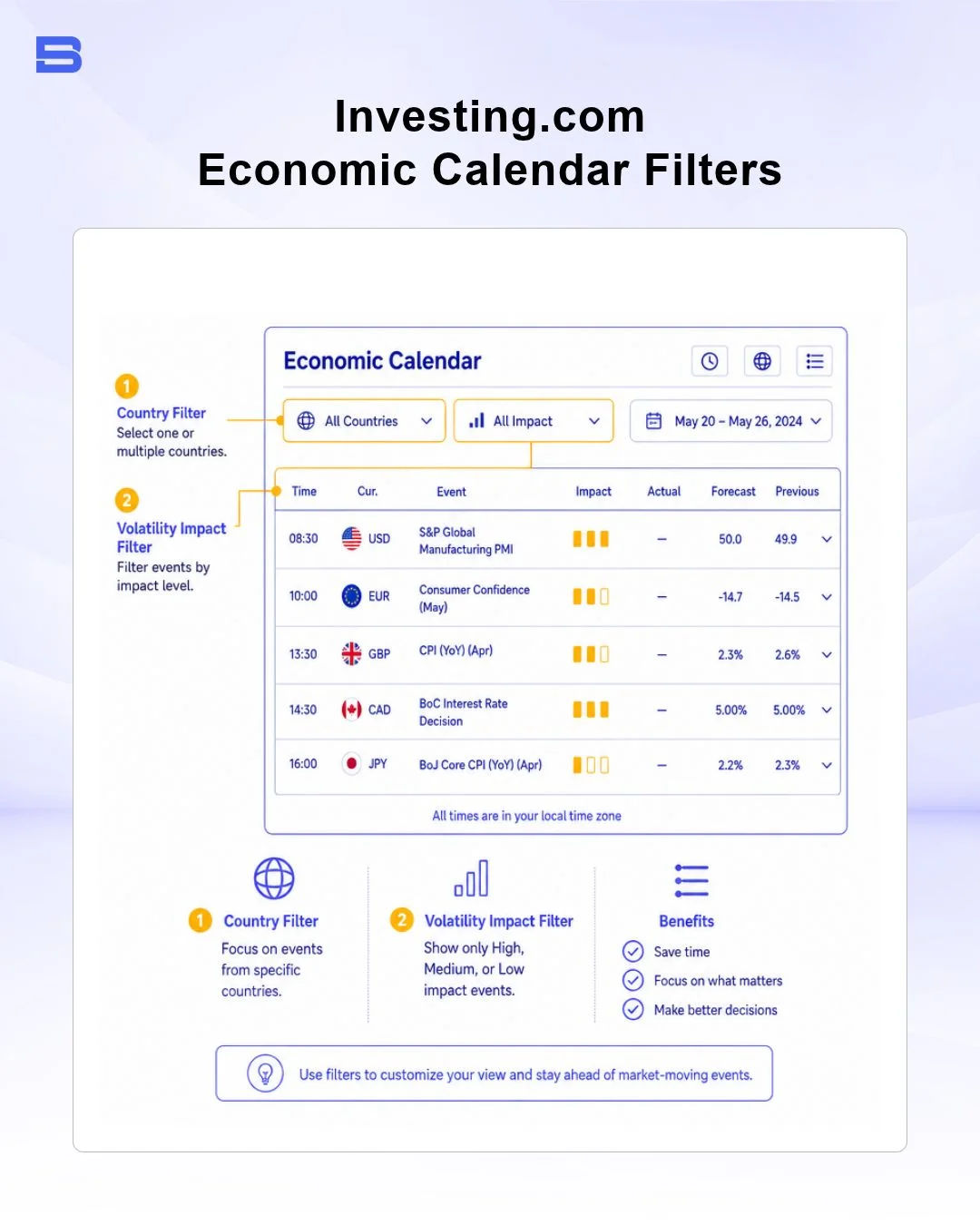
When evaluating economic events, the calendar displays three critical figures:
- Previous: The verified statistic reported during the preceding release period.
- Forecast: The consensus baseline estimate projected by market analysts.
- Actual: The official figure published by the government agency or central bank at the exact release timestamp.
When comparing event notification speeds and impact ratings against alternative tools like Forex Factory, it provides a wider array of regional emerging market indicators alongside its global coverage.
Consider a practical risk scenario: Suppose you hold a leveraged position of 100,000 units on USD/MYR ahead of a BNM rate decision. The market consensus projects the OPR to hold steady at 3.00%. If the actual announcement surprises the market with an unexpected 25-basis-point rate hike, USD/MYR can adjust rapidly within seconds.
High-impact economic releases often trigger rapid price slippage and temporary spread widening. Using the economic calendar allows you to identify these scheduled volatility windows beforehand so you can adjust your position sizing or widen your stop-loss parameters accordingly.
Key Features: Screeners, Charts, and Portfolio Tracking
Beyond tracking real-time news and macroeconomic events, Investing.com provides practical tools for market screening and individual portfolio management.
Stock Screener and Portfolio Tracking Tools
The stock screener enables retail investors to filter global equities and local listings on Bursa Malaysia based on defined technical and fundamental parameters. You can filter stocks using fundamental ratios such as Price-to-Earnings (P/E), Dividend Yield, Return on Equity (ROE), and Market Capitalization.
Simultaneously, technical filters allow you to identify equities forming specific chart setups, such as stocks crossing above their 200-day moving average or recording oversold Relative Strength Index (RSI) levels.
The portfolio tracking feature lets you build custom watchlists and track virtual holding positions across multi-asset portfolios.
By logging your asset entries, quantity, and purchase prices, the tool calculates total unrealized gains, daily percentage fluctuations, and overall asset distribution. Watchlists automatically synchronize across both desktop web browsers and mobile application accounts.
Platform Usability and Mobile Access
The Investing.com mobile app (available on iOS and Android) is engineered for fast monitoring on the go. Users can set custom price alerts that trigger push notifications on their mobile devices when a stock, commodity, or currency pair reaches a specified target price. You can also set high-impact macro event notifications, so you receive a mobile prompt minutes before a central bank rate release occurs.
Free Tier vs. InvestingPro Subscription
A common question among retail investors is: Is Investing.com free? Yes, Investing.com provides full, uninhibited access to its baseline portal, market news, economic calendar, basic charting tools, and screeners entirely for free, supported by online advertising.
For forex traders seeking news-driven calendar alerts, Investing.com's event notifications rival specialized platforms like Forex Factory, though Forex Factory remains the industry standard for scheduled economic releases.
However, the platform also offers a paid subscription tier known as InvestingPro for users seeking institutional-grade fundamental models and ad-free analysis.
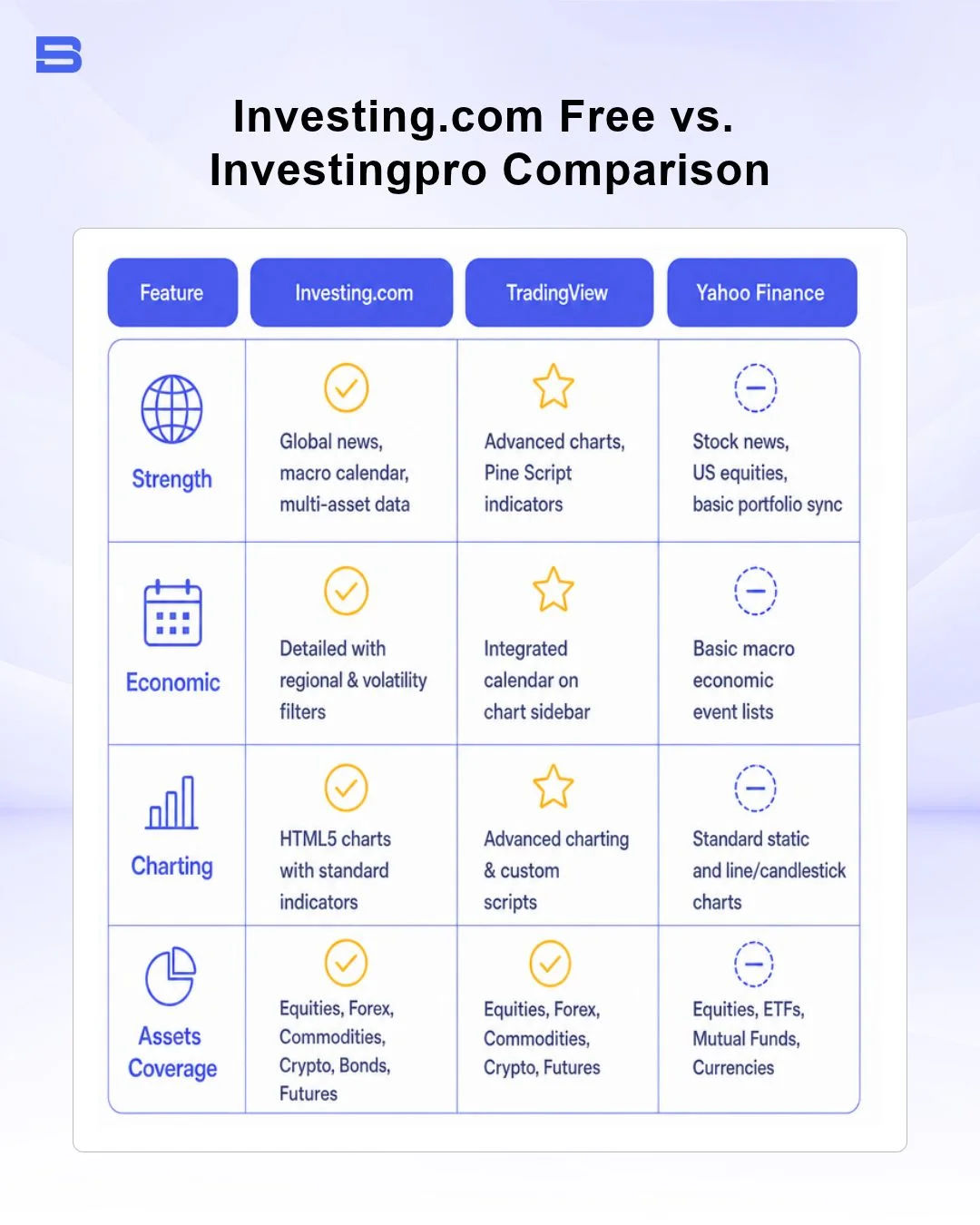
For standard daily monitoring, macro event tracking, and quick price checks, the free ad-supported portal provides more than enough functional depth for retail investors. Investing.com features HTML5 charts (the modern web standard for interactive graphics) with standard technical indicators such as moving averages and oscillators.
Intermediate equity investors who rely heavily on deep fundamental research, discounted cash flow (DCF) modeling, and historical financial statements may find the InvestingPro tier useful for streamlining their analytical workflow.
Comparing Investing.com with Alternative Market Platforms
Choosing the right analytical platform depends on your primary trading focus, whether you require macro news, technical charting, or stock screening.
When comparing macroeconomic coverage, Investing.com pairs its real-time economic calendars with broad technical charting tools and retail community forums. Other specialized macro platforms, such as TradingEconomics, focus strictly on historical datasets and institutional economic series—a useful complement if you require deep historical context for long-term macro analysis.
Limitations and Data Accuracy Risks
While Investing.com provides a comprehensive set of research tools—including economic calendars, stock screeners, and portfolio tracking—retail traders must remain aware of platform limitations and operational risks:
- Ad-Heavy Free Interface: The free tier features high volumes of display banner advertising, which can slow browser performance or cause accidental clicks during fast-moving market conditions.
- Exchange Feed Latencies: Market data for regional equities (such as Bursa Malaysia stock listings) or specific regional futures contracts is typically delayed by 15 minutes on free accounts—a limitation you should verify in real time before executing any trades. Always verify whether your feed is labeled "Real-Time" or "Delayed" before basing execution decisions on its quotes.
- Automated Technical Indicators & Consensus Meters: Investing.com features automated "Technical Summary" gauges (e.g., "Strong Buy" or "Strong Sell") generated by algorithmic moving average and oscillator crossovers. These automated summaries are technical calculations, not personalized investment advice or guaranteed trading signals.
The Bottom Line
It serves as a versatile, comprehensive central hub for tracking global asset prices, breaking market news, and macroeconomic events. By using its economic calendar volatility filters and stock screening tools, you can stay informed on international and regional market shifts. Maintain strict risk management, confirm whether your price data is real-time or delayed, and always use a licensed broker when executing live transactions.
- Proprietary Trading Explained: What It Is and Its Key Benefits
- TradingView: Features, Broker Integration, and Strategies
- cTrader: How It Works and How It Compares
- What Is a VPS for Trading and Do You Need One?
- Thinkorswim Trading: Features, Tools, and Availability
- Trading Platform Malaysia: What to Look For
- Bursa Anywhere: A Guide to Managing Shares in Malaysia
- What Is Forex Factory and How Do Traders Use It?
- Delta App: Multi-Asset Portfolio Tracker for Crypto & Stocks
- What Is Trading Central and How to Use It?
- What Is Simply Wall St and How to Use It
- What Is Seeking Alpha and How to Use It
- What Is MarketWatch and How to Use It
- What Is Barchart and How to Use It
- Google Finance Explained: How to Track Stocks and Markets
- What Is Finviz and How to Use It for Stock Screening
- What Is Yahoo Finance and How to Use It
- What Is TradingEconomics and How to Use It
- StockCharts Review 2026: Features, Pricing, and Performance
- What Is ZuluTrade and How Does Copy Trading Work on It?
- What Is Investing.com and How to Use It?
- What Is Myfxbook and How Do Traders Use It?
- What Is CoinGecko? A Complete Guide to Crypto Data Tracking
- What Is CoinMarketCap and How to Use It
- What Is CoinStats and How to Use It for Portfolio Tracking
- What Is Sharesight and How to Use It for Portfolio Tracking
- What Is Personal Capital and How to Use It
- What Is a Low Spread Broker? How It Affects Your Trading
- What Is an Introducing Broker (IB) in Forex?
- What Is Social Trading? How Copy Trading Platforms Work
- What Is a PAMM Account? How Managed Forex Accounts Work
- What Is a Margin Account and How Does Margin Trading Work?
- What Are Trading Signals and How Do They Work?
- What Is an Expert Advisor (EA) in Forex Trading?
Disclaimer: The content on this page is intended for educational and informational purposes only. It does not constitute financial, investment, tax, or legal advice, and should not be interpreted as a recommendation to buy, sell, or hold any financial instrument or asset. Trading and investing involve significant risk, including the possible loss of your entire capital. Products such as forex, CFDs, and cryptocurrencies carry additional risks due to leverage, high volatility, and limited regulatory protection in some jurisdictions. Past performance of any financial instrument does not guarantee future results. Any market views, forecasts, or opinions expressed are those of the author at the time of writing and may not reflect current market conditions. Platform features, fees, and regulatory status are subject to change — always verify information directly with the relevant provider or regulator before making any financial decision. BrokerSpecs may receive compensation from third parties featured on this site. Always conduct your own due diligence and consider seeking advice from a licensed financial professional before investing. Portions of this article were prepared with the assistance of AI tools and reviewed by our editorial team before publication.