



Related Tags
Imagine sitting down at your trading desk after a long day, only to realize that a high-probability currency setup unfolded three hours ago while you were stuck in traffic or asleep. For many market participants, the physical limits of human attention create a constant friction between life and trading execution. This frustration is precisely why automated scripts have become a central part of modern retail trading platforms, including forex expert advisors.
What Is an Expert Advisor (EA)?
An Expert Advisor (EA) is an automated software program built specifically for the MetaTrader 4 (MT4) and MetaTrader 5 (MT5) platforms that analyzes market data and executes trades according to pre-programmed algorithmic rules. Written in MetaQuotes Language (MQL4 for MT4 or MQL5 for MT5), an EA operates directly within your client terminal, monitoring live prices without requiring human manual intervention.
When you run an MT4 expert advisor or an MT5 EA script, the software continuously reads incoming tick data. Depending on its code, an EA can range from a simple alert tool that notifies you of a technical indicator crossover to a fully autonomous system that manages lot sizing, opens buy or sell orders, adjusts trailing stops, and exits trades independently.
This structural integration makes automated trading accessible to retail participants without needing complex external software setups.
Expert Advisor vs. Trading Bot at a Glance
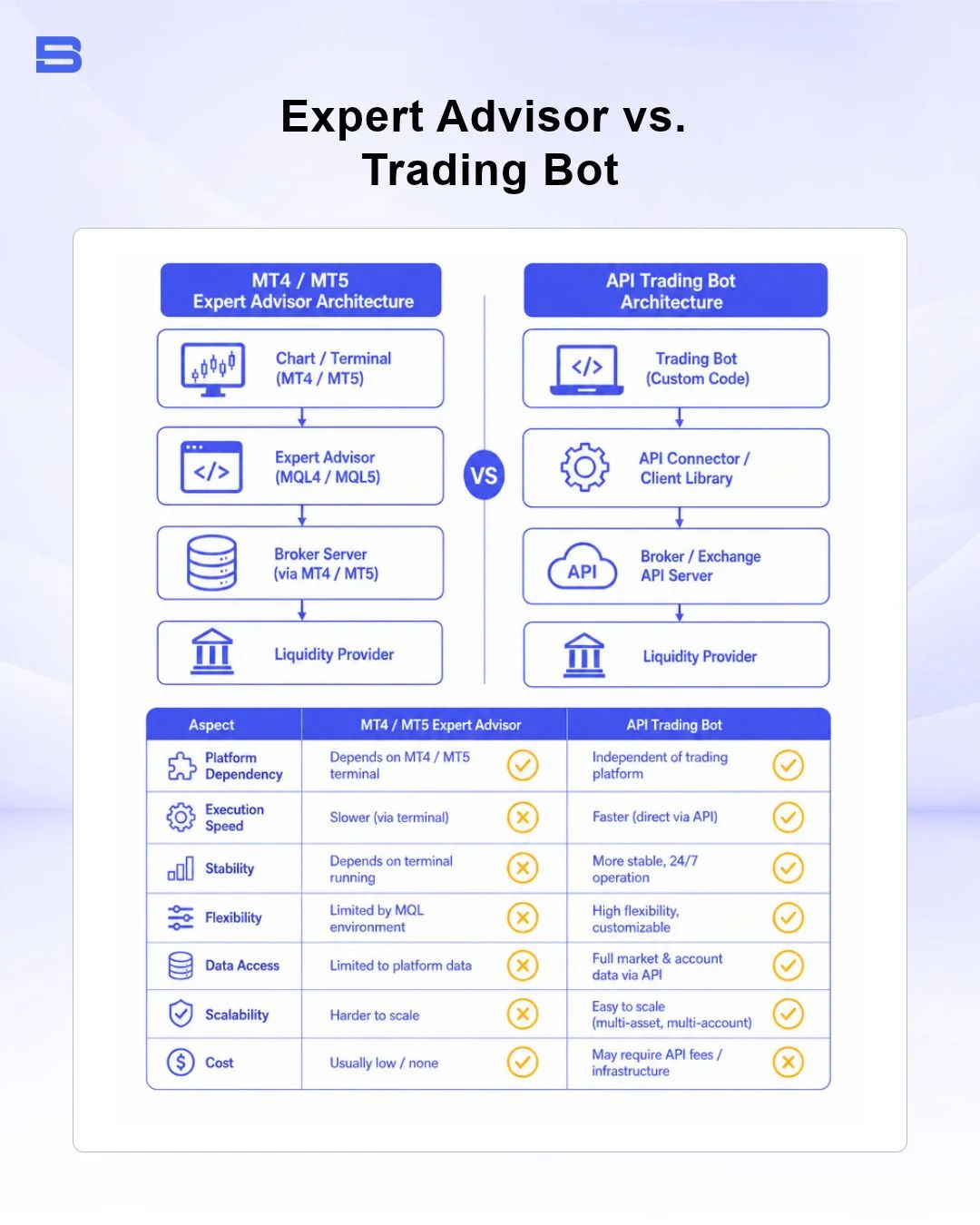
While traders often use the terms interchangeably, there is a clear difference between EA and a trading bot. An EA is natively tied to the MetaTrader environment and runs inside the terminal's built-in MQL runtime engine.
In contrast, an external trading bot typically operates as an independent application written in languages like Python or C++. These external bots communicate with a brokerage platform through a custom trading API to fetch market quotes and send order routing instructions. EAs are generally easier to install for MT4 and MT5 users, whereas API-based trading bots offer greater programming flexibility for multi-exchange or non-MetaTrader environment strategies.
How Expert Advisors Work (and Where They Fail)
At its technical core, an EA operates on an event-driven execution loop. Every time your broker transmits a new price quote—known as a tick—the platform triggers the EA's OnTick() code function. The EA evaluates its built-in mathematical conditions against this incoming quote. If the technical criteria align, it sends a digital order command directly to the broker's server.
However, many beginners mistakenly view EAs as hands-off income generators. While automated systems excel at eliminating human emotion and executing rules with millisecond speed, they remain highly vulnerable to changing market dynamics.
Consider a scenario where an EA is programmed with a strict 1:2 risk-to-reward strategy, risking $100 per trade with a 20-pip stop-loss on EUR/USD. During calm market conditions, the code executes smoothly. However, during a major central bank announcement or economic release, spread widening can severely impact performance.
If the broker's spread expands from 1 pip to 8 pips instantly, the EA's entry price shifts, creating execution slippage. Furthermore, if the price gaps past your stop-loss level, the broker fills the order at the next available market price, resulting in a drawdown significantly larger than the $100 risk parameter written in the code.
Common points where EAs encounter failure include:
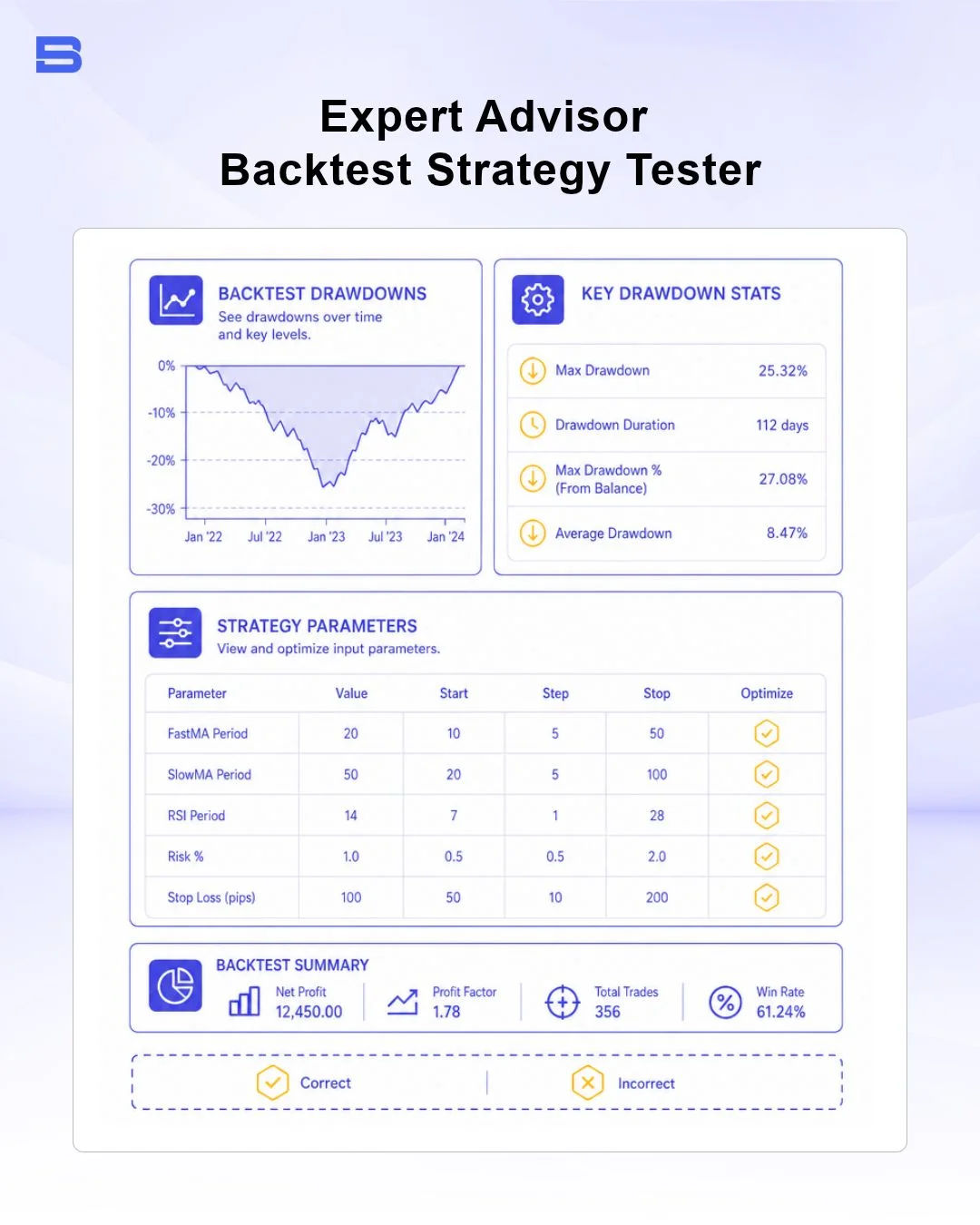
- Curve Fitting (Over-Optimization): Programmers often optimize EA parameters to fit historical data perfectly, resulting in impressive backtest charts that crumble during live forward trading.
- Lack of Fundamental Awareness: Standard technical EAs cannot interpret geopolitical headlines or emergency interest rate changes, leaving positions exposed during black swan events.
- High-Risk Execution Models: EAs built on grid or Martingale strategies increase lot sizes during losing streaks, which can wipe out an entire account balance during a prolonged trend.
Setting Up and Running an EA Safely
Deploying an EA requires technical precision and risk controls before connecting real trading capital. Financial authorities, such as the Financial Conduct Authority (FCA) and the US Securities and Exchange Commission (SEC), regularly caution retail investors about automated trading tools, emphasizing that platform automation does not eliminate principal risk or broker execution variances.
Building or Installing an EA on MetaTrader
If you are wondering how to create expert advisor MT5 or MT4 scripts, you can write the code yourself using MetaEditor—the built-in development environment within MetaTrader. Alternatively, you can purchase or download pre-compiled files.
- File Placement: Copy your compiled EA file (.ex4 for MT4 or .ex5 for MT5) into the platform's MQL/4Experts or MQL5/Experts folder.
- Terminal Setup: Refresh your Navigator window, enable "Allow Algo Trading" in the platform settings, and drag the EA onto your desired chart.
- Input Configuration: Adjust risk parameters, maximum lot sizes, and slippage tolerance within the EA's inputs tab.
Technical Infrastructure: VPS, Latency, and Execution
To run an EA reliably, your trading terminal must maintain a continuous, uninterrupted connection to your broker's trade server. If your home computer shuts down, loses internet connection, or enters sleep mode, any active EA stops executing its protective stops or exit triggers.
For this reason, active automated traders typically host their platforms on a dedicated VPS for trading (Virtual Private Server). A VPS keeps your MetaTrader platform running 24/7 in a secure cloud data center. Placing your VPS close to your broker's execution server reduces trade latency (ping time), minimizing slippage on time-sensitive strategy orders.
Final Thoughts
So, do expert advisors really work? They can execute a strategy precisely as coded, but they are not a guaranteed path to profit — their success depends entirely on the quality and risk controls of the underlying strategy.
It is a tool for mechanical discipline and execution efficiency, not a passive money machine. By testing algorithms thoroughly in demo environments, utilizing proper server infrastructure, and enforcing strict lot-size limits, you can integrate automation into your trading workflow while protecting your account capital.
- Proprietary Trading Explained: What It Is and Its Key Benefits
- TradingView: Features, Broker Integration, and Strategies
- cTrader: How It Works and How It Compares
- What Is a VPS for Trading and Do You Need One?
- Thinkorswim Trading: Features, Tools, and Availability
- Trading Platform Malaysia: What to Look For
- Bursa Anywhere: A Guide to Managing Shares in Malaysia
- What Is Forex Factory and How Do Traders Use It?
- Delta App: Multi-Asset Portfolio Tracker for Crypto & Stocks
- What Is Trading Central and How to Use It?
- What Is Simply Wall St and How to Use It
- What Is Seeking Alpha and How to Use It
- What Is MarketWatch and How to Use It
- What Is Barchart and How to Use It
- Google Finance Explained: How to Track Stocks and Markets
- What Is Finviz and How to Use It for Stock Screening
- What Is Yahoo Finance and How to Use It
- What Is TradingEconomics and How to Use It
- StockCharts Review 2026: Features, Pricing, and Performance
- What Is ZuluTrade and How Does Copy Trading Work on It?
- What Is Investing.com and How to Use It?
- What Is Myfxbook and How Do Traders Use It?
- What Is CoinGecko? A Complete Guide to Crypto Data Tracking
- What Is CoinMarketCap and How to Use It
- What Is CoinStats and How to Use It for Portfolio Tracking
- What Is Sharesight and How to Use It for Portfolio Tracking
- What Is Personal Capital and How to Use It
- What Is a Low Spread Broker? How It Affects Your Trading
- What Is an Introducing Broker (IB) in Forex?
- What Is Social Trading? How Copy Trading Platforms Work
- What Is a PAMM Account? How Managed Forex Accounts Work
- What Is a Margin Account and How Does Margin Trading Work?
- What Are Trading Signals and How Do They Work?
- What Is an Expert Advisor (EA) in Forex Trading?
Disclaimer: The content on this page is intended for educational and informational purposes only. It does not constitute financial, investment, tax, or legal advice, and should not be interpreted as a recommendation to buy, sell, or hold any financial instrument or asset. Trading and investing involve significant risk, including the possible loss of your entire capital. Products such as forex, CFDs, and cryptocurrencies carry additional risks due to leverage, high volatility, and limited regulatory protection in some jurisdictions. Past performance of any financial instrument does not guarantee future results. Any market views, forecasts, or opinions expressed are those of the author at the time of writing and may not reflect current market conditions. Platform features, fees, and regulatory status are subject to change — always verify information directly with the relevant provider or regulator before making any financial decision. BrokerSpecs may receive compensation from third parties featured on this site. Always conduct your own due diligence and consider seeking advice from a licensed financial professional before investing. Portions of this article were prepared with the assistance of AI tools and reviewed by our editorial team before publication.