


Related Tags
Keeping up with fast-moving global financial markets often feels overwhelming. You open a dozen browser tabs to check different stock indexes, search for reliable news, and manually update personal portfolio spreadsheets. Moving between multiple platforms wastes valuable time and increases the risk of missing critical market movements.
Google Finance offers a simple, centralized solution. Built directly into the Google ecosystem, it gives you quick access to real-time asset prices, tailored watchlists, and integration with Google Sheets. Whether you want a simple daily market summary or an automated personal portfolio tracker, understanding how to use Google Finance effectively helps streamline your financial routine.
What Is Google Finance?
Google Finance is a web-based market data aggregator and financial management tool provided free by Google. It tracks major global stock indexes, foreign exchange rates, cryptocurrencies, and commodities. Rather than functioning as an active trading execution platform, it serves as a central intelligence dashboard for individual investors and market observers.
The platform aggregates financial news, company earnings announcements, and market trends into a single, clean user interface. By connecting directly with your Google account, Google Finance saves your preferences across desktop and mobile browsers without requiring separate software downloads or paid subscriptions.
Core Platform Features
Google Finance provides several core capabilities designed for daily market tracking:
- Real-time & Delayed Market Quotes: Track performance across broad market benchmarks like the S&P 500, Nasdaq, FTSE 100, and regional indexes.
- Personalized Watchlists & Portfolios: Organize your investments by custom categories, tracking daily price changes, total gains, and asset distribution.
- Automated News Aggregation: Read curated financial news stories linked directly to the specific companies and indexes in your watchlist.
- Market Trends & Movers: Discover top-gaining stocks, major decliners, and most active assets across various global exchanges.
Real-Time Quotes and Data Latency
Understanding data latency is essential for setting realistic tracking expectations. Google Finance sources market data from global exchanges, but trade updates are not uniformly real-time across all instruments.
While major US exchanges like the NYSE and NASDAQ offer real-time or near-real-time data for general viewing, many international exchanges operate under standard exchange data agreements that enforce a 15-to-20 minute delay.
Regulatory frameworks are established by authorities like the US Securities and Exchange Commission (SEC) to ensure strict reporting standards for public market feeds, but retail display tools like Google Finance display delayed feeds for specific global indices unless commercial real-time data rights apply. Always verify the specific exchange badge next to a ticker symbol to confirm whether quotes are real-time or delayed before making timing-sensitive analysis.
What Is Google Finance and How to Use It
Navigating Google Finance requires no complex setup. Accessing the platform via google.com/finance brings up a main dashboard organized into market overviews, personal tracking spaces, and trending news.
The top search bar serves as the main navigation tool. Searching for a ticker symbol or company name opens a dedicated asset page featuring historical price charts, valuation metrics, earnings reports, and key financial ratios like Price-to-Earnings (P/E) and dividend yields.
Tracking Stocks and Creating Portfolios
Setting up personalized tracking takes just a few clicks. You can build a Watchlist to monitor assets you own or want to research.
- Log in: Sign in with your standard Google Account.
- Search Asset: Type a stock ticker or company name into the search bar (e.g., NASDAQ: AAPL or BURSA: MAYBANK).
- Add to Watchlist: Click the + Follow button on the stock details page.
- Create a Custom Portfolio: Click on the "Portfolios" tab to manually enter transaction details, including shares bought and purchase prices, allowing Google Finance to track your performance and paper gains over time.
Organizing stocks into distinct lists—such as "Dividend Holdings" or "Tech Watchlist"—helps keep your daily monitoring focused and clear.
Mobile Access and Notifications
Google Finance operates as a mobile-responsive web app rather than a standalone native application on iOS or Android. Accessing the page through your smartphone browser offers a clean layout optimized for touch navigation.
By adding a shortcut to your mobile home screen, you can open your watchlists instantly. Furthermore, if you enable Google Search market alerts on your mobile device, Google sends push notifications for significant price movements, earnings releases, or major news headlines involving stocks on your watchlist.
How to Use the GOOGLEFINANCE Function in Google Sheets
One of Google Finance’s greatest strengths is its direct integration with Google Sheets. Using the built-in =GOOGLEFINANCE() syntax, you can stream live market data directly into your personal financial spreadsheets, eliminating manual data entry.
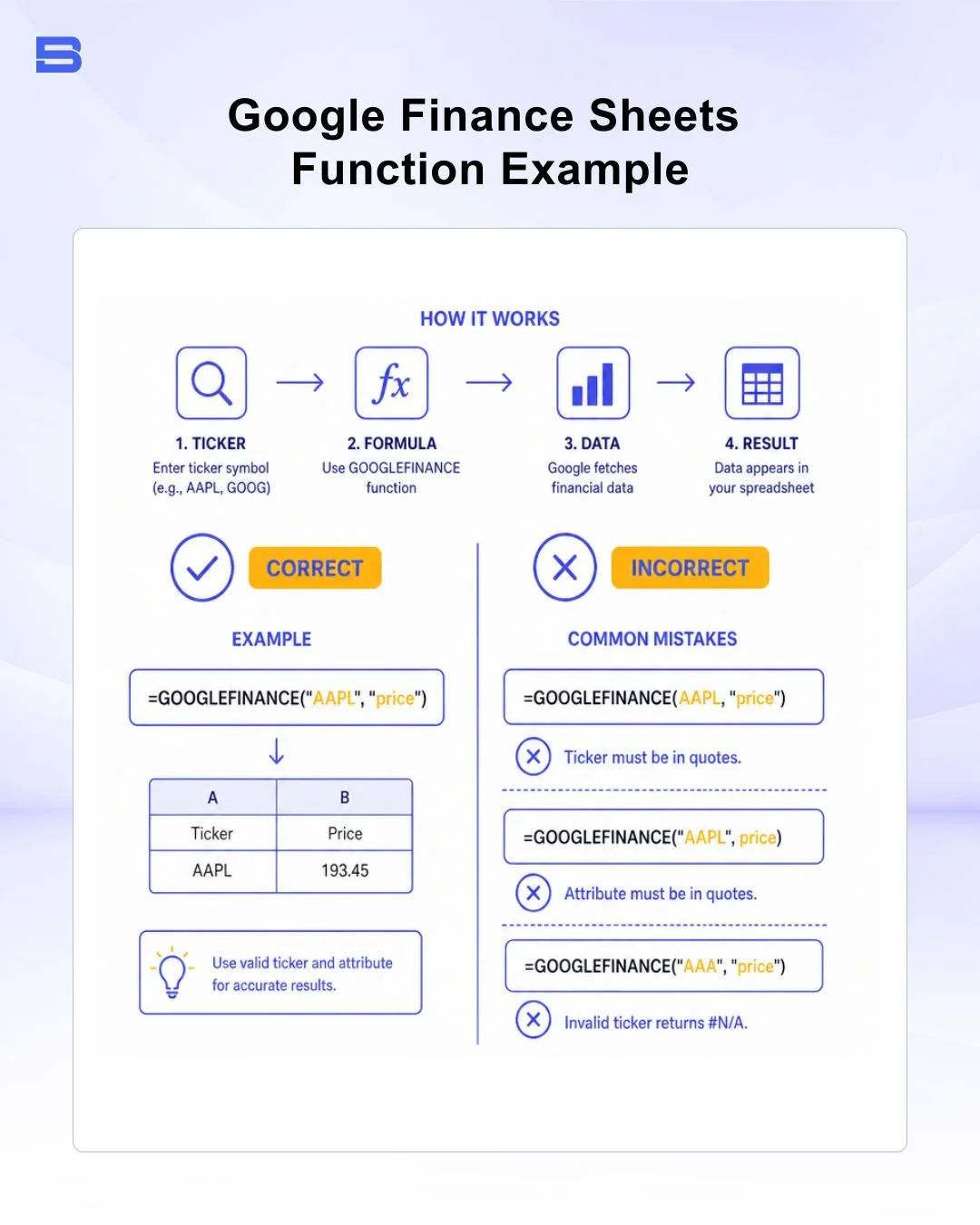
The basic formula structure requires a ticker symbol and an attribute:
=GOOGLEFINANCE("exchange:ticker", "attribute")
Common Formula Examples
- Fetch Current Price: =GOOGLEFINANCE("NASDAQ:GOOG", "price")
- Fetch 52-Week High: =GOOGLEFINANCE("NASDAQ:AAPL", "high52")
- Fetch Market Capitalization: =GOOGLEFINANCE("NASDAQ:MSFT", "marketcap")
- Fetch Currency Exchange Rates: =GOOGLEFINANCE("CURRENCY:USDMYR", "price")
Building a Practical Stock Tracker Table
To build a dynamic tracking sheet, set up a simple table with ticker symbols in Column A:
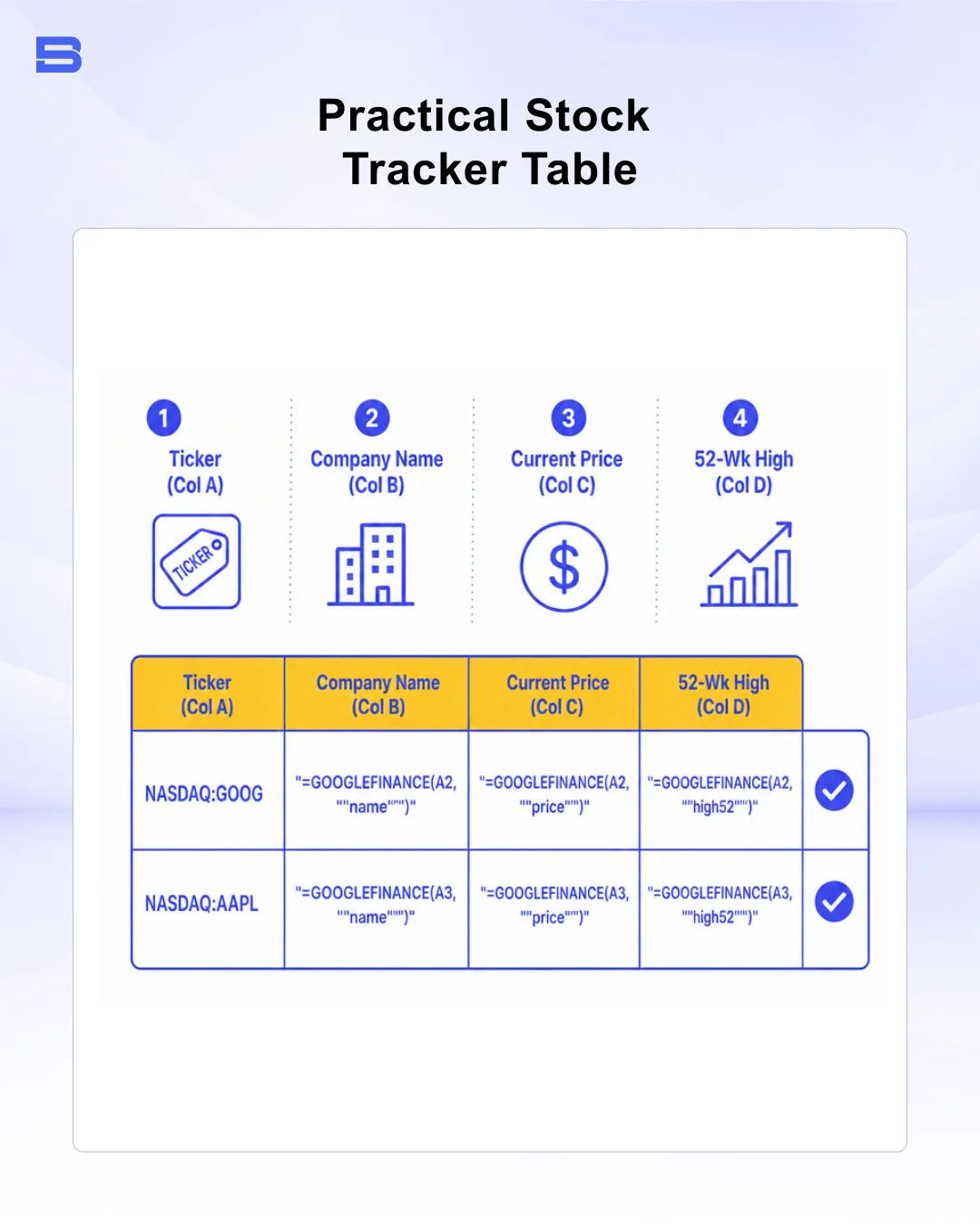
When you open your spreadsheet, Google Sheets pulls updated values automatically. While formulas update periodically, avoid refreshing massive spreadsheets containing hundreds of =GOOGLEFINANCE() function calls simultaneously to prevent temporary API rate limiting.
Google Finance vs. Yahoo Finance
While both platforms provide free market data, they cater to different investor workflows. Google Finance prioritizes speed, minimal design, and spreadsheet integration. In contrast, Yahoo Finance offers deeper historical datasets, options chains, and extensive commentary.
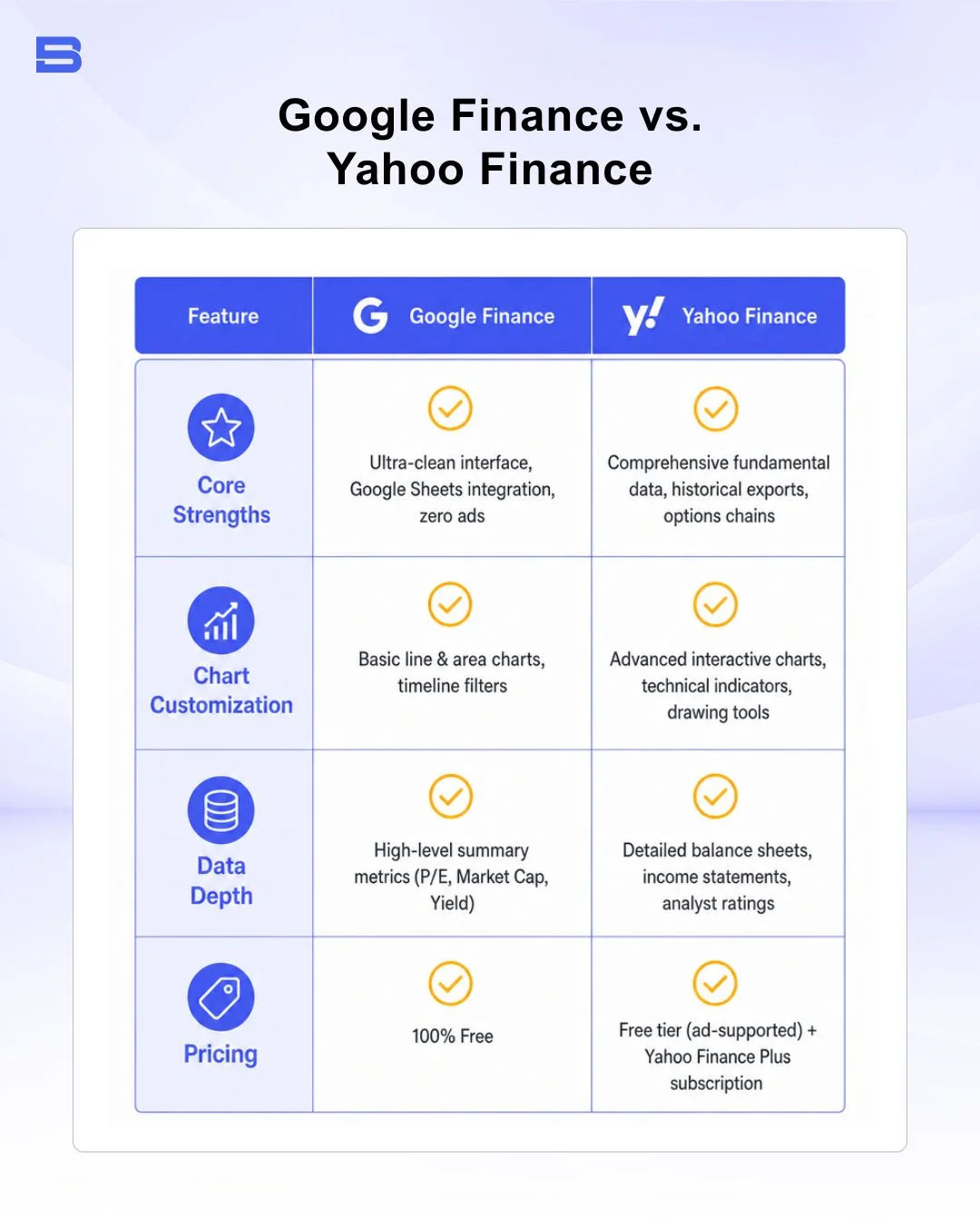
Google Finance is best for quick price checks and custom spreadsheet tracking. Investors needing in-depth technical analysis or detailed corporate SEC filings often pair it with broader financial portals.
Alternative Platforms Comparison
Depending on your trading style and analytical needs, other market platforms offer specialized tools that complement or replace basic tracking tools.
For advanced charting and technical analysis, TradingView remains an industry benchmark, offering multi-timeframe charts, community scripts, and direct broker integration. Active traders looking for dedicated trading execution terminals often prefer platform environments like cTrader.
If your analysis focuses on macroeconomic data and global indicators, platforms like TradingEconomics provide comprehensive economic calendars and sovereign debt data. For stock research, MarketWatch, Seeking Alpha, and Simply Wall St offer specialized fundamental breakdowns, financial visualizer tools, and community-driven equity research.
Final Thoughts
Google Finance provides an accessible, ad-free environment for tracking global financial markets. Its seamless connection to Google Sheets makes it an invaluable tool for investors who prefer custom portfolio spreadsheets over cluttered commercial platforms.
While active day traders may require advanced technical charting tools, Google Finance remains one of the cleanest, most efficient options for daily market tracking and personal portfolio oversight.
- Proprietary Trading Explained: What It Is and Its Key Benefits
- TradingView: Features, Broker Integration, and Strategies
- cTrader: How It Works and How It Compares
- What Is a VPS for Trading and Do You Need One?
- Thinkorswim Trading: Features, Tools, and Availability
- Trading Platform Malaysia: What to Look For
- Bursa Anywhere: A Guide to Managing Shares in Malaysia
- What Is Forex Factory and How Do Traders Use It?
- Delta App: Multi-Asset Portfolio Tracker for Crypto & Stocks
- What Is Trading Central and How to Use It?
- What Is Simply Wall St and How to Use It
- What Is Seeking Alpha and How to Use It
- What Is MarketWatch and How to Use It
- What Is Barchart and How to Use It
- Google Finance Explained: How to Track Stocks and Markets
- What Is Finviz and How to Use It for Stock Screening
- What Is Yahoo Finance and How to Use It
- What Is TradingEconomics and How to Use It
- StockCharts Review 2026: Features, Pricing, and Performance
- What Is ZuluTrade and How Does Copy Trading Work on It?
- What Is Investing.com and How to Use It?
- What Is Myfxbook and How Do Traders Use It?
- What Is CoinGecko? A Complete Guide to Crypto Data Tracking
- What Is CoinMarketCap and How to Use It
- What Is CoinStats and How to Use It for Portfolio Tracking
- What Is Sharesight and How to Use It for Portfolio Tracking
- What Is Personal Capital and How to Use It
- What Is a Low Spread Broker? How It Affects Your Trading
- What Is an Introducing Broker (IB) in Forex?
- What Is Social Trading? How Copy Trading Platforms Work
- What Is a PAMM Account? How Managed Forex Accounts Work
- What Is a Margin Account and How Does Margin Trading Work?
- What Are Trading Signals and How Do They Work?
- What Is an Expert Advisor (EA) in Forex Trading?
Disclaimer: The content on this page is intended for educational and informational purposes only. It does not constitute financial, investment, tax, or legal advice, and should not be interpreted as a recommendation to buy, sell, or hold any financial instrument or asset. Trading and investing involve significant risk, including the possible loss of your entire capital. Products such as forex, CFDs, and cryptocurrencies carry additional risks due to leverage, high volatility, and limited regulatory protection in some jurisdictions. Past performance of any financial instrument does not guarantee future results. Any market views, forecasts, or opinions expressed are those of the author at the time of writing and may not reflect current market conditions. Platform features, fees, and regulatory status are subject to change — always verify information directly with the relevant provider or regulator before making any financial decision. BrokerSpecs may receive compensation from third parties featured on this site. Always conduct your own due diligence and consider seeking advice from a licensed financial professional before investing. Portions of this article were prepared with the assistance of AI tools and reviewed by our editorial team before publication.