


Related Tags
Imagine logging into your brokerage platform, opening a gold chart, and instantly seeing key support levels, target price projections, and alternative scenario pivots overlaid directly on your screen. Trading Central delivers this automated research suite to millions of retail traders across global brokers, but turning these automated insights into consistent execution requires understanding how the platform operates and where its limitations lie.
What Is Trading Central?
Trading Central is a fintech provider that delivers automated technical analysis, market sentiment tracking, and financial media analytics to online brokerages. Founded in Paris in 1999, Trading Central provides financial market research and technical analysis for investors and financial professionals.
In the United States, its subsidiary, Trading Central Americas, Inc., is registered as an investment adviser with the US Securities and Exchange Commission (SEC). In France, Trading Central is subject to the applicable regulatory framework of the Autorité des Marchés Financiers (AMF) and is a member of ANACOFI-CIF, while its Hong Kong subsidiary holds a Type 4 and Type 5 licence from the Securities and Futures Commission (SFC).
Unlike consumer charting software that you purchase directly as an end user, Trading Central operates on a Business-to-Business (B2B) model. It licenses its analytical software suite directly to global retail brokers. Once integrated into a broker's trading platform or client portal, eligible traders gain free access to automated technical signals across forex pairs, global indices, commodities, stocks, and cryptocurrencies.
The platform relies on proprietary pattern-recognition algorithms that continuously scan market data to identify classic chart patterns, indicator crossovers, and key price levels. However, every automated technical view generated by the software is reviewed by qualified human financial analysts before distribution, ensuring a hybrid "quant-meets-analyst" approach to market research.
Key Features of the Trading Central Suite
The platform offers several distinct modules that cover technical analysis, market sentiment, macroeconomics, and automated screening.
Technical Views & Technical Insight
Technical Views serves as the flagship chart-analysis module within the suite. It automatically identifies support and resistance boundaries, trendline breakouts, and technical indicator setups across multiple timeframes.
Every Technical Views projection centers around a clear Pivot Level. If the asset's price remains above the designated pivot, the primary forecast remains bullish, targeting two specific upside price levels (Target 1 and Target 2). Conversely, if the price drops below the pivot level, the primary scenario is invalidated, and an alternative bearish scenario activates with downward targets.
Technical Insight extends this functionality by scanning thousands of instruments for specific technical events, such as a Moving Average Convergence Divergence (MACD) signal line crossover, a Relative Strength Index (RSI) extreme reading, or a classic Head and Shoulders chart pattern breakout.
Market Buzz & Sentiment Analytics
Market Buzz replaces traditional news feeds with natural language processing (NLP) and artificial intelligence. It monitors thousands of digital news channels, blogs, and social media platforms to measure online investor conversation volume and overall sentiment for specific assets.
The tool displays a visual "buzz meter" that highlights which assets are experiencing unusual spikes in news volume relative to their historical averages. By tracking media volume alongside sentiment scores (ranging from very negative to very positive), traders can quickly identify whether a sudden market move is being driven by retail attention or institutional interest.
Economic Insight & Calendar Tools
Economic Insight upgrades the traditional economic calendar into an interactive trading tool. Rather than simply displaying past, consensus, and actual macroeconomic figures (such as Nonfarm Payrolls or central bank rate decisions), it provides actionable volatility context.
When an economic release occurs, the tool automatically calculates the historical price movement of related assets over previous release cycles. It displays expected price volatility ranges and directional bias, helping event-driven traders manage their leverage and position sizing ahead of high-impact news releases.
Featured Ideas & Strategy Screening
Featured Ideas acts as an automated trade idea generator focused on technical and fundamental criteria. It continuously scans equity and forex markets to present custom, high-probability trade setups based on specific user-defined filters.
You can customize your screening preferences by selecting specific asset classes, preferred holding periods (intraday, swing, or position trading), and technical patterns (such as double bottoms or bullish engulfing candles). The engine then updates in real time, serving actionable ideas complete with entry levels, target targets, and stop pivot points.
How to Install Trading Central on MetaTrader 4 and MT5
Integrating the analytical suite directly onto your MetaTrader desktop terminal allows you to view technical levels overlaid directly onto your live price charts.
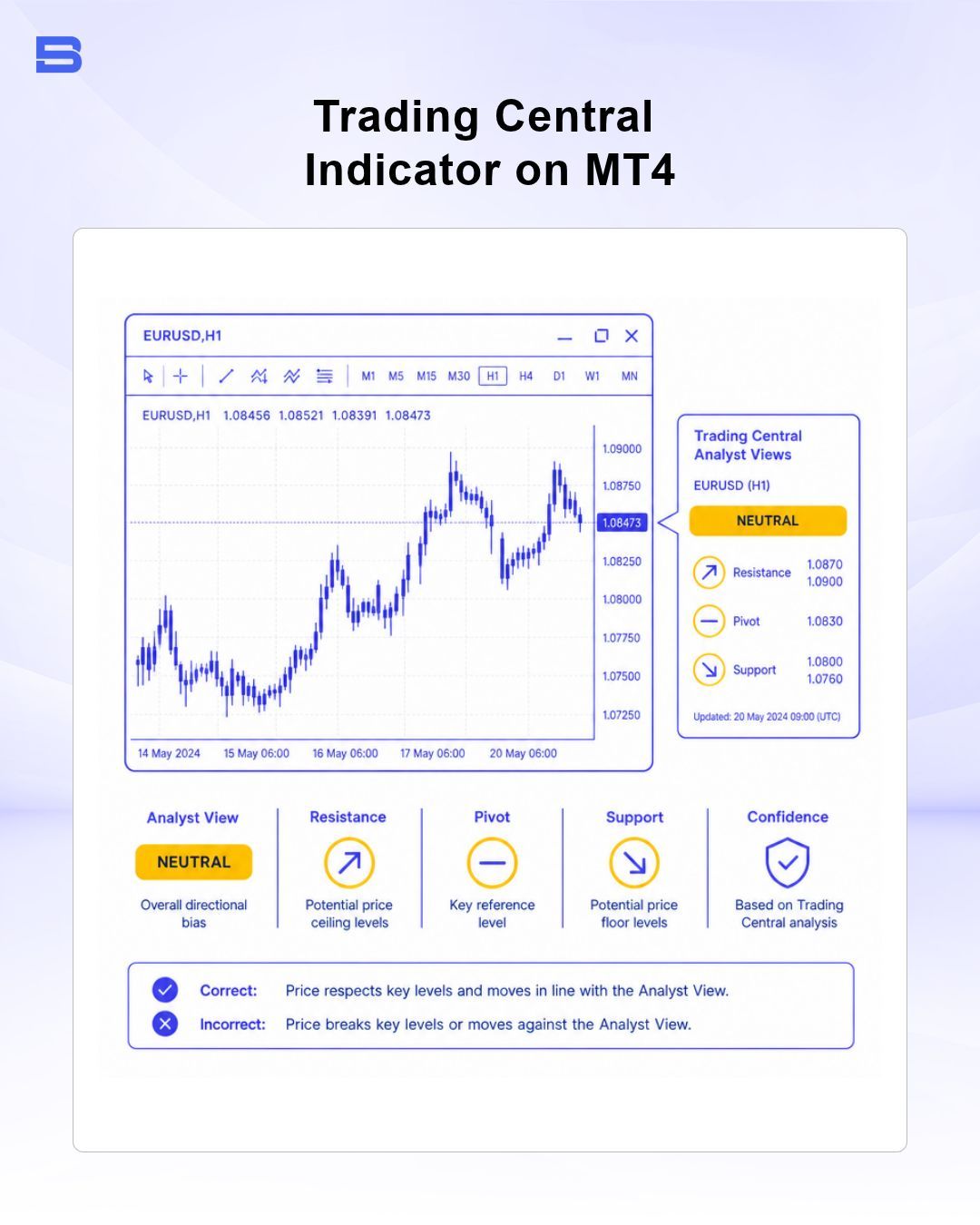
- Log in to your broker's client portal: Navigate to the platform downloads or research section of your supporting brokerage account to download the official Trading Central MetaTrader indicator package executable.
- Run the indicator setup wizard: Close all active MetaTrader 4 or MetaTrader 5 terminals on your computer, launch the downloaded installer file, and select your specific broker terminal directory when prompted.
- Open the MetaTrader terminal: Launch MT4 or MT5, open the Navigator window (Ctrl + N), and expand the Indicators or Expert Advisors sub-menu.
- Attach "Analyst Views" to a chart: Click and drag the Analyst Views indicator onto any active asset chart. In the settings window, check the box labeled Allow DLL imports under the Inputs tab, then click OK.
- View automated technical levels: The indicator overlay will now render the current pivot line, primary scenario targets, and brief technical commentary directly on your active chart window.
In addition to MT4 and MT5, the platform integrates seamlessly with cTrader terminals, proprietary broker web portals, and mobile trading apps.
How to Evaluate and Validate Trading Central Signals
Automated technical analysis provides immediate market perspective, but treating automated signals as automatic trade execution triggers is a critical mistake. Market conditions change rapidly, and no automated technical indicator can account for sudden geopolitical shifts or unexpected liquidity gaps.
To protect your capital, treat every technical view as a second opinion or a filtering mechanism—never as direct investment advice or an absolute market instruction. Always validate automated trade ideas against your personal trading plan and risk management framework.
Signal Validation Scenario: EUR/USD
Consider a scenario where the Analyst Views indicator generates a bullish setup on EUR/USD on the 1-hour chart:
- Current Price: 1.0880
- Pivot Level (Stop Pivot): 1.0850
- Target 1: 1.0910
- Target 2: 1.0940
- Indicator Note: RSI is above 50; the MACD line crossed above the signal line.
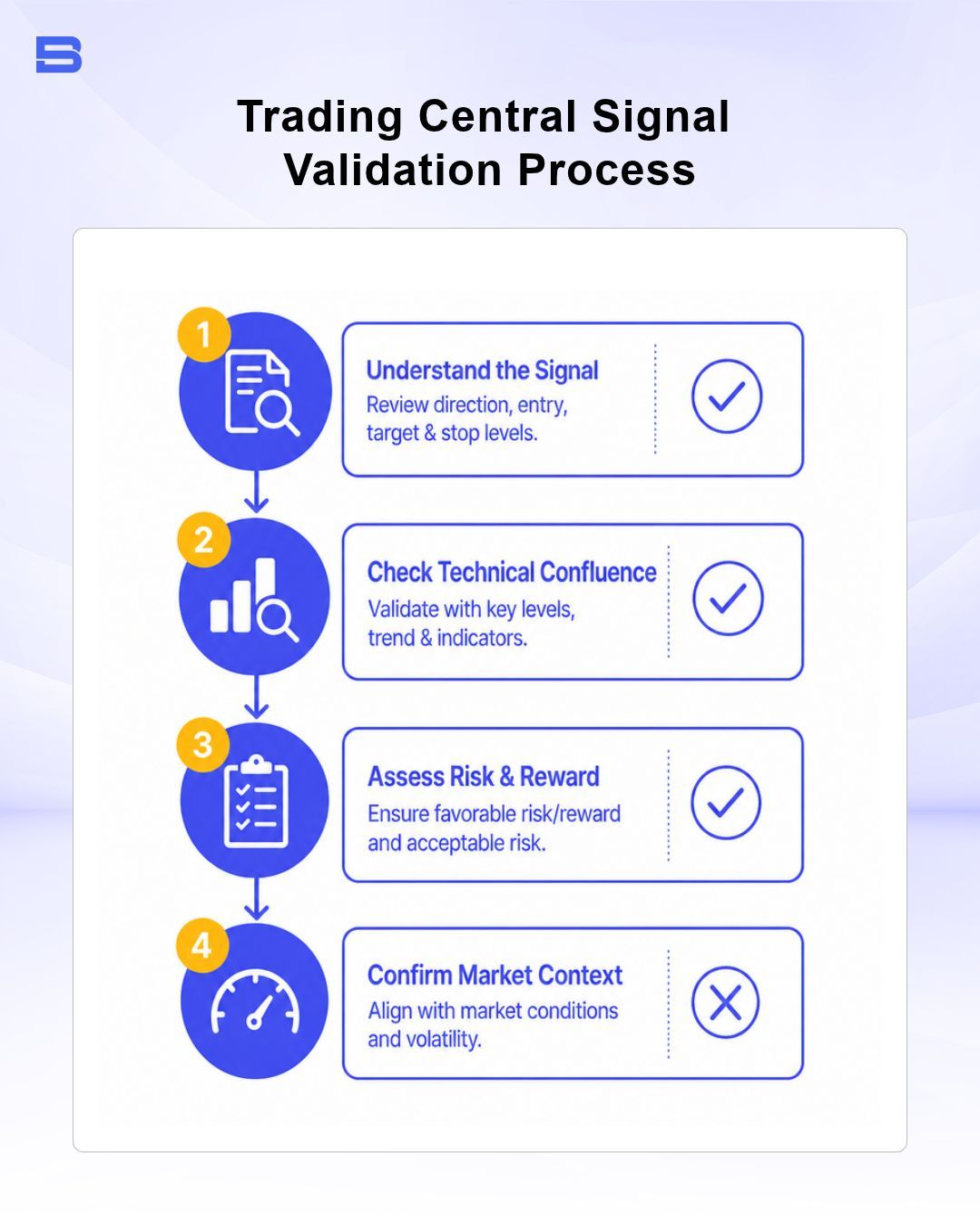
Before placing an order based on this setup, apply a strict 4-step validation checklist:
- Check overall market structure: Open a higher timeframe chart (such as the 4-hour or Daily). Is EUR/USD trading within an overall uptrend, or is this 1-hour bullish signal firing directly into a strong daily resistance zone? Aligning intraday signals with higher-timeframe trends significantly increases historical reliability.
- Calculate the Risk-to-Reward Ratio (RRR): If you enter at 1.0880 with a stop-loss set just below the pivot level at 1.0845 (35 pips of risk) and set Target 1 at 1.0910 (30 pips of reward), your RRR is 1:0.85. This trade offers poor potential reward relative to risk. Waiting for a minor pullback toward 1.0860 reduces your risk to 15 pips while expanding your upside to Target 1 (50 pips), establishing a far healthier 1:3.3 RRR.
- Verify the macroeconomic calendar: Check the Economic Insight tool for scheduled high-impact events. If the U.S. Federal Reserve is releasing its rate decision in 30 minutes, placing a technical trade immediately before the news exposes your account to spread widening and severe execution slippage.
- Determine exact position sizing: Calculate your position size based on the distance between your entry price and the stop pivot. If risking $100 on a 15-pip stop distance, your trade size should be precisely 0.67 lots (assuming $10 per pip on 1.00 standard lot EUR/USD).
Leverage amplifies your returns when the market moves in your favor, but it accelerates capital destruction just as quickly when price moves against you—a 30-pip sudden drop against an over-leveraged position can wipe out a substantial portion of your account margin.
Trading Central vs. TradingView: Key Differences
Traders frequently confuse Trading Central with platforms like TradingView or Barchart. While all three offer financial market analysis, they serve completely different roles in a trader's toolkit.
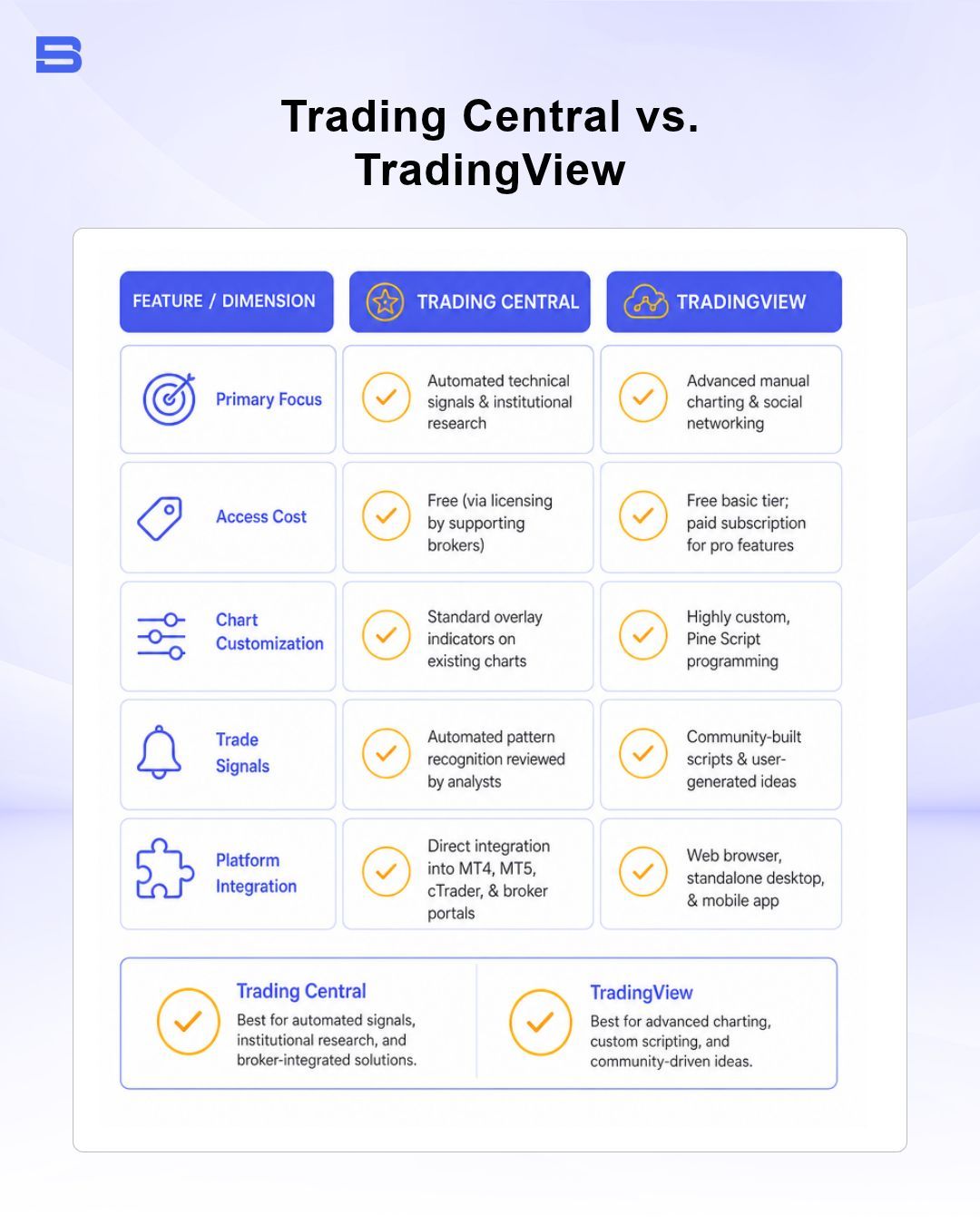
Trading Central excels as a turnkey research hub that delivers institutional-grade market context directly into your broker's trading terminal. By contrast, TradingView is built for hands-on technical analysts who prefer drawing custom trendlines, coding custom indicators, and building independent charting templates from scratch.
The Bottom Line
Trading Central provides a comprehensive research engine that bridges the gap between complex technical analysis and practical execution. By automating chart pattern recognition, monitoring global market sentiment, and contextualizing economic events, the platform saves traders valuable time every day.
However, automated technical views are most effective when used as a screening tool rather than a standalone execution signal. Maintaining consistent risk control, sizing positions correctly, and independently validating technical pivots against broader market conditions remain the fundamental responsibility of every trader.
- Proprietary Trading Explained: What It Is and Its Key Benefits
- TradingView: Features, Broker Integration, and Strategies
- cTrader: How It Works and How It Compares
- What Is a VPS for Trading and Do You Need One?
- Thinkorswim Trading: Features, Tools, and Availability
- Trading Platform Malaysia: What to Look For
- Bursa Anywhere: A Guide to Managing Shares in Malaysia
- What Is Forex Factory and How Do Traders Use It?
- Delta App: Multi-Asset Portfolio Tracker for Crypto & Stocks
- What Is Trading Central and How to Use It?
- What Is Simply Wall St and How to Use It
- What Is Seeking Alpha and How to Use It
- What Is MarketWatch and How to Use It
- What Is Barchart and How to Use It
- Google Finance Explained: How to Track Stocks and Markets
- What Is Finviz and How to Use It for Stock Screening
- What Is Yahoo Finance and How to Use It
- What Is TradingEconomics and How to Use It
- StockCharts Review 2026: Features, Pricing, and Performance
- What Is ZuluTrade and How Does Copy Trading Work on It?
- What Is Investing.com and How to Use It?
- What Is Myfxbook and How Do Traders Use It?
- What Is CoinGecko? A Complete Guide to Crypto Data Tracking
- What Is CoinMarketCap and How to Use It
- What Is CoinStats and How to Use It for Portfolio Tracking
- What Is Sharesight and How to Use It for Portfolio Tracking
- What Is Personal Capital and How to Use It
- What Is a Low Spread Broker? How It Affects Your Trading
- What Is an Introducing Broker (IB) in Forex?
- What Is Social Trading? How Copy Trading Platforms Work
- What Is a PAMM Account? How Managed Forex Accounts Work
- What Is a Margin Account and How Does Margin Trading Work?
- What Are Trading Signals and How Do They Work?
- What Is an Expert Advisor (EA) in Forex Trading?
Disclaimer: The content on this page is intended for educational and informational purposes only. It does not constitute financial, investment, tax, or legal advice, and should not be interpreted as a recommendation to buy, sell, or hold any financial instrument or asset. Trading and investing involve significant risk, including the possible loss of your entire capital. Products such as forex, CFDs, and cryptocurrencies carry additional risks due to leverage, high volatility, and limited regulatory protection in some jurisdictions. Past performance of any financial instrument does not guarantee future results. Any market views, forecasts, or opinions expressed are those of the author at the time of writing and may not reflect current market conditions. Platform features, fees, and regulatory status are subject to change — always verify information directly with the relevant provider or regulator before making any financial decision. BrokerSpecs may receive compensation from third parties featured on this site. Always conduct your own due diligence and consider seeking advice from a licensed financial professional before investing. Portions of this article were prepared with the assistance of AI tools and reviewed by our editorial team before publication.