


Related Tags
Entering a trade for the first time on a legacy broker terminal often feels like operating outdated flight control software. Static charts, delayed order execution, and isolated tools leave active traders constantly jumping between multiple tabs. Modern multi-asset analysis demands a workspace where real-time charts, strategy testing, and live execution merge seamlessly into a single cloud browser window.
Whether you are evaluating global equities, tracking forex pairs, or scanning cryptocurrency markets, TradingView has become one of the most widely used market analysis platforms, with the company stating on its official website that more than 100 million traders and investors use its platform worldwide (as of September 2026).
Understanding how to harness its core infrastructure without overpaying for unnecessary subscriptions is critical to building a disciplined trading workflow.
What Is TradingView and How Does It Work?
TradingView is a cloud-based charting platform and social network that allows retail traders and financial analysts to study market data directly within any modern web browser or mobile app. Unlike MetaTrader 4, which is built around a locally installed terminal where charts and templates are saved per device, TradingView stores your workspace on its cloud servers. This architecture ensures that every drawing line, indicator template, and customized layout automatically synchronizes across your desktop, web, and mobile devices in real time.
The platform functions as a single entry point for global financial markets, streaming market data across asset classes:
- Global Equities: Stocks and indices from international exchanges, including Bursa Malaysia, the New York Stock Exchange, and Nasdaq.
- Foreign Exchange (Forex): Spot forex currency pairs, with quotes sourced from several brokers and data providers.
- Cryptocurrencies: Spot, futures, and decentralized market data aggregated across global exchanges.
- Futures and Commodities: Real-time and delayed contracts for crude oil, gold, agricultural products, and index futures.
For active traders who need fast platform access without complex local installations, TradingView removes system performance bottlenecks. However, retail traders must recognize that while basic chart streaming is continuous, official real-time exchange data feeds for specific stock markets often require small monthly exchange licensing fees due to regulatory data rights.
Free Plan vs. Paid Tiers: What Do You Actually Need?
A common question among new traders is whether TradingView's free tier is adequate for live market analysis or if an upgrade to a paid subscription (Essential, Plus, Premium, or Ultimate) is mandatory.
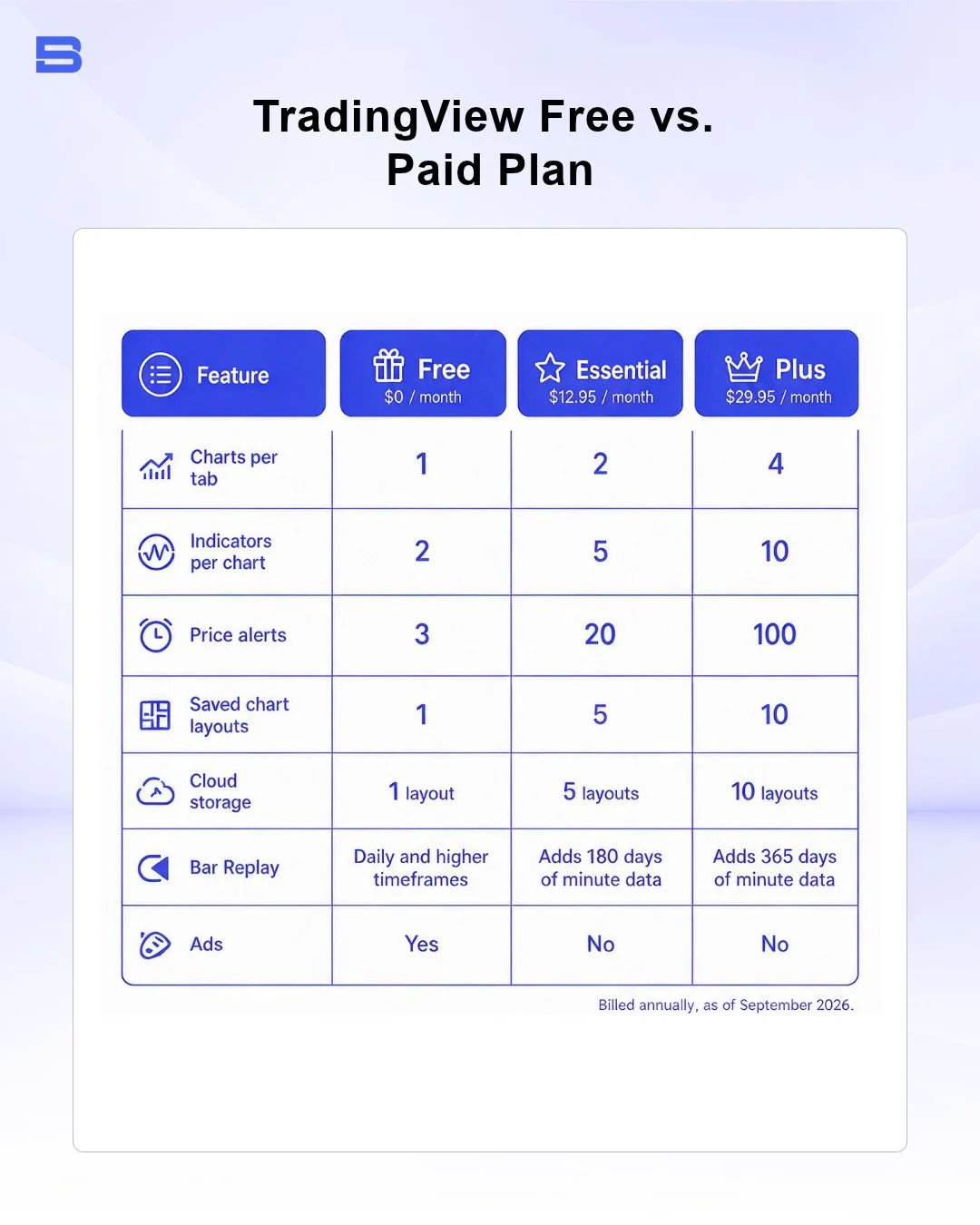
The free tier offers access to core technical analysis tools, historical data, and Pine Script indicators. However, it imposes limits designed to encourage upgrades. Here's how the free Basic plan compares with the two most popular paid tiers (pricing billed annually, as of September 2026):
For informed beginners and swing traders who rely on clean price action paired with a simple moving average and the Relative Strength Index (RSI) indicator, the free tier provides more than enough functional depth. The true trigger for upgrading usually isn't additional indicators, which can clutter your chart, but the need for more server-side alerts that monitor price levels 24/7 when you're away from your screen.
Core Analysis Tools: Indicators, Chart Types, and Screeners
Technical analysis relies on converting raw price and volume data into actionable visual insights. TradingView delivers a vast library of built-in technical indicators—ranging from traditional Exponential Moving Averages (EMA) and Bollinger Bands to advanced overlays like Volume Profile, which shows how much trading happened at each price level, and Anchored Volume-Weighted Average Price (VWAP), which tracks the average price paid from a point you choose.
Beyond basic line and bar visuals, the platform supports specialized chart types designed to filter market noise:
- Heikin-Ashi: Smooths price fluctuations to isolate visual trend directional strength.
- Renko and Kagi Charts: Construct price blocks based purely on movement size, completely removing the time element.
- Point & Figure: Highlights supply and demand imbalance shifts without time distortion.
To quickly filter global markets, TradingView incorporates multi-asset stock, forex, and crypto screeners. These screeners scan thousands of active instruments simultaneously using custom parameters like RSI oversold levels, dividend yields, or candlestick pattern formations. For retail traders who rely on automated technical analysis integrations like Trading Central through their primary broker accounts, TradingView's built-in screening engine provides an efficient direct scanning workspace.
Custom Analysis via Pine Script
One of TradingView’s core advantages is Pine Script, a lightweight programming language created specifically to build custom indicators, plot technical alerts, and backtest automated trading strategies.
Traders can access TradingView's public Community Scripts library, which the company says holds more than 100,000 user-built indicators and strategies (as of September 2026). However, relying on unverified community scripts introduces significant risk:
Script Repainting Caution: Certain unverified public community scripts suffer from "repainting"—a coding flaw where historical signal arrows dynamically shift after bars close to make historical accuracy look flawless. Never commit capital based on a community indicator without auditing its underlying Pine Script source code for repainting vulnerabilities.
Backtesting Strategies with Bar Replay
Before risking live capital, testing a trading strategy against historical price data is essential. TradingView provides a Bar Replay tool that hides future price action and lets you step through past market bars one at a time.
To run a reliable manual backtest:
- Open your chosen asset chart and select the Bar Replay icon on the top navigation bar.
- Jump back to your designated historical starting date.
- Advance price action bar-by-bar, recording entry points, stop-loss triggers, and take-profit targets into your trading log.
- Calculate your win rate and profit factor (total gains divided by total losses) over a minimum of 100 sample trades to evaluate real edge potential.
Always remember that historical backtest results do not account for real-world order execution issues like unexpected slippage during volatile news events or widening bid-ask spreads.
Executing Trades Directly via Integrated Brokers
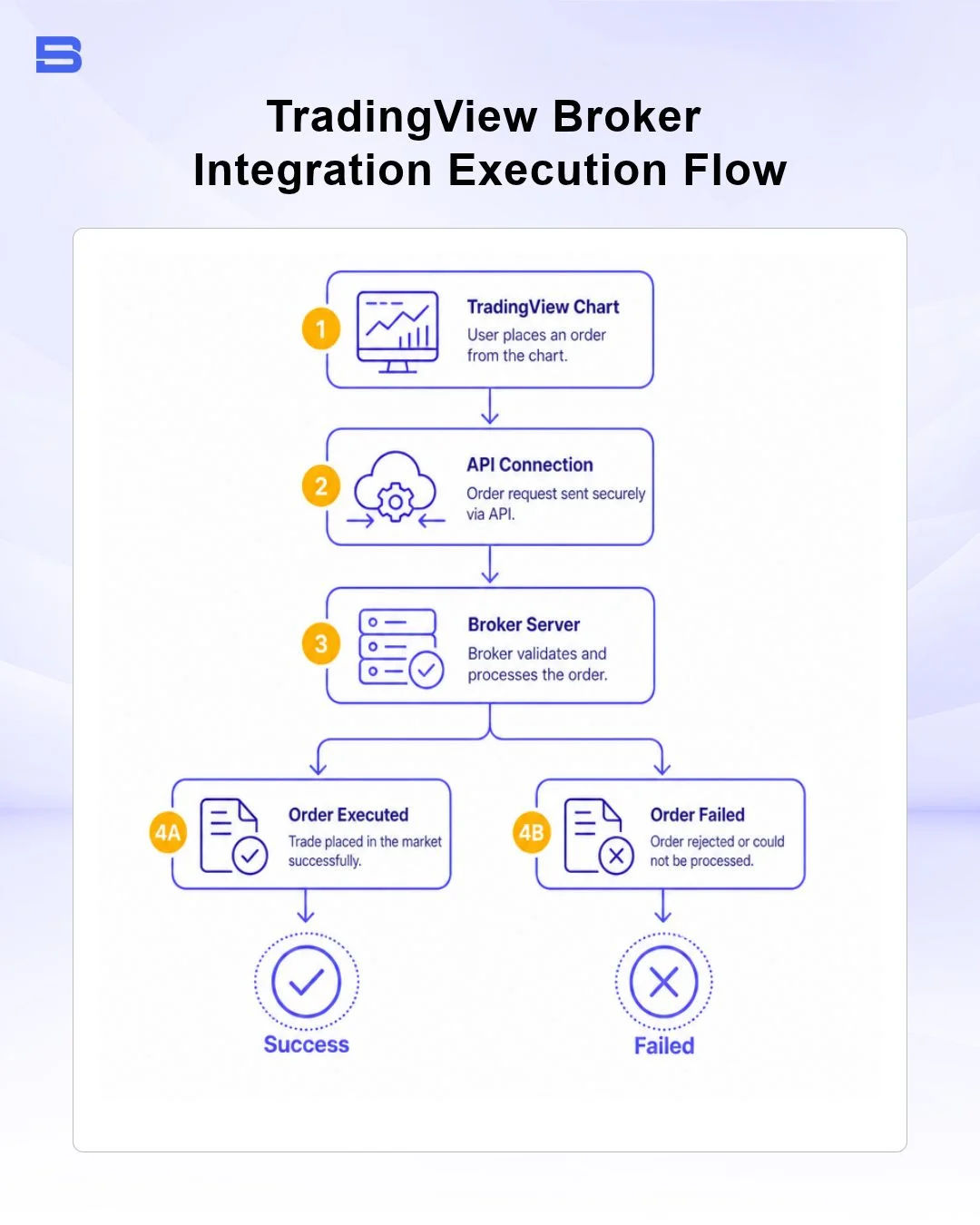
While TradingView started purely as a market analysis suite, its API infrastructure now connects directly to licensed external brokerages. This integration allows traders to run technical analysis and execute live buy or sell orders directly from the same chart interface without switching windows.
Regulated brokerages across major global jurisdictions support direct TradingView API integration:
- Interactive Brokers: Global equities, options, and futures execution under US Securities and Exchange Commission (SEC) oversight.
- OANDA & FOREX.com: Spot forex execution through regional entities overseen by tier-1 regulators such as the UK Financial Conduct Authority (FCA), the US Commodity Futures Trading Commission (CFTC) and National Futures Association (NFA), and the Monetary Authority of Singapore (MAS). Protections depend on which entity your account is opened under, so Malaysian traders should check the Securities Commission Malaysia (SC) Investor Alert List before opening any offshore account.
- Saxo Bank & TradeStation: Multi-asset order routing and portfolio tracking.
Connecting your broker requires opening the Trading Panel at the bottom of the TradingView workspace, selecting your licensed broker, and authenticating through secure OAuth API protocols.
While direct execution is convenient, active day traders must account for potential latency. Order execution speed relies on API communication between TradingView’s web servers and your broker's execution servers. During major macroeconomic news releases, sudden network congestion can lead to execution lag or order slippage compared to placing orders directly on a broker's native desktop terminal. For detailed technical execution mechanics, review The Technology Behind Modern Trading Platforms and Brokerages.
Practicing Without Capital via Paper Trading
For market beginners or traders testing a new strategy, TradingView includes a built-in Paper Trading simulator. This tool provides a virtual funding balance (defaulted to $100,000 USD) to practice order entry, stop-loss placement, and trade management in live simulated market conditions without financial risk.
Simulated paper trading is an effective learning environment, but it cannot fully replicate live market dynamics:
- Execution Slippage Illusion: Paper trading engines assume 100% order fill rates at your limit price, whereas live markets often suffer fill delays or price slippage during fast moves.
- Absence of Emotional Stress: Managing virtual capital eliminates the psychological pressure of real monetary loss—a factor that often leads traders to break their strict risk management rules when transitioning to real accounts.
TradingView vs. MetaTrader and cTrader: Which Platform Suits You Best?
Selecting the right trading tool depends heavily on your primary focus: deep charting analysis, community script exploration, or high-speed automated trading execution. TradingView regularly draws comparisons with established desktop platforms like MetaTrader (MT4/MT5) and cTrader when traders evaluate the best online trading platforms.
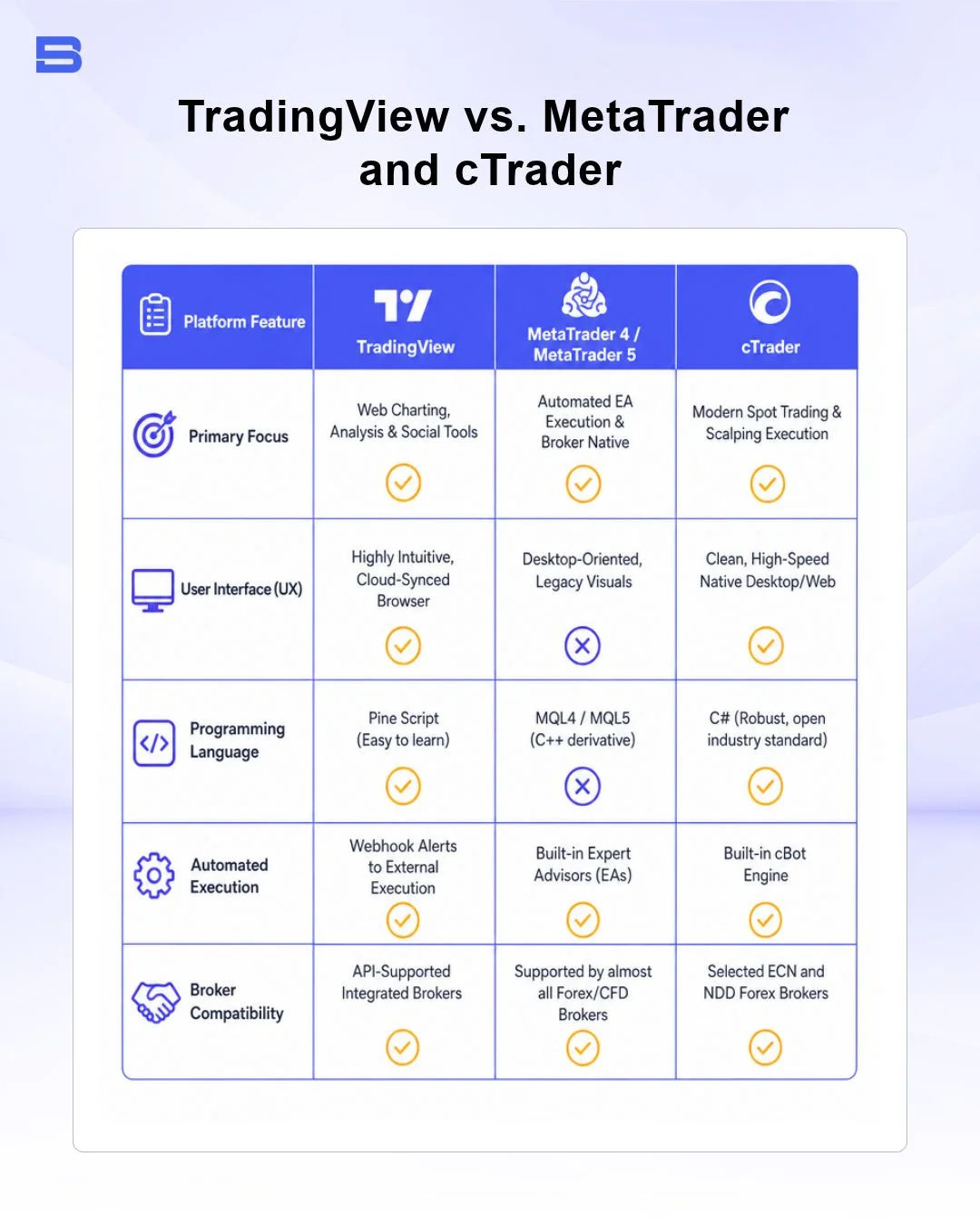
If your strategy focuses on multi-asset technical charting, historical backtesting, and seamless mobile access, many traders find TradingView offers a smoother user experience. Conversely, if your trading relies heavily on complex automated Expert Advisors (EAs) or high-frequency automated execution, dedicated desktop terminals like MetaTrader or cTrader are often better suited as execution engines.
Alternative Charting Tools: StockCharts, Finviz, Thinkorswim, and Barchart
While TradingView offers an all-in-one web solution, alternative platforms cater to specific analytical niches:
- StockCharts: Ideal for classic chartists seeking high-resolution point-and-figure analysis and long-term economic data visualization.
- Finviz: Offers rapid stock screening, industry sector heatmaps, and financial news aggregation for stock traders.
- Thinkorswim (by Charles Schwab): A professional-grade desktop terminal offering options trading analytics and risk profiling tools.
- Barchart: Focuses on commodity futures, options greeks, and market momentum metrics.
The Bottom Line: Is TradingView Right for You?
TradingView has changed how many retail investors work with market data by bringing cloud-based technical analysis tools to any web browser. Its intuitive layout, Pine Script customization, and direct broker integration make it a strong analysis hub for multi-asset traders.
However, advanced tools do not eliminate market risk. Charting software can isolate price setups, but long-term success relies on maintaining strict position sizing, executing firm stop-loss management, and keeping trading costs low across volatile market cycles.
- Proprietary Trading Explained: What It Is and Its Key Benefits
- TradingView: Features, Broker Integration, and Strategies
- cTrader: How It Works and How It Compares
- What Is a VPS for Trading and Do You Need One?
- Thinkorswim Trading: Features, Tools, and Availability
- Trading Platform Malaysia: What to Look For
- Bursa Anywhere: A Guide to Managing Shares in Malaysia
- What Is Forex Factory and How Do Traders Use It?
- Delta App: Multi-Asset Portfolio Tracker for Crypto & Stocks
- What Is Trading Central and How to Use It?
- What Is Simply Wall St and How to Use It
- What Is Seeking Alpha and How to Use It
- What Is MarketWatch and How to Use It
- What Is Barchart and How to Use It
- Google Finance Explained: How to Track Stocks and Markets
- What Is Finviz and How to Use It for Stock Screening
- What Is Yahoo Finance and How to Use It
- What Is TradingEconomics and How to Use It
- StockCharts Review 2026: Features, Pricing, and Performance
- What Is ZuluTrade and How Does Copy Trading Work on It?
- What Is Investing.com and How to Use It?
- What Is Myfxbook and How Do Traders Use It?
- What Is CoinGecko? A Complete Guide to Crypto Data Tracking
- What Is CoinMarketCap and How to Use It
- What Is CoinStats and How to Use It for Portfolio Tracking
- What Is Sharesight and How to Use It for Portfolio Tracking
- What Is Personal Capital and How to Use It
- What Is a Low Spread Broker? How It Affects Your Trading
- What Is an Introducing Broker (IB) in Forex?
- What Is Social Trading? How Copy Trading Platforms Work
- What Is a PAMM Account? How Managed Forex Accounts Work
- What Is a Margin Account and How Does Margin Trading Work?
- What Are Trading Signals and How Do They Work?
- What Is an Expert Advisor (EA) in Forex Trading?
Disclaimer: The content on this page is intended for educational and informational purposes only. It does not constitute financial, investment, tax, or legal advice, and should not be interpreted as a recommendation to buy, sell, or hold any financial instrument or asset. Trading and investing involve significant risk, including the possible loss of your entire capital. Products such as forex, CFDs, and cryptocurrencies carry additional risks due to leverage, high volatility, and limited regulatory protection in some jurisdictions. Past performance of any financial instrument does not guarantee future results. Any market views, forecasts, or opinions expressed are those of the author at the time of writing and may not reflect current market conditions. Platform features, fees, and regulatory status are subject to change — always verify information directly with the relevant provider or regulator before making any financial decision. BrokerSpecs may receive compensation from third parties featured on this site. Always conduct your own due diligence and consider seeking advice from a licensed financial professional before investing. Portions of this article were prepared with the assistance of AI tools and reviewed by our editorial team before publication.