


Related Tags
Sitting in front of a trading terminal before the market opens can quickly turn into a frustrating ordeal if you’re manually scanning through thousands of US equities. Sifting through endless balance sheets, earnings reports, and chart patterns consumes hours that should be spent executing your trading plan. Finviz—short for Financial Visualization—is designed to solve this exact problem by compressing dense market data into intuitive visual heat maps, performance tables, and a high-speed stock screening engine.
What Is Finviz?
It’s a browser-based financial research and visualization platform created primarily for US stock market analysis. Rather than operating as an execution terminal where you place actual buy and sell orders, Finviz functions strictly as a market discovery hub. It aggregates market data across thousands of stocks, exchange-traded funds (ETFs), futures, and forex pairs, organizing complex fundamental metrics and technical signals into clean visual formats.
For retail traders, regulatory disclosures made to authorities like the US Securities and Exchange Commission (SEC) generate massive amounts of financial data every quarter. Finviz parses this quantitative data—ranging from Price-to-Earnings (P/E) ratios and insider trading reports to daily price breakouts—and presents it through searchable filters. This allows you to evaluate market breadth, spot emerging trends, and build targeted watchlists without needing custom programming or expensive institutional software. Finviz offers over 30 screening factors according to the tool's official documentation.
How to Use the Finviz Stock Screener for Market Research
The core feature of the platform is the Finviz stock screener, a tool that allows you to filter thousands of publicly traded companies down to a manageable shortlist in seconds. When you first open the screener interface, the overwhelming number of variables can easily lead to analytical paralysis. The key to using it effectively is structuring your search around three distinct categories: Descriptive, Fundamental, and Technical filters.
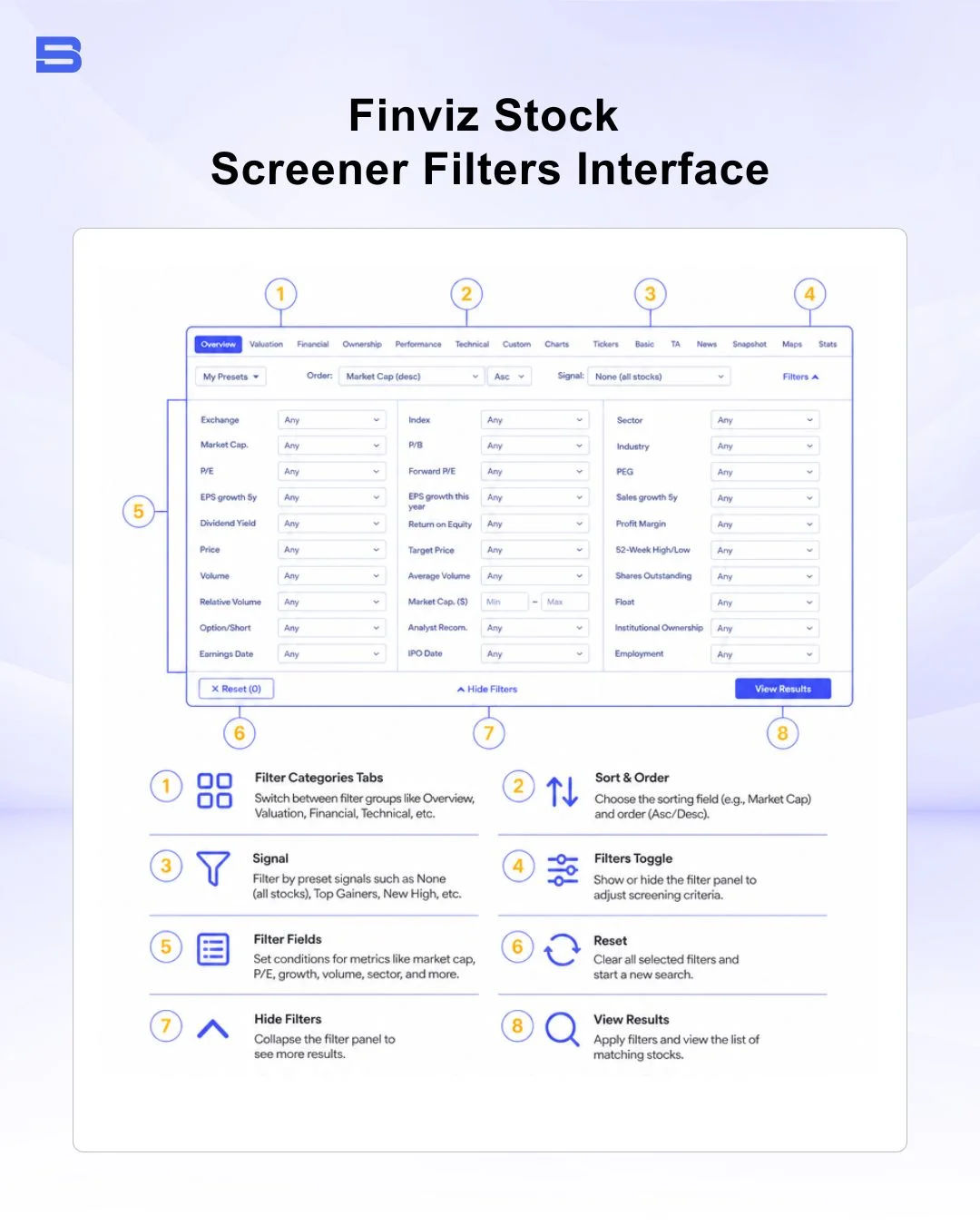
Navigating Descriptive, Fundamental, and Technical Filters
To avoid cluttering your workspace, Finviz divides its screening parameters into three main tabs:
- Descriptive Filters: Define the structural identity of the stock, including market capitalization, sector, industry, country, average daily trading volume, and index membership.
- Fundamental Filters: Isolate companies based on financial health and valuation metrics such as Price-to-Earnings (P/E) ratios, Earnings Per Share (EPS), and insider trading reports, as well as daily price breakouts and ownership levels.
- Technical Filters: Identify specific chart setups and price action criteria, such as relative strength index (RSI) levels, moving average crossovers, performance percentage, and volatility measurements.
By combining criteria across all three tabs, you can isolate high-probability trading setups—for example, if you practice swing trading, you might select US mid-cap stocks under the Descriptive tab, filter for companies with positive earnings growth under the Fundamental tab, and specify prices trading above their 200-day Simple Moving Average (SMA) under the Technical tab.
This multi-layered approach ensures you only scan stocks that possess both sound fundamentals and active technical momentum.
Visualizing Market Sentiment: Heat Maps and Sector Performance
Beyond individual stock screening, Finviz is widely recognized for its visual market heat maps. These heat maps represent the stock market as a collection of color-coded tiles, where the size of each tile corresponds to the company's market capitalization and the color indicates its current price performance. Bright green signifies strong gains, dark red indicates sharp declines, and gray represents neutral price movement.
Traders frequently use sector heat maps during pre-market hours to identify relative strength and sector rotation. If technology and healthcare sectors show vivid green while financial and energy sectors show deep red, money is flowing into growth assets and out of cyclical sectors. Observing these macro capital flows prevents you from fighting market momentum, allowing you to focus your long positions on sectors that are actively receiving institutional support.
Finviz Free vs. Finviz Elite: Which Tier Suits Your Needs?
A common question among retail investors is whether it is entirely free or if a paid subscription is necessary. It operates under a freemium model: the core features—including delayed stock screening, visual heat maps, and basic charts—are accessible without paying anything or even creating an account. However, active traders often run into limitations on the free tier.
Advanced Features: Real-Time Data, Backtesting, and Custom Alerts
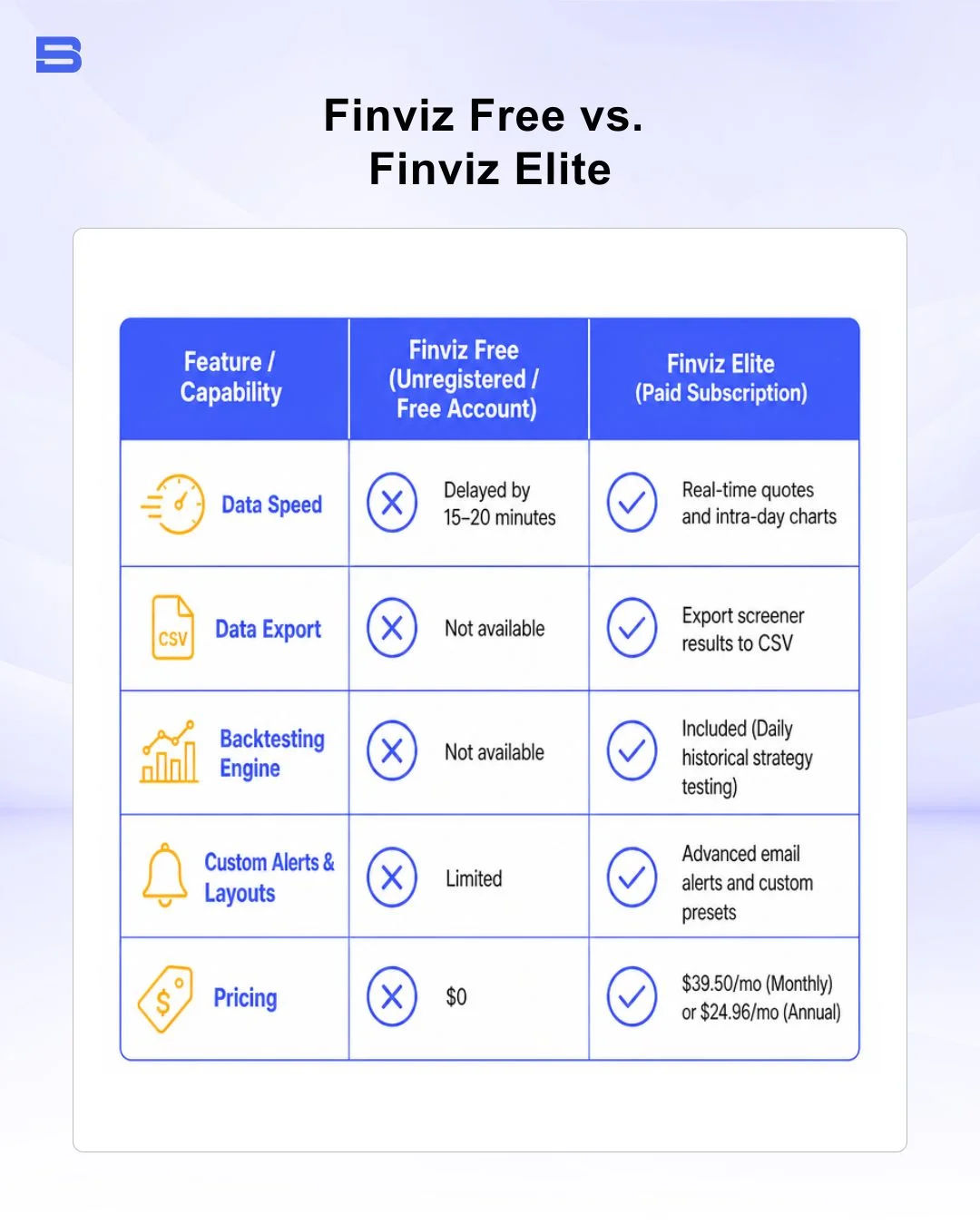
Finviz Elite is the premium tier, priced at $39.50 per month (or $24.96 per month when billed annually). Upgrading unlocks several critical functional upgrades designed for active market participants:
- Real-Time Data: Free users receive stock quotes delayed by 15 to 20 minutes. Finviz Elite provides real-time equity quotes and tick-by-tick charts, which are essential for intra-day analysis. International data guidelines enforced by bodies like the Financial Conduct Authority (FCA) highlight that delayed data poses severe execution risks for short-term day trading.
- Strategy Backtesting Module: Elite subscribers gain access to a technical backtesting engine that evaluates historical strategy performance over daily timeframes, helping you verify win rates before risking capital.
- Export and Customization: Elite allows you to export screener tables to CSV format, set up customized email alerts for price or fundamental triggers, and save custom layout presets.
For long-term investors and weekend swing traders who perform analysis after market close, the free version of the platform offers ample functionality. However, if you rely on live pre-market price breakouts or export large datasets for quantitative modeling, Finviz Elite is often worth the investment.
Finviz vs. TradingView: Choosing the Right Tool for Your Workflow
When selecting market analysis software, traders frequently compare Finviz against TradingView. While both platforms aggregate market data, they serve different workflow purposes: Finviz excels at screening speed and data density (primarily for US equities), while TradingView is optimized for advanced charting and multi-asset technical analysis. Many traders use both tools complementarily.
It excels at data density and rapid discovery. Its primary strength lies in screening thousands of US stocks simultaneously using quantitative fundamental and technical criteria, presenting the results in simple lists or visual grids. Conversely, TradingView is built for advanced charting and multi-asset technical execution. It offers custom Pine Script indicator creation, extensive drawing tools, direct broker integration, and coverage across international forex, futures, and crypto markets.
Many traders pair the platform with dedicated charting tools: using Finviz in the morning as a screening engine to identify stocks meeting their technical or fundamental criteria, then analyzing those candidates on charting platforms like TradingView, cTrader, or Thinkorswim for fine-grained technical timing before placing orders.
Finviz vs. Alternative Market Aggregators (Yahoo Finance & Barchart)
To understand where it sits in the financial media landscape, it helps to contrast it against other popular aggregators:
- Yahoo Finance: Excellent for fundamental news aggregation, official earnings calendar tracking, and basic portfolio syncing, but lacks the deep, customizable multi-filter stock screener speed found in Finviz.
- Barchart: Offers exceptional depth in commodity, options, and futures market data, making it preferable for derivatives traders, whereas it offers a cleaner visual interface for US equities.
Pros and Cons of Finviz
Before integrating the platform into your daily research routine, consider its primary operational strengths and limitations:
Pros:
- Unmatched Screening Speed: Filter thousands of US stocks using descriptive, fundamental, and technical criteria in seconds.
- Intuitive Heat Maps: Instant visual assessment of overall market health, sector performance, and relative strength.
- Generous Free Tier: Core screening and visual capabilities are accessible without mandatory paid subscriptions.
- Clean Data Layout: Consolidates balance sheet data, analyst targets, insider transactions, and price charts into a single page per ticker.
Cons:
- Delayed Data on Free Tier: The 15–20 minute price delay on the free tier makes live day trading impractical.
- Dated User Interface: The visual design feels utilitarian, and modern charting controls are limited compared to dedicated charting platforms.
- Primary US Equity Focus: Coverage for international stock exchanges, forex, and commodities is basic compared to its US market depth.
- No Direct Order Execution: You cannot execute trades directly through Finviz; orders must be manually placed on your broker's terminal.
The Bottom Line
It remains one of the most efficient, user-friendly market discovery tools available for stock traders today. By combining descriptive, fundamental, and technical filters into a single web-based interface, it drastically reduces the time required to build focused daily watchlists.
Day traders typically prefer the real-time capabilities of Finviz Elite or integrate a secondary charting engine for live execution. Many retail swing traders find the free tier's screening speed adequate for building watchlists; however, the 15–20 minute price delay means live day trading remains impractical on the free plan. Always ensure that any trade candidates discovered through market screening align with your overall risk management guidelines and position sizing rules.
- Proprietary Trading Explained: What It Is and Its Key Benefits
- TradingView: Features, Broker Integration, and Strategies
- cTrader: How It Works and How It Compares
- What Is a VPS for Trading and Do You Need One?
- Thinkorswim Trading: Features, Tools, and Availability
- Trading Platform Malaysia: What to Look For
- Bursa Anywhere: A Guide to Managing Shares in Malaysia
- What Is Forex Factory and How Do Traders Use It?
- Delta App: Multi-Asset Portfolio Tracker for Crypto & Stocks
- What Is Trading Central and How to Use It?
- What Is Simply Wall St and How to Use It
- What Is Seeking Alpha and How to Use It
- What Is MarketWatch and How to Use It
- What Is Barchart and How to Use It
- Google Finance Explained: How to Track Stocks and Markets
- What Is Finviz and How to Use It for Stock Screening
- What Is Yahoo Finance and How to Use It
- What Is TradingEconomics and How to Use It
- StockCharts Review 2026: Features, Pricing, and Performance
- What Is ZuluTrade and How Does Copy Trading Work on It?
- What Is Investing.com and How to Use It?
- What Is Myfxbook and How Do Traders Use It?
- What Is CoinGecko? A Complete Guide to Crypto Data Tracking
- What Is CoinMarketCap and How to Use It
- What Is CoinStats and How to Use It for Portfolio Tracking
- What Is Sharesight and How to Use It for Portfolio Tracking
- What Is Personal Capital and How to Use It
- What Is a Low Spread Broker? How It Affects Your Trading
- What Is an Introducing Broker (IB) in Forex?
- What Is Social Trading? How Copy Trading Platforms Work
- What Is a PAMM Account? How Managed Forex Accounts Work
- What Is a Margin Account and How Does Margin Trading Work?
- What Are Trading Signals and How Do They Work?
- What Is an Expert Advisor (EA) in Forex Trading?
Disclaimer: The content on this page is intended for educational and informational purposes only. It does not constitute financial, investment, tax, or legal advice, and should not be interpreted as a recommendation to buy, sell, or hold any financial instrument or asset. Trading and investing involve significant risk, including the possible loss of your entire capital. Products such as forex, CFDs, and cryptocurrencies carry additional risks due to leverage, high volatility, and limited regulatory protection in some jurisdictions. Past performance of any financial instrument does not guarantee future results. Any market views, forecasts, or opinions expressed are those of the author at the time of writing and may not reflect current market conditions. Platform features, fees, and regulatory status are subject to change — always verify information directly with the relevant provider or regulator before making any financial decision. BrokerSpecs may receive compensation from third parties featured on this site. Always conduct your own due diligence and consider seeking advice from a licensed financial professional before investing. Portions of this article were prepared with the assistance of AI tools and reviewed by our editorial team before publication.