


Related Tags
Imagine watching open positions in MetaTrader as market volatility picks up. Floating losses begin to pile up, causing your available equity to shrink. Below your open trades, the platform's status bar changes color. That changing figure—the margin level—is your account's vital sign, measuring how much financial buffer remains before your broker automatically closes your positions.
What Is Margin Level in Forex?
Margin level in forex is the percentage ratio of your account equity to your used margin, serving as an indicator of trading leverage risk. It tells you precisely how well-funded your open positions are relative to the collateral required to keep them open.
Understanding margin trading and your margin level in forex goes beyond tracking a metric on a trading platform. It serves as a continuous risk gauge. When market prices move in your favor, your margin level rises, giving your portfolio breathing room.
Conversely, when floating losses increase, your margin level drops toward critical liquidation thresholds. Managing this ratio effectively helps prevent total capital depletion.
Differentiating Balance, Equity, Used Margin, and Free Margin
To monitor your account health accurately, you need to distinguish between four core metrics:
- Balance: The total cash in your account, reflecting only realized profits or losses from closed trades.
- Equity: Your real-time account value, calculated as Balance + Floating Profits - Floating Losses.
- Used Margin (Margin): The locked capital held by your broker as collateral to keep open trades active.
- Free Margin: The remaining unencumbered equity available to open new positions or absorb market drawdowns (Free Margin = Equity - Used Margin).
How to Calculate Margin Level (Formula and Steps)
Calculating your margin level in forex relies on a simple mathematical formula comparing your real-time equity against your locked collateral:
Margin Level = (Equity / Used Margin) x 100
To apply the margin level formula manually, follow these three steps:
- Determine your Equity: Add floating unrealized profits to (or subtract floating unrealized losses from) your account balance.
- Identify your Used Margin: Sum the required deposit margins across all open positions based on your chosen leverage ratio.
- Divide Equity by Used Margin and multiply by 100: The resulting percentage represents your active Margin Level.
Using a Margin Level Calculator vs Manual Math
Modern trading software automatically calculates margin levels in real time. However, calculating math manually helps you model downside risk before placing a trade.
Consider a worked scenario: You deposit $10,000 into a trading account. You open a 1.0 lot (100,000 units) EUR/USD trade that requires $1,000 in used margin. Initially, with zero floating loss, your equity is $10,000.
Margin Level = ($10,000 / $1,000) x 100 = 1,000%
Now, suppose the market turns against your position, creating a $2,000 floating loss. Your equity falls to $8,000 ($10,000 - $2,000).
Margin Level = ($8,000 / $1,000) x 100 = 800%
If adverse market movements increase your floating loss to $9,000, your equity drops to $1,000.
Margin Level = ($1,000 / $1,000) x 100 = 100%
At an 800% margin level, your position remains safe. At 100%, your account reaches a critical warning threshold.
Margin Level Meaning: Reading Your Account Health
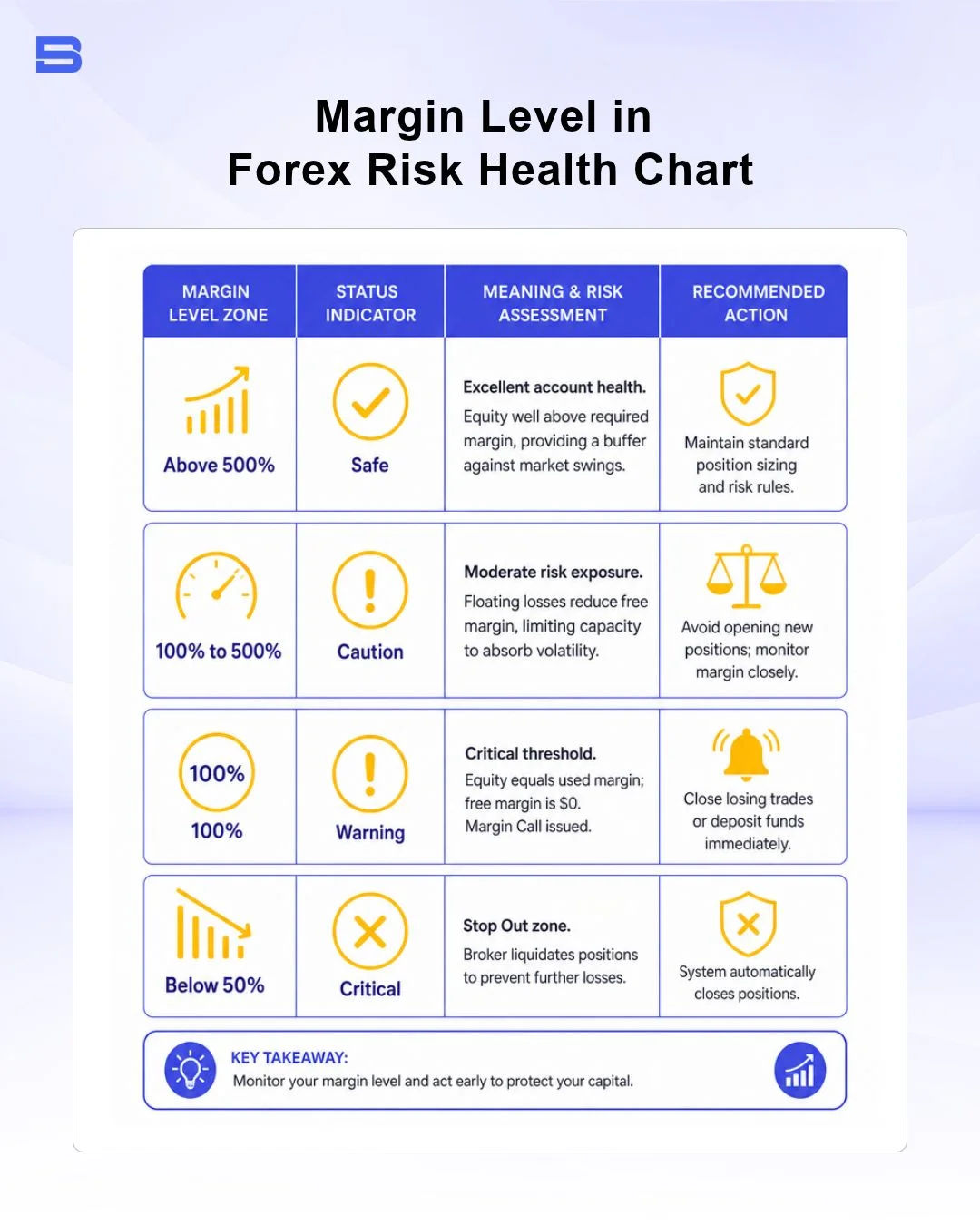
Traders categorize margin level ratios into distinct risk zones. Monitoring these levels helps prevent automated liquidations.
As a general guide, a margin level above 500% gives you a comfortable buffer. Between 100% and 500%, your buffer is shrinking, so it helps to monitor your trades closely and avoid opening new positions. At 100%, your free margin reaches zero, and the margin call level is typically reached. Once your margin level falls below your broker's stop-out level, such as the 50% that applies to retail traders in the EU and Australia, positions begin to close automatically.
What Is a Healthy Margin Level Ratio?
As a common rule of thumb, a healthy margin level in forex stays well above 500%, although the right buffer depends on your leverage, position size, and market volatility. Operating near 100% exposes your account to sudden market spikes or spread widenings during high-impact news events.
Utilizing higher leverage reduces your initial required margin, but it magnifies loss speed relative to total capital. Maintaining a conservative position size helps protect your account from rapid drawdowns.
Margin Call vs Stop-Out Thresholds
Traders often confuse a margin call with a stop-out, but they represent distinct phases in risk escalation.
- Margin Call (100% Threshold): A warning notification from your broker indicating that floating losses have consumed your free margin. At this stage, your broker blocks you from opening new trades. Existing open trades remain active, but you must either deposit additional capital or close positions manually to bring your margin level back up.
- Stop-Out (50% or Broker Default Threshold): The automatic liquidation trigger. When floating losses push your margin level below the stop-out percentage, the platform automatically closes your active positions, typically starting with the trade carrying the largest floating loss, until your margin level rises back above the stop-out limit.
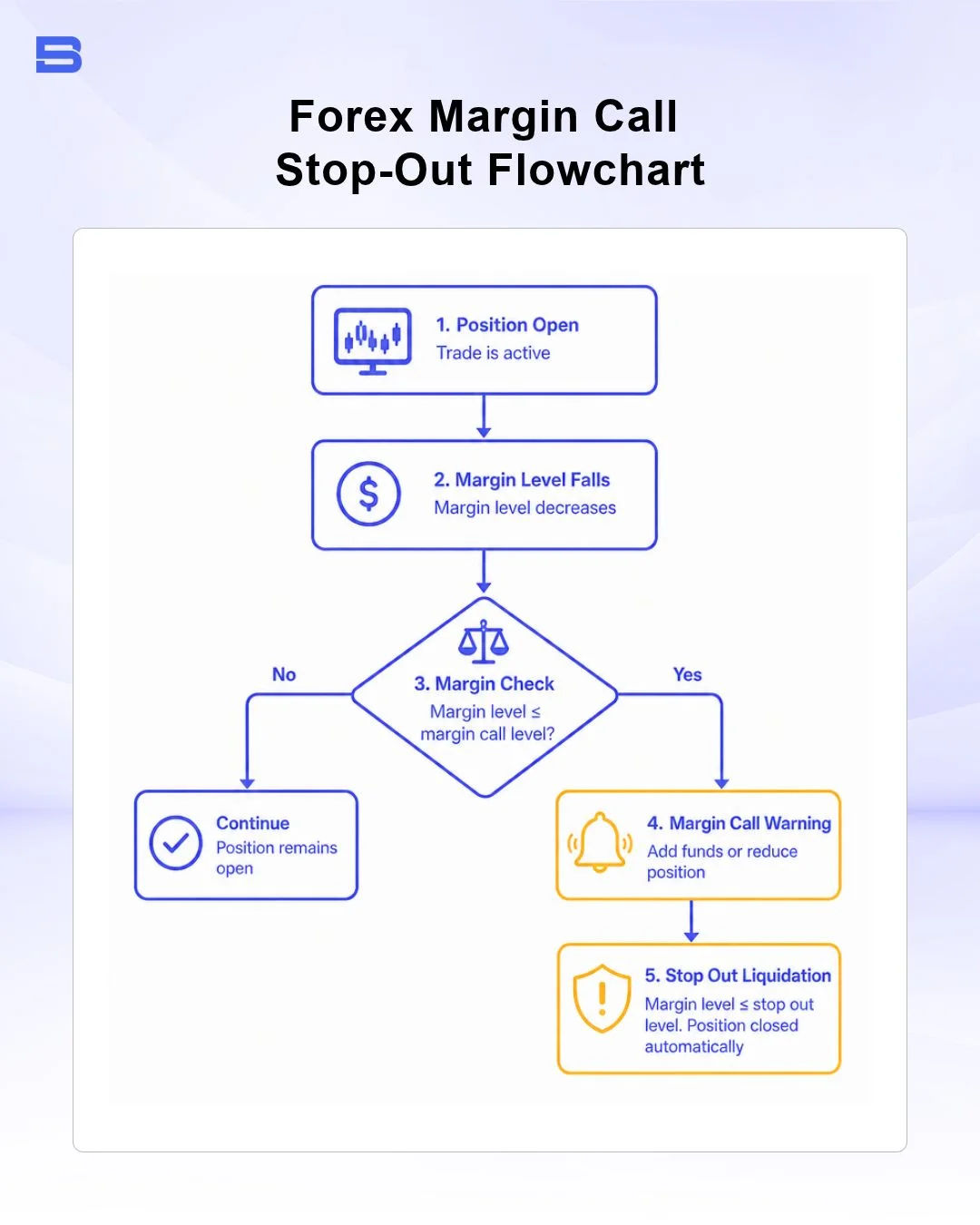
Regulatory bodies enforce strict protection frameworks to limit retail trading losses. Regulatory standards set by the European Securities and Markets Authority (ESMA) and the Australian Securities and Investments Commission (ASIC) mandate a standard 50% stop-out rule for retail traders. These rules require brokers to liquidate retail positions when account equity falls below 50% of the combined required margin.
Brokers operating outside Tier-1 jurisdictions (strictly regulated markets such as the EU, UK, and Australia) are not bound by the 50% rule and may set lower stop-out levels, which can expose traders to a higher risk of losing more of their capital before liquidation occurs. Always confirm the exact stop-out level in your broker's client agreement.
Monitoring Margin Level in MT4 and MT5 Platforms
In MetaTrader 4 (MT4) and MetaTrader 5 (MT5), real-time margin metrics appear at the bottom of the Terminal (MT4) or Toolbox (MT5) window under the Trade tab.
When floating losses push your margin level down to the broker's margin call threshold (typically 100%), the entire metrics bar turns red or flashes an alert. Monitoring this bar during high volatility helps you manage risk before the platform triggers an automatic stop-out.
How to Keep Your Margin Level Healthy and Avoid a Stop-Out
Managing your margin level in forex is essential for long-term trading capital preservation. By keeping a healthy equity-to-margin ratio, using consistent stop-loss discipline, and avoiding excessive leverage, you can reduce the risk of unexpected stop-outs, although no approach removes the risk of loss.
Disclaimer: The content on this page is intended for educational and informational purposes only. It does not constitute financial, investment, tax, or legal advice, and should not be interpreted as a recommendation to buy, sell, or hold any financial instrument or asset. Trading and investing involve significant risk, including the possible loss of your entire capital. Products such as forex, CFDs, and cryptocurrencies carry additional risks due to leverage, high volatility, and limited regulatory protection in some jurisdictions. Past performance of any financial instrument does not guarantee future results. Any market views, forecasts, or opinions expressed are those of the author at the time of writing and may not reflect current market conditions. Platform features, fees, and regulatory status are subject to change — always verify information directly with the relevant provider or regulator before making any financial decision. BrokerSpecs may receive compensation from third parties featured on this site. Always conduct your own due diligence and consider seeking advice from a licensed financial professional before investing. Portions of this article were prepared with the assistance of AI tools and reviewed by our editorial team before publication.